Razer Kitsune Button Test
The Razer Kitsune test checks every input on Razer's leverless arcade controller in your browser — the quad-movement buttons, all eight attack buttons, and the optical switches underneath. Because the Kitsune has no analog sticks or triggers, the button test is the diagnostic that matters: connect over USB-C, press each button, and confirm clean, simultaneous registration before your next set.
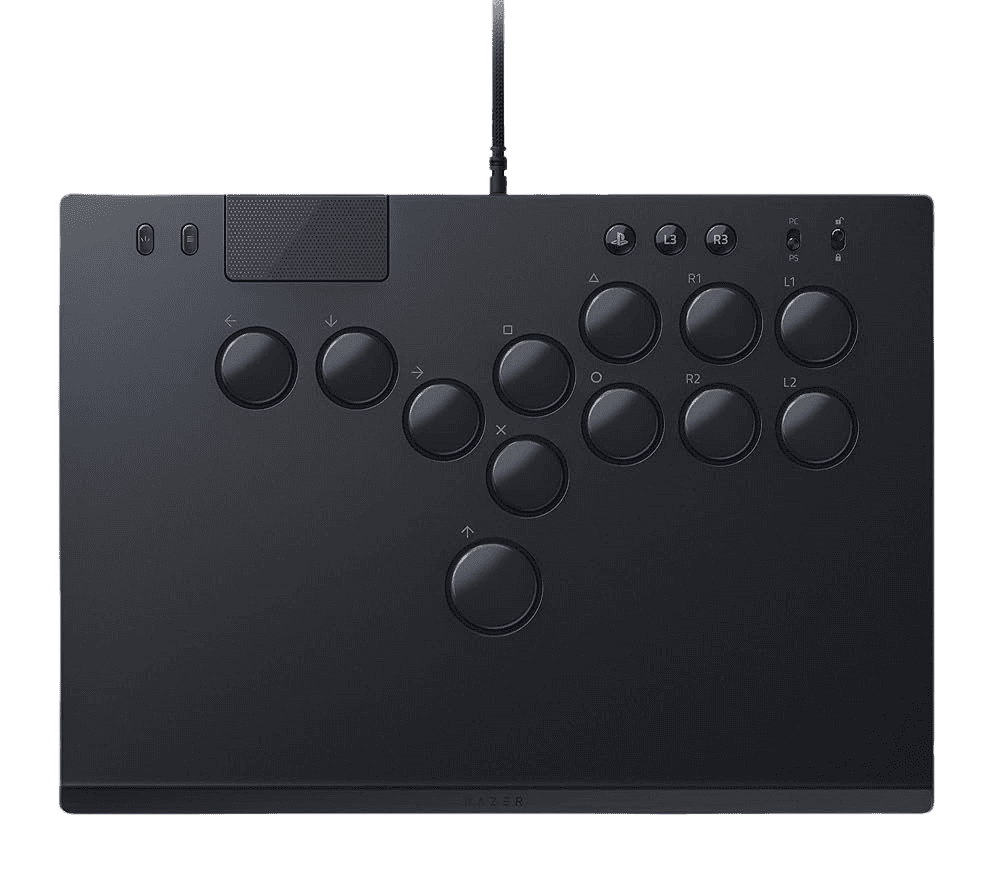
Verify every Kitsune optical switch
On a leverless controller, button accuracy is everything — a missed or double input loses the round. The button test lights up each input the Kitsune sends, so you can confirm every optical switch registers, check simultaneous-input handling (SOCD-relevant directions), and verify nothing chatters. No sticks or triggers to test here; this is the diagnostic built for an all-button deck.
Razer Kitsune hardware specifications
| Specification | Razer Kitsune |
|---|---|
| Connection | USB-C |
| Button count | 20 |
| Analog stick type | Mixed (varies by revision) |
| Gyroscope | No |
| Rumble / haptics | None |
| Impulse triggers | No |
| Adaptive triggers | No |
| Touchpad | No |
| Built-in microphone | No |
| Built-in speaker | No |
| Back paddles | No |
| Battery life | ~0 hours |
| Weight | 771 g |
| Release year | 2024 |
| MSRP | $299.99 USD |
Recommended tests for Razer Kitsune
Each test runs in your browser via the Gamepad API — no install, no account, no upload. Run any individually, or use the full benchmark above.
Known Razer Kitsune notes
Recurring problems users report with this controller, ranked by frequency. Each links to a step-by-step fix guide.
- Common
PS5/PC toggle set to the wrong platform
The Kitsune has a physical switch to toggle between PS5 and PC modes. If it isn't recognized, check the toggle matches the system you're plugged into — the most common 'not connecting' cause. The PlayStation license means PS5 detection is automatic once the switch is correct.
View fix guide - Occasional
Tournament lock disabling buttons unexpectedly
The tournament lock switch deliberately disables non-essential buttons (menu, function) to prevent accidental inputs mid-match. If menu buttons seem dead, the lock is engaged — that's intended. Disengage it to remap or navigate menus.
View fix guide - Rare
Optical switch feels inconsistent after a swap
The low-profile optical switches are swappable (Razer's own or compatible low-profile switches like Keychron). A switch that wasn't seated fully after a swap can register inconsistently or double-fire. Reseat it with a keycap/switch puller until flush, then re-run the button test to confirm clean single inputs.
View fix guide
How to set up the Razer Kitsune
Get your controller connected before running diagnostics — wired or wireless, mobile or desktop.
Set the PS5/PC toggle
Flip the platform switch to match your system before connecting. The Kitsune is PlayStation-licensed, so PS5 mode is recognized automatically; PC mode presents it as a standard controller.
Connect over USB-C
Attach the detachable USB-C cable and secure it with the built-in cable clasp so it can't pull loose mid-match. The Kitsune is wired-only — there is no wireless mode, by tournament-legal design.
Disengage tournament lock for setup
If you need menu or function buttons during setup, make sure the tournament lock switch is off. Re-engage it before competitive play to block accidental inputs.
Press any button to confirm in the browser
Browsers gate gamepad access behind a user gesture. With the Kitsune in PC mode and connected over USB-C, press any button to expose it to the Gamepad API, then verify each optical switch on the page.
Razer Kitsune vs the competition
Head-to-head reviews against the other controllers most buyers cross-shop.
- vs
Victrix Pro FS
The Victrix Pro FS is a traditional lever-based arcade stick with a Sanwa joystick; the Kitsune goes fully leverless with optical buttons for movement — cleaner motions, but a real learning curve.
- vs
Brook Wingman FGC2
The Wingman FGC2 is a converter that lets fightsticks work across consoles; the Kitsune is a complete leverless controller, PlayStation-licensed for PS5 out of the box.
- vs
Hori Fighting Commander OCTA
The Fighting Commander OCTA is a pad-style fightpad with a six-button face layout; the Kitsune is a full-size leverless deck with optical switches and a tournament-grade build.
Razer Kitsune definitions
Plain-language definitions for the terms used on this page. Each links to the full glossary entry with thresholds, mechanism, and FAQs.
Razer Kitsune questions
No. The Kitsune is a leverless controller — it replaces the joystick with four movement buttons in a quad-movement layout, with the Up/jump button sitting under your thumb like a spacebar. This eliminates the lever entirely, which many players find produces cleaner, faster inputs once they adapt.
Razer's own low-profile linear optical switches — the same optical tech as Razer's fastest keyboards, with a short actuation height and near-zero debounce. They're swappable, so you can replace them with other low-profile switches like Keychron's if you prefer a different feel.
Wired only, over a detachable USB-C cable with a security clasp. This is standard for tournament-legal fight controllers, where wired connections guarantee consistent latency and eliminate disconnection risk.
PS5 and PC. A physical toggle switches between the two, and the Kitsune is developed under PlayStation's official licensing program so it's recognized natively on PS5.
Because it has neither. A leverless controller is all buttons — no analog sticks, no analog triggers, no gyro or rumble. The meaningful diagnostics are button registration and input latency, which is why the button test is the primary tool on this page.
A switch that disables non-essential buttons (like menu and function keys) during a match, so you can't accidentally pause or open a menu mid-set. It's a competitive-integrity feature standard on tournament-grade controllers.
It's a premium, competition-focused controller with a real learning curve — players moving from a stick often describe the first week as 'learning to walk again.' Once adapted, many report cleaner specials and faster execution. At its price, it's aimed more at dedicated FGC players than newcomers.
Get a full health report for your Razer Kitsune
Run the Controller Benchmark to score every subsystem and generate a shareable Controller Health Score graded S through F.
Run the Benchmark