Controller Latency Test - measure input lag in ms
Use this controller latency test to inspect the gaps between input changes seen by your browser. Move the sticks for ten seconds, then compare the average and longer gaps. These are browser input timings. They do not measure the full delay from a physical press to a change on your screen.
Collect a repeatable timing sample
Connect your controller
Plug in your controller via USB or pair it via Bluetooth. Press any button to wake the controller - browsers require this before exposing gamepad input for privacy reasons.
Start the 10-second sample
Click Start. The test begins capturing input state changes from the Gamepad API immediately, using performance.now() for microsecond-precision timing.
Provide continuous input
Move both analog sticks in continuous circles and tap buttons throughout the 10-second window. The more varied input you provide, the more accurate the measurement.
Read your results
The test reports minimum, average, 95th percentile, and maximum browser-observed input intervals in milliseconds. The average is the primary metric. The histogram shows the distribution of those observed intervals.
Why 16.7 ms does not prove controller lag
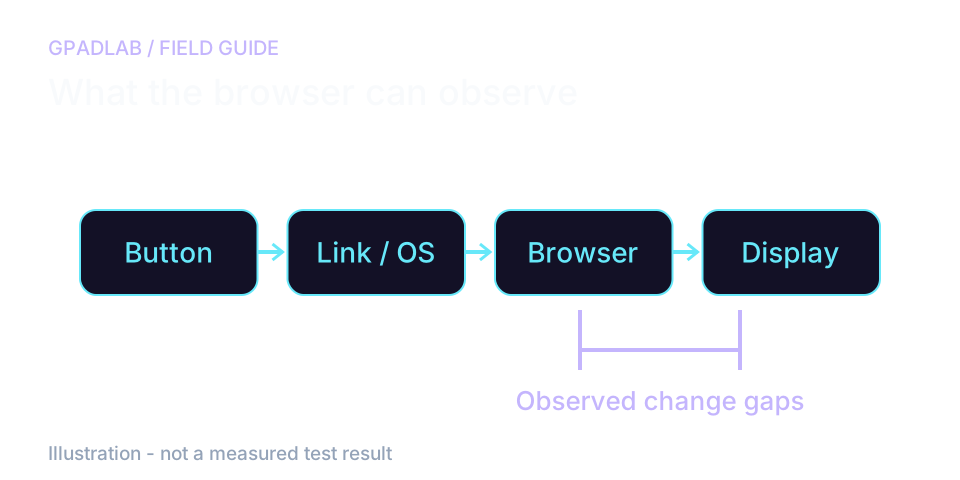
The browser sees only part of the path
At 60 frames per second, an animation loop has about 16.7 milliseconds between frames. This page checks input on that loop. A cluster near 16.7 ms can reflect when it checked, not the controller's own delay.
Move the sticks at a steady pace for ten seconds. Your movement also affects the gaps, so slow taps and fast circles are not fair comparisons.
Compare repeated runs, not a single grade
Use the same browser, display, and movement pattern for each run. Compare the average with the 95th percentile, which marks the upper end of most recorded gaps.
The tool excludes gaps of half a second or more. It does not capture every stall. A lower result cannot establish lower input-to-screen lag or tournament suitability.
What the numbers mean
These bands classify observed input-change gaps. They do not represent physical controller latency, transport speed, or suitability for a game.
| Average Latency | Verdict | What It Means |
|---|---|---|
| < 5ms | Excellent | Compare repeat runs with the same movement, browser, and display. This band does not identify the source of a delay. |
| 5 - 10ms | Good | Compare repeat runs with the same movement, browser, and display. This band does not identify the source of a delay. |
| 10 - 20ms | Acceptable | Compare repeat runs with the same movement, browser, and display. This band does not identify the source of a delay. |
| 20 - 40ms | Degraded | Compare repeat runs with the same movement, browser, and display. This band does not identify the source of a delay. |
| > 40ms | Problematic | Compare repeat runs with the same movement, browser, and display. This band does not identify the source of a delay. |
Compatible devices
The latency test works with any controller your operating system recognizes as a standard gamepad - wired, Bluetooth, or proprietary wireless. Device guides below can help with setup. Confirm support on your browser and connection before interpreting results.
Latency repair guides
Related diagnostics
Latency questions
Controller latency is the total time between a physical button press or stick movement and the input registering in software. It is measured in milliseconds. Lower latency means more responsive gameplay - a critical factor in competitive shooters, fighting games, and rhythm games where individual frames matter.
Our test measures the intervals between consecutive controller state changes as they become observable to the page through the browser's Gamepad API. Browser-side timing cannot separate the controller, wireless or USB transport, operating-system input stack, browser scheduling, JavaScript execution, or display timing into individual components. The result is therefore a browser-observed polling/input interval, not a direct measurement of full end-to-end button-to-screen latency.
There is no universal controller-lag target for this measurement. It times changes observed by the page. Movement speed and browser cadence affect it. Compare repeated runs under the same conditions rather than treating a grade as proof of gaming response time.
High browser-observed intervals can be influenced by wireless interference, battery state, receiver distance, controller firmware, operating-system behavior, browser scheduling, CPU load, USB conditions, and the controller's own reporting behavior. Re-run the test several times and compare wired and wireless modes where available before attributing the result to one cause.
Wired connections often provide lower and more consistent browser-observed intervals, but there is no single universal polling rate for all wired or Bluetooth controllers. Reporting behavior varies by controller model, firmware, operating system, connection mode, receiver, and browser. Compare the same controller under the same test conditions when evaluating wired versus wireless performance.
We use performance.now() for high-resolution timestamps and sample many observed input transitions over 10 seconds. Timer resolution is finer than ordinary millisecond clocks, but the practical accuracy of the result is still limited by Gamepad API update behavior, browser scheduling, operating-system timing, display cadence, and system load. Repeated runs are more useful than treating a single value as laboratory-grade latency.
Yes, provided the browser and operating system expose the Bluetooth controller through the Gamepad API. The measurement method is the same, but the observed result can differ with connection mode, radio conditions, receiver placement, firmware, browser scheduling, and system load. Run multiple tests under similar conditions when comparing Bluetooth with wired operation.
No. A high browser-observed interval does not itself damage a controller. Persistently high results can justify checking connection quality, battery state, cables, firmware, system load, and controller behavior, but this browser test alone cannot identify the exact underlying cause.
How we measure latency
For ten seconds, the page timestamps input changes it sees on its animation loop. It needs at least 30 gaps and excludes gaps of 500 ms or more. Results describe those observed intervals. User movement, browser cadence, and system load affect them. The page does not measure physical input-to-screen latency.
Run the GPADLAB Controller Health Score
The Controller Benchmark combines six core diagnostic stages into GPADLAB's site-defined composite score. Use the stage breakdown for diagnosis and the score for repeat comparison.
Run the Benchmark