Joy-Con Drift Test
The Joy-Con drift test detects unwanted stick input on either Joy-Con in your browser — the most common Nintendo Switch controller failure. Place the Joy-Con flat with the stick at rest; the test samples axis values for several seconds and flags drift above 0.05. Works for left and right Joy-Cons individually, over Bluetooth, on any platform that supports the Gamepad API.
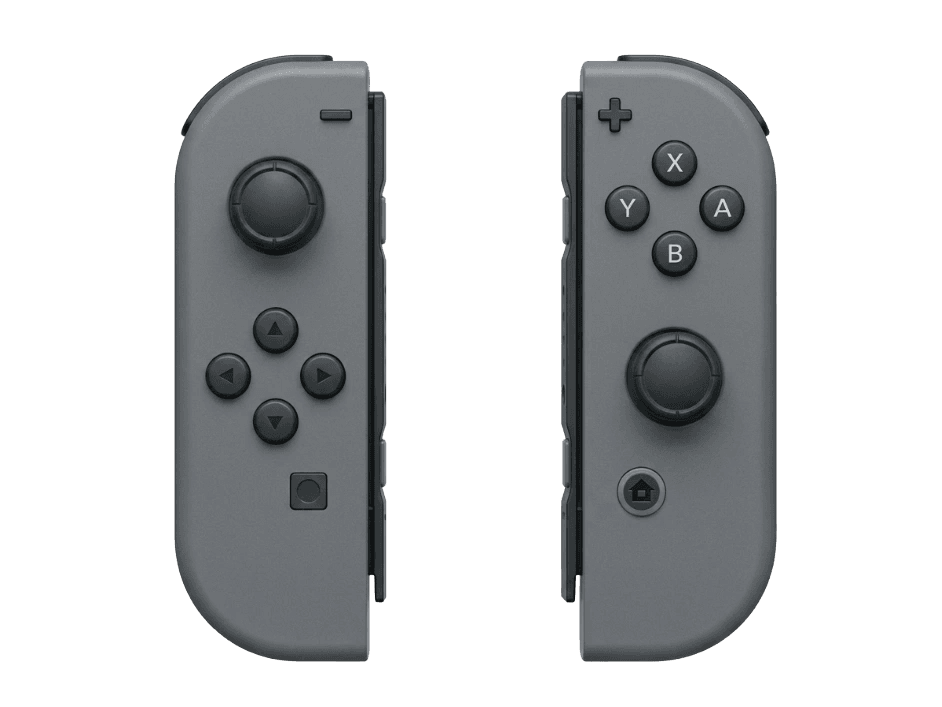
Test for Joy-Con drift
Joy-Con drift is the #1 reported Switch hardware issue. Run the stick drift test below to detect drift on either Joy-Con — even mild drift below the in-game threshold but above 0.05 indicates the stick module is wearing and will worsen. Connect Joy-Cons over Bluetooth (instructions in the pairing section), then press any button to begin.
Joy-Con hardware specifications
| Specification | Joy-Con |
|---|---|
| Connection | Bluetooth |
| Button count | 20 |
| Analog stick type | Potentiometer (susceptible to drift) |
| Gyroscope | Yes |
| Rumble / haptics | Haptic (voice-coil / LRA) |
| Impulse triggers | No |
| Adaptive triggers | No |
| Touchpad | No |
| Built-in microphone | No |
| Built-in speaker | No |
| Back paddles | No |
| Battery life | ~20 hours |
| Weight | 99 g |
| Release year | 2017 |
| MSRP | $79.99 USD |
Recommended tests for Joy-Con
Each test runs in your browser via the Gamepad API — no install, no account, no upload. Run any individually, or use the full benchmark above.
Stick Drift Test
Detect unwanted analog input at rest
Deadzone Test
Measure your stick’s deadzone radius
Snapback Test
Measure how fast sticks return to center
Button Test
Check every button responds instantly
Gyro Test
Test 6-axis motion sensors
Vibration Test
Test both rumble motors independently
Circularity Test
Visualize stick travel as a circle
Latency Test
Measure input lag in milliseconds
Known Joy-Con drift
Recurring problems users report with this controller, ranked by frequency. Each links to a step-by-step fix guide.
- Common
Stick drift (the defining Joy-Con failure)
Joy-Con drift has been the subject of multiple class actions globally. Failure typically develops 3–12 months into regular use — the fastest drift onset of any major controller. Nintendo offers free repair regardless of warranty status in many regions; check Nintendo's support site for your country.
View fix guide - Common
Won't connect or lose sync repeatedly
Left Joy-Cons in particular drop Bluetooth sync more frequently than right Joy-Cons, attributed to the antenna position near the wrist strap rail. Try replacing the Joy-Con strap, or move closer to the host. Persistent issues often indicate antenna damage requiring repair.
View fix guide - Occasional
Rail slide release jammed
The small spring-loaded latch on the back of each Joy-Con can wear, jam, or fail entirely — preventing the Joy-Con from locking to the Switch console or to the grip. Often a $5 part replacement available from repair shops.
View fix guide - Occasional
Won't pair with PC at all
Joy-Cons use a non-standard Bluetooth HID descriptor that confuses some Windows builds. Steam Input handles each Joy-Con cleanly as either a solo gamepad or a paired set. Outside Steam, tools like BetterJoy or JoyShockMapper provide proper Windows support.
View fix guide - Occasional
Battery degrades after 2-3 years
The internal Li-ion cell is small (525 mAh per Joy-Con) and degrades faster than larger controller batteries. After 2–3 years of regular use, expect to see real-world battery life drop from 20 hours new to 8–12 hours. Replacement cells are user-installable with tri-wing screwdrivers.
View fix guide
How to pair the Joy-Con
Get your controller connected before running diagnostics — wired or wireless, mobile or desktop.
Detach the Joy-Cons from the Switch
Press the small round release button on the back of each Joy-Con while sliding it up off the console. Both Joy-Cons need to be detached before they can pair to a different host.
Press the Sync button on each Joy-Con
On the inner rail of each Joy-Con (the side that slides against the Switch), there's a small Sync button between the SL and SR buttons. Press and hold it for about three seconds — the LEDs on the rail edge will start cycling.
Open your device's Bluetooth menu
Windows: Settings → Bluetooth & devices → Add device → Bluetooth. macOS: System Settings → Bluetooth. The Joy-Cons appear separately as "Joy-Con (L)" and "Joy-Con (R)" — pair each individually.
Pair each Joy-Con individually
Tap or click each entry to pair. Some hosts (especially Steam Input) can pair them as a combined pair instead of two separate gamepads — consult your platform documentation for pairing-mode preferences.
Press any button to confirm in the browser
Browsers gate gamepad access behind a user gesture. Press any button on a Joy-Con to expose it to the Gamepad API. Each Joy-Con appears as a separate gamepad object — test left and right independently.
Joy-Con vs the competition
Head-to-head reviews against the other controllers most buyers cross-shop.
- vs
Switch Pro Controller
Pro Controller is one ergonomic pad with a real D-pad and longer battery; Joy-Cons split for two-player or motion games.
- vs
Switch 2 Joy-Cons
Switch 2 Joy-Cons add mouse mode (slide on a desk), refined sticks, magnetic attachment, and bigger batteries. Switch 1 Joy-Cons remain Switch 1-only.
- vs
8BitDo Lite SE
8BitDo Lite SE is a Joy-Con-grip alternative with Hall-effect sticks (no drift) — but cannot detach for two-player play.
Joy-Con definitions
Plain-language definitions for the terms used on this page. Each links to the full glossary entry with thresholds, mechanism, and FAQs.
Joy-Con questions
The Joy-Con's stick module is physically smaller than the modules in the Pro Controller or PS5 DualSense, leaving less room for the carbon contact and the encoder pad. Combined with higher use intensity (players hold Joy-Cons longer in mobile mode), the contact wears faster — typically producing drift in 3–12 months versus 12–24 months for full-sized controllers.
Yes in most regions. Following multiple class action settlements, Nintendo offers free Joy-Con drift repairs regardless of warranty status in the US, UK, EU, Japan, and other markets. Visit Nintendo's official support site for your country to start the repair process. Turnaround is typically 7–14 days.
Either works. Each Joy-Con pairs independently as its own Bluetooth gamepad, and the Gamepad API exposes each as a separate object. You can run the drift test on just the left, just the right, or both — the browser sees them as distinct devices unless paired as a combined virtual gamepad.
No. The original Switch Joy-Cons use potentiometer-based sticks, the same technology family responsible for the drift problem. Aftermarket Hall-effect replacement sticks exist (Gulikit and others sell them) and can be installed at home with a tri-wing screwdriver — that's the most reliable permanent fix.
Drift is mechanical wear on the carbon contact inside the stick module. The Joy-Con you hold in your dominant hand (or the side with the stick you use more — usually left for movement) wears first. Right Joy-Con drift is less common because the right stick is typically used for camera and gets fewer total movement cycles.
No. The IR camera in the right Joy-Con is exposed only through Nintendo's proprietary HID protocol, not the standard Gamepad API. Browsers cannot access camera data, motion-aim from IR, or the NFC reader in the right Joy-Con. Gyroscope and accelerometer ARE accessible.
Run the vibration test with the Joy-Con paired as an individual gamepad. The test sends rumble commands to whichever gamepad index you select. Joy-Cons use voice-coil actuators (HD Rumble), so the rumble feel is more nuanced than standard ERM rumble — light pulses feel different from a Switch Pro Controller.
Joy-Cons remember the last host they paired with. After pairing to a PC, they need to be re-synced to the Switch — slide them onto the console (this triggers wired re-pairing), or use the Sync button + Controllers menu on the Switch home screen.
Get a full health report for your Joy-Con
Run the Controller Benchmark to score every subsystem and generate a shareable Controller Health Score graded S through F.
Run the Benchmark