Stick Drift Test - free joystick drift checker
A stick drift test checks for unwanted input while your thumbsticks rest. This browser tool reads both sticks for five seconds and shows the largest offset it sees. Connect a supported USB or Bluetooth gamepad, let go of the sticks, and compare repeat runs. The result helps you investigate drift; it does not identify a failed part.
Get a clean resting-stick reading
Connect your controller
Plug in your controller via USB, or pair it via Bluetooth. Press any button to wake the controller - browsers require this before exposing gamepad input for privacy reasons.
Place the controller flat
Set the controller on a flat surface and let go of both analog sticks completely. Any human contact during the test will skew the reading.
Start the 5-second test
Click Start. The test samples your sticks at your display's native refresh rate - typically 60-144 readings per second - for five full seconds.
Read your results
Read the peak offset for each stick. Repeat the sample without touching the sticks. Compare repeated results with the movement you notice in a game before deciding on repair.
What the numbers mean
The result is the largest distance from center seen on each stick. These are GPADLAB screening bands, not manufacturer limits or a diagnosis of the cause.
| Drift Value | Verdict | What It Means |
|---|---|---|
| 0.000 - 0.049 | No drift | Resting input stayed below this tool's first screening threshold during the sample. |
| 0.050 - 0.149 | Mild drift | Detectable but tolerable. Affects precision aiming and slow camera movement. |
| 0.150+ | Significant drift | Repeat with the sticks untouched, then check the symptom in a game and follow model-specific support steps. |
When a resting stick moves your game
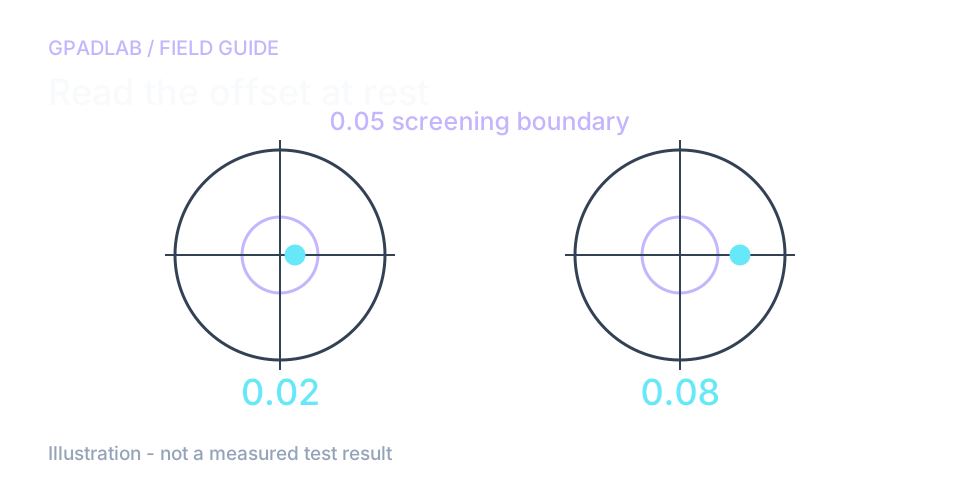
One high reading is a reason to repeat
Suppose the left stick peaks at 0.02 and the right at 0.08. Put the controller down and run the five-second test again. Move and release each stick between runs. A repeated offset is more useful than a spike caused by touching the stick.
The result combines both axes into distance from center. GPADLAB's bands help you screen the input; they are not limits set by the controller maker.
Why drift appears in only one game
A deadzone is the area of stick input a game ignores near center. One game may hide an offset that another responds to. Check that game's settings before you decide the stick needs repair.
A larger deadzone may stop unwanted movement, but it also hides fine input. A zero result here only describes this short sample. It does not rule out an issue that comes and goes.
Compatible devices
These device guides can help with setup. Support depends on the browser, connection, and gamepad mapping. Confirm that each stick moves the matching plot before testing.
Common repair guides
Key definitions
Plain-language definitions for the terms used on this page. Each links to the full glossary entry with thresholds, mechanism, and FAQs.
Related diagnostics
Stick Drift questions
Stick drift is unwanted stick input while the stick rests. You may notice a moving camera or character. Wear is one possible cause, but settings, calibration, and other faults can also affect the reported center. This test cannot identify the cause.
The test reads both stick axes on each browser animation frame for five seconds. It combines each pair into distance from center and reports the largest value. The actual sample cadence depends on the browser and display.
This tool labels readings below 0.05 as no drift detected, 0.05 to below 0.15 as mild, and 0.15 or more as significant. These are screening bands. Games apply different deadzones, so a number alone cannot establish whether the controller needs repair.
Any controller recognized as a standard gamepad by your operating system. This includes PlayStation DualSense, DualSense Edge, DualShock 4 and 3, Xbox Series X/S, Xbox One, Xbox Elite Series 2, Nintendo Switch Pro Controller, Joy-Con, and third-party brands like 8BitDo, Scuf, Razer, and Nacon. Connection can be USB-wired, Bluetooth, or wireless dongle.
Some issues improve after model-specific calibration or support steps. Others need repair. Follow the maker's instructions before opening or cleaning the controller. Hall effect replacements avoid contact-track wear but are not immune to all drift or mechanical faults.
Traditional contact-based sensors can wear, but a browser reading cannot establish the cause on a particular controller. Check the support guidance for your exact model. Repair availability and terms depend on the maker and your location.
Yes. Connect a Bluetooth controller to your iOS or Android device, open this page in your browser, and the test runs identically. The Gamepad API is supported in mobile Chrome, Safari, and Edge.
A screenshot can help describe what you observed, but it is not a manufacturer-approved diagnosis. Follow the support process for your controller. GPADLAB cannot promise that a warranty provider will accept the result.
How we measure stick drift
The page reads both stick axes on each browser animation frame for five seconds. It combines each pair into distance from center and keeps the largest value per stick. Bands at 0.05 and 0.15 are GPADLAB screening choices. They are not manufacturer limits, and this page does not establish the cause of an offset.
Run the GPADLAB Controller Health Score
The Controller Benchmark combines six core diagnostic stages into GPADLAB's site-defined composite score. Use the stage breakdown for diagnosis and the score for repeat comparison.
Run the Benchmark