Circularity Test - stick gate shape checker
A controller circularity test plots the outer stick trace as you sweep around the rim. This tool reports the spread of captured radii as an error percentage, alongside coverage and sample count. Use a complete sweep and repeat it before judging the shape. The trace does not identify sensor type or prove wear.
Trace the entire outer rim
Connect your controller
Plug in via USB or pair over Bluetooth. Press any button to expose the controller to the page. The tester reads the left stick's X and Y axes through the Gamepad API.
Push the stick to full deflection
Hold the left stick pushed all the way out so it rides along the physical gate. The math only counts samples where the radius from center exceeds 0.85 - anything inside that ring is ignored.
Rotate continuously around the rim
Rotate the stick around the rim, both clockwise and counter-clockwise, for at least two full rotations. The live polar plot fills in a 36-wedge coverage fan so you can see which angles still need coverage.
Auto-complete on 95% coverage
The test finishes when the 36 angular buckets are 95% populated and at least 300 rim samples are captured. On a confident rotation this takes around 6-8 seconds. A 15-second timeout fires if coverage stalls.
Read the result
Circularity error is (max radius − min radius) divided by mean radius, expressed as a percentage. The polar plot overlays a verdict-colored hull on the trace so you can see exactly where the gate flattens, peaks, or sticks.
What the circularity error means
These GPADLAB bands classify the radius spread in this test. They do not identify wear, controller age, or sensor technology. Read them with coverage and repeat sweeps.
| Error % | Verdict | What It Means |
|---|---|---|
| 0-5% | Excellent | Hall-effect or premium-grade potentiometer stick. The gate is functionally circular and the sensor is reading uniformly across all angles. |
| 5-10% | Good | Healthy potentiometer stick within typical manufacturing tolerance. New DualSense, Xbox Series X, and 8BitDo Ultimate pads typically land here. |
| 10-20% | Larger radius spread | Check coverage and repeat the sweep. Output shaping, calibration, and movement can all affect this range. |
| > 20% | High radius spread | Inspect the trace and repeat with full coverage. This number alone does not establish a need for replacement. |
Read the outline before judging the percentage
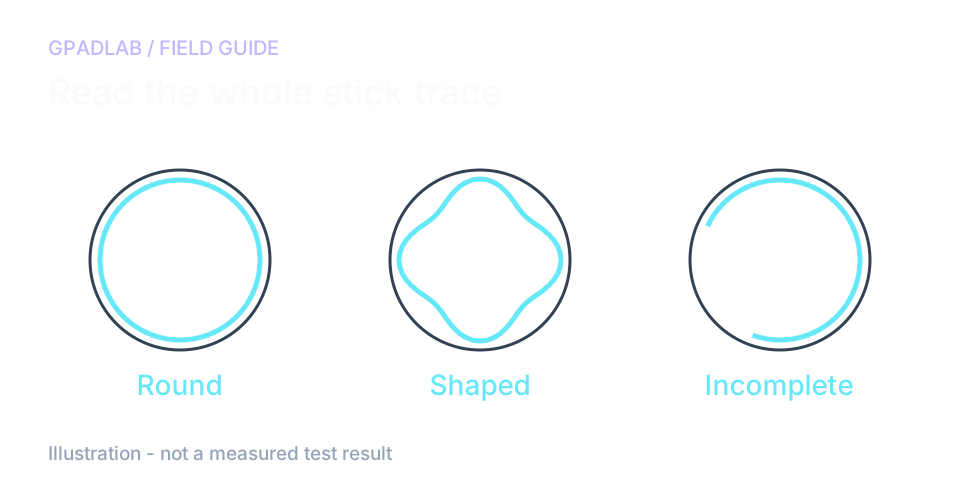
A complete sweep makes the result useful
Push the left stick to the outer edge and trace the whole rim at a steady pace. Watch the coverage display. A gap may mean you did not reach that part of the rim.
The score uses variation in the radius of captured outer samples. It is not a direct measure of sensor wear or aiming skill.
Rounder is not always better for your game
Controller settings can shape the reported output. A round plot alone does not identify Hall effect sensors or prove that every direction is accurate.
Compare the trace with repeated sweeps and with the behavior you notice in a game. Use the Stick Drift Test for unwanted input at rest; circularity checks a different part of stick travel.
Compatible devices
The circularity test works with any controller that exposes an analog left stick. Octagonal-gate controllers are auto-detected for context-aware result copy:
Common repair guides
Related diagnostics
Circularity questions
Circularity error is a measurement of how round your analog stick's outer rim is when you push it to full deflection and rotate around the gate. A perfect stick produces a perfect circle, scoring 0%. Real sticks show some deviation because of physical gate shape, sensor non-linearity, and wear. We express it as (max radius − min radius) divided by mean radius, multiplied by 100.
Fighting-game and Super Smash Bros. inputs depend on precise diagonal motions - quarter circles, half circles, dash dances, tilts. When a stick's gate is worn or uneven, those diagonals don't register reliably, causing dropped inputs and execution failures. A worn cardinal direction (up, down, left, right) reads at maximum value while diagonals fall short, scrambling motion inputs. Competitive players test circularity regularly to know when to replace sticks.
An octagonal gate has eight physical edges. Do not infer that shape from a controller ID or from a browser plot alone. Calibration and output shaping can also create a non-round trace. This tool does not inspect the physical gate.
There is no universal passing percentage for every controller and setting. This tool measures the spread of outer sample radii. Check complete coverage and repeat the sweep. A high value does not establish wear, and a low value does not establish sensor type.
The test measures the gate shape, so it needs samples from all 360 degrees of the rim. We bucket the rim into 36 angular wedges and complete only when 95% of those buckets are populated. A still stick or partial rotation gives no data to compute circularity. The live polar plot fills in a coverage fan as you rotate so you can see which angles still need attention.
Yes - these measure different failure modes. Stick drift is unwanted input when the stick is centered. Circularity error is uneven reach at the outer rim. A stick can have a perfect center (no drift) while its gate has worn flat in one direction. FGC players often see this in dash dance failures: drift is fine, but tilt-then-snap inputs miss because the gate has worn unevenly.
Sensor type alone does not determine this result. Calibration and output shaping also affect the trace. Use the exact model specification to identify the sensor and compare repeat sweeps to assess the output seen by the browser.
First check whether your coverage was complete - the result panel shows angular coverage percentage. If coverage was below 90%, the hull may be drawn across an empty arc, inflating the error. Re-run the test and make sure to rotate in both directions for a full two rotations. If coverage was complete and error is still high, your stick is genuinely worn or your controller has an octagonal gate that wasn't detected (older third-party pads sometimes copy the DualShock gate shape without a recognizable id).
How we measure circularity
The page collects outer samples with radius above 0.85. It aims for 300 samples and 95 percent angular coverage, with a 15-second limit. Error is the radius range divided by its mean, as a percentage. Coverage, movement, and controller settings affect this value. It does not measure wear directly.Dedicated methodology article not yet published; see the methodology hub for the methods currently available.
Run the GPADLAB Controller Health Score
The Controller Benchmark combines six core diagnostic stages into GPADLAB's site-defined composite score. Use the stage breakdown for diagnosis and the score for repeat comparison.
Run the Benchmark