Snapback Test - stick return speed checker
A controller snapback test looks for a brief opposite-direction input after you release the stick. Push the left stick right, release it cleanly, and repeat three times. The tool plots the return and reports overshoot, settling, and final rest. Browser sampling may miss very short events, so confirm any symptoms in your game too.
Make three clean stick releases
Connect your controller
Plug in via USB or pair over Bluetooth. Press any button to expose the controller to the page. The tester reads the left stick's X-axis via the Gamepad API at your display's native refresh rate.
Push the stick fully right
Hold the left stick all the way right until it rests against the gate. The tester watches for the X value to exceed 0.85, which marks the stick as at-peak.
Release cleanly
Let go of the stick - let the spring snap it back without guiding it with your thumb. Release detection fires when the X value drops by more than 0.5 in a single frame while the previous frame was at peak.
Sample 500ms of return curve
From the moment of release, the tester samples X-axis values for 500 milliseconds. At 60Hz refresh that's roughly 30 samples; at 144Hz, roughly 72. The samples feed four metrics: overshoot (most-negative X), oscillation count (zero-crossings), settling time (first 50ms continuous window with |x| ≤ 0.05), and final rest position.
Repeat 3 times, take median
Snapback has natural per-release variance from fingertip placement and release speed. The test runs three attempts back-to-back with a one-second pause between, then computes the median per metric. The verdict is the worst-metric-wins severity across the four medianed values.
What the numbers mean
Four metrics, each classified independently. The verdict is the worst classification across all four after median-averaging the three attempts.
| Metric | Verdict | Threshold |
|---|---|---|
| Overshoot | Most-negative X past center | Excellent ≤ 5% · Good 5-15% · Worn 15-30% · Failing > 30%. Some bounce is normal - sticks past 18 months of use often hit 15-20%. |
| Oscillations | Zero-crossings in 500ms | Excellent 0-1 · Good 2 · Worn 3 · Failing 4+. Loose mechanisms cause prolonged oscillation; a healthy spring damps quickly. |
| Settling time | First continuous 50ms within ±0.05 | Excellent ≤ 80ms · Good ≤ 150ms · Worn ≤ 300ms · Failing > 300ms or never settles. Slow settling causes dropped dash inputs. |
| Final rest position | Mean |X| over last 50ms | Excellent ≤ 0.020 · Good ≤ 0.050 · Worn ≤ 0.100 · Failing > 0.100. Indicates the stick isn't returning fully - combine with the Stick Drift Test for confirmation. |
Catch the brief move past center
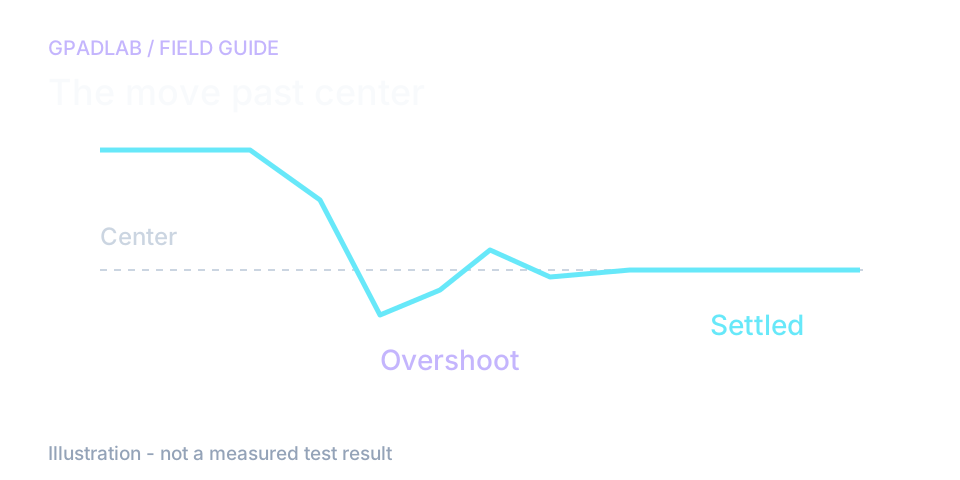
Release the stick cleanly
Push the left stick fully right, then lift your thumb away. Do not guide the stick back to center. Repeat the three attempts with the same release motion.
If one attempt looks very different, try another set. A thumb brushing the stick on release can change the trace.
Snapback and drift need different checks
Snapback is the brief opposite input after release. Drift is an offset that remains while the stick rests. A controller can show one without the other.
Compare overshoot, settling time, and the final resting value. These are browser observations, not a direct test of the spring. If a quick reversal affects a game, confirm the symptom there before changing hardware.
Compatible devices
The snapback test works with any controller exposing an analog left stick. FGC and Smash players commonly test:
Common repair guides
Related diagnostics
Snapback questions
Snapback is the behavior of an analog stick returning to center after being released from full deflection. A healthy stick snaps cleanly back with minimal overshoot and damps quickly. A worn stick overshoots heavily, oscillates multiple times before settling, or fails to return to center at all. Snapback is governed by the centering spring inside the stick mechanism - when the spring weakens or the bearing surfaces wear, snapback degrades.
A brief opposite input after release can affect directional actions in games that respond to it. Repeat clean releases here, then check the action in your game. Browser traces do not reproduce every game's input rules or frame timing.
Settling depends on the stick, settings, release technique, and browser sampling. Compare three clean releases and inspect the trace. The tool's timing bands are screening choices, not age-based specifications or proof of spring damage.
Snapback has natural variance from fingertip placement, release speed, and how the stick contacts the gate before release. A single attempt is too noisy to base a verdict on. Running three attempts and taking the median per metric filters out the worst outlier (usually the first attempt as the user learns the release motion) and gives a more honest verdict.
Overshoot above 15% usually means the centering spring is too strong for the current bearing friction, or the sensor mounting has loosened so the magnet (Hall-effect) or wiper (potentiometer) overshoots center. On older potentiometer sticks, debris in the housing can also cause the sensor to read a strong negative dip briefly after release. Hall-effect upgrades typically reduce overshoot.
They can occur together, but they describe different behavior. Snapback is brief motion past center after release. Drift is unwanted input at rest. Run both checks if needed; neither identifies the failed internal part.
An adapter may expose a GameCube controller to the browser. Confirm that the left stick moves the expected axis before testing. Support depends on the adapter mode, driver, and browser. The controller model alone does not guarantee a usable trace.
High variance between attempts indicates an inconsistent stick - sometimes from a partial spring failure where the centering force is uneven. The per-attempt breakdown in the result panel shows each attempt's metrics independently. If one attempt is dramatically worse than the other two, your stick is unreliable under repeated stress, which materially affects fighting games and platformers. Replace the spring or upgrade to Hall-effect.
How we measure snapback
After a detected release from the right, the page samples the left stick for 500 ms. It records overshoot, zero crossings, settling, and final rest across three attempts. The summary uses a median for each metric. Browser frame timing can miss brief motion, and the trace cannot identify a failed spring.Dedicated methodology article not yet published; see the methodology hub for the methods currently available.
Run the GPADLAB Controller Health Score
The Controller Benchmark combines six core diagnostic stages into GPADLAB's site-defined composite score. Use the stage breakdown for diagnosis and the score for repeat comparison.
Run the Benchmark