GameCube Controller Test
The GameCube controller test runs a full diagnostic on Nintendo's DOL-003 controller in your browser — verifying analog stick drift, button response, hybrid analog/digital trigger range, and rumble. Connect via the official Nintendo GameCube Controller Adapter (or a compatible third-party clone), press any button, and get a Controller Health Score graded S through F.
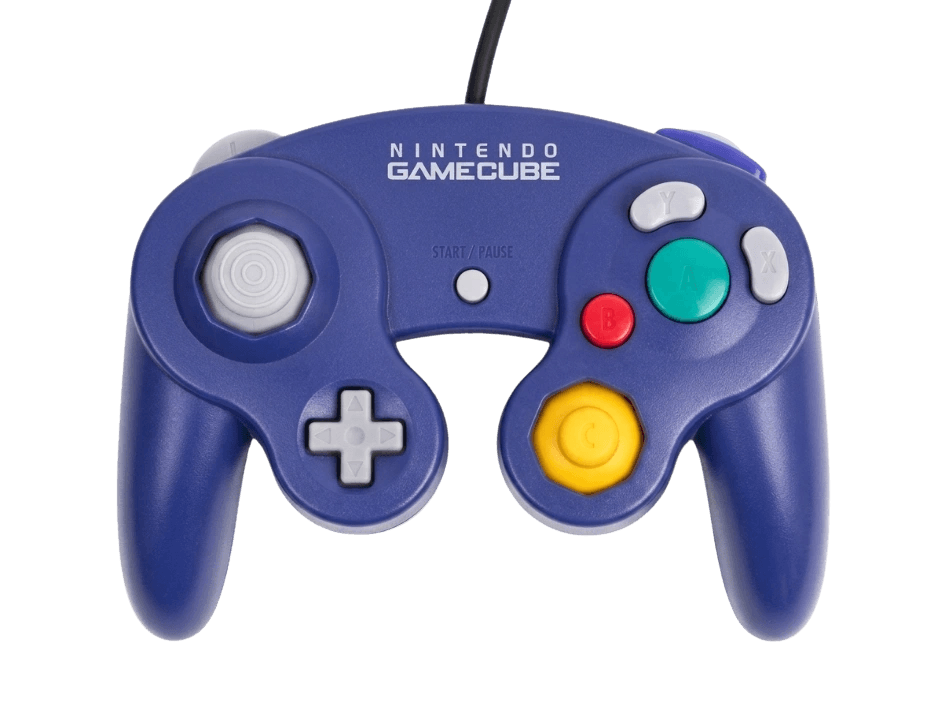
Full GameCube controller diagnostic
The Controller Benchmark runs every relevant subsystem on your GameCube controller — stick drift, deadzone, button response, hybrid analog/digital trigger range, rumble, latency, and connection stability — then produces a composite Controller Health Score. Drift is universal on 20+ year old GameCube controllers; the stick drift test catches it whether it's mild enough to ignore or severe enough to require modding.
GameCube Controller hardware specifications
| Specification | GameCube Controller |
|---|---|
| Connection | USB-A |
| Button count | 8 |
| Analog stick type | Potentiometer (susceptible to drift) |
| Gyroscope | No |
| Rumble / haptics | ERM motors (standard rumble) |
| Impulse triggers | No |
| Adaptive triggers | No |
| Touchpad | No |
| Built-in microphone | No |
| Built-in speaker | No |
| Back paddles | No |
| Battery life | Wired (no internal battery) |
| Weight | 190 g |
| Release year | 2001 |
| MSRP | $24.99 USD |
Recommended tests for GameCube Controller
Each test runs in your browser via the Gamepad API — no install, no account, no upload. Run any individually, or use the full benchmark above.
Stick Drift Test
Detect unwanted analog input at rest
Deadzone Test
Measure your stick’s deadzone radius
Button Test
Check every button responds instantly
Trigger Pressure
Verify full analog range on triggers
Snapback Test
Measure how fast sticks return to center
Circularity Test
Visualize stick travel as a circle
Vibration Test
Test both rumble motors independently
Latency Test
Measure input lag in milliseconds
Known GameCube Controller drift
Recurring problems users report with this controller, ranked by frequency. Each links to a step-by-step fix guide.
- Common
Stick drift on the main analog stick
After 20+ years in active use, drift on the main analog stick is universal on GameCube controllers. Melee competitive play has driven the mod community to develop multiple drift fixes — replacement potentiometers, Hall-effect upgrades (Phob Box / GoodCC), and notch-modded sticks. The stick drift test catches drift before it's bad enough to affect gameplay; Melee players often replace sticks well before they'd be unusable for casual play.
View fix guide - Common
C-stick snapback inconsistency
The C-stick (yellow secondary stick) snaps back to center mechanically rather than through analog smoothing. Worn or modded C-sticks can produce input on the opposite axis as they return to center — particularly disruptive in Melee where the C-stick triggers smash attacks. The snapback test measures the return-to-center transient, which competitive Melee players obsess over.
View fix guide - Common
Rumble doesn't work on Nintendo Switch
The official Nintendo GameCube Controller Adapter (WUP-028) does not pass through rumble commands on Nintendo Switch — this is a Switch-side limitation, not an adapter fault. Rumble works correctly on Wii U with the same adapter. The gray USB plug on the adapter (which carries rumble power) is unnecessary for Switch use.
View fix guide - Occasional
Triggers register the digital click before the analog max
GameCube triggers are hybrid analog/digital — they have an analog pressure range for ~90% of the pull, then a hard click at the end that fires a digital button. Worn or modded triggers can have the click misalign with the analog max, registering the click while the analog value is still around 0.8. The trigger pressure test exposes this; not necessarily a fault for Melee (which uses the click) but problematic for racing games (which use analog).
View fix guide - Common
Won't connect to Nintendo Switch without the adapter
The GameCube controller uses a proprietary Nintendo connector — there is no way to connect it to a modern device without the WUP-028 adapter (or a compatible clone). 8BitDo, Brook, and Mayflash all sell adapters; pricing ranges from $20 (clones) to $30 (official Nintendo). The adapter is the only path to using a GameCube controller on PC, Switch, or Wii U.
View fix guide
How to pair the GameCube Controller
Get your controller connected before running diagnostics — wired or wireless, mobile or desktop.
Get the right adapter
The official Nintendo GameCube Controller Adapter (WUP-028) is the most reliable option. Third-party clones from Mayflash, 8BitDo, and others work but may identify with different USB IDs. The adapter has TWO USB cables — black (power, required) and gray (rumble, optional). For browser testing, only the black USB cable is needed.
Plug the adapter into your PC, Switch, or Wii U
Insert the black USB-A cable into any USB port. On Switch, use the front USB ports for best reliability. On PC, the adapter shows as USB ID 057E:0337 in Device Manager — if it doesn't, the adapter is faulty or driver-blocked. Switch from version 4.0.0 onward natively recognizes the adapter.
Connect the GameCube controller to the adapter
Plug the GameCube controller's proprietary connector into any of the adapter's four input ports. The ports are numbered 1–4 left to right; in 4-player games, this determines which player slot the controller occupies. Click in firmly — the connector is tight by design to prevent disconnection during gameplay.
Set the mode switch (third-party adapters only)
Third-party adapters often have a physical switch between Wii U/Switch mode and PC mode. The mode affects which protocol the adapter advertises to the host. The official Nintendo WUP-028 adapter has no mode switch and operates the same on every host that supports it.
Press any button to confirm in the browser
Browsers gate gamepad access behind a user gesture. Press any button on the GameCube controller (A is the largest face button) to expose it to the Gamepad API. The browser sees the adapter, not the individual controller — if you have multiple controllers connected to the adapter, each appears as a separate gamepad object indexed by port.
GameCube Controller vs the competition
Head-to-head reviews against the other controllers most buyers cross-shop.
- vs
Switch Pro Controller
Switch Pro Controller has HD Rumble, gyro, NFC, and 40+ hour battery; GameCube controller is wired-only but has the hybrid analog/digital triggers and unique button layout Smash competitive play standardized on.
- vs
Switch 2 Pro Controller
Switch 2 Pro Controller has refined sticks, mouse mode, and HD Rumble 3; GameCube controller has hybrid trigger architecture and the asymmetric A/B/X/Y face button layout dedicated Smash players prefer.
- vs
8BitDo Pro 2
8BitDo Pro 2 has Hall-effect sticks (drift-proof), back paddles, and multi-platform mode switching; GameCube controller is wired-only with potentiometer sticks but has the irreplaceable Melee-standard layout.
GameCube Controller definitions
Plain-language definitions for the terms used on this page. Each links to the full glossary entry with thresholds, mechanism, and FAQs.
GameCube Controller questions
The competitive Smash Bros. Melee community standardized on the GameCube controller in the early 2000s and never moved off it. The controller's hybrid analog/digital triggers, asymmetric face button layout (large A, smaller B, X and Y on the right), and C-stick are all optimized for Melee's specific input requirements. Every major Melee tournament still uses GameCube controllers as the standard input device.
No. The GameCube controller uses a proprietary Nintendo connector that does not match any standard USB or other connector. You need an adapter — the official Nintendo WUP-028 (works on Switch, Wii U, and PC), or a third-party clone from 8BitDo, Mayflash, or Brook. The adapter handles protocol translation between the controller and the host.
Rumble support requires the adapter to receive command signals from the host. The Nintendo Switch does not send these signals to the WUP-028 adapter — this is a Switch-side limitation Nintendo hasn't addressed in firmware updates. Rumble works correctly on Wii U with the same adapter. Third-party adapters from 8BitDo and Brook offer Switch rumble passthrough as a software feature.
Original Nintendo GameCube controllers use potentiometer-based sticks, the same family responsible for drift on every PlayStation and Xbox controller. After 20+ years of use, drift is universal on original units. The Melee modding community has developed Hall-effect upgrade kits — the Phob Box and GoodCC are the most popular — that retrofit the original shell with Hall sensors. Newer Switch 2 re-release GameCube controllers may use updated sticks, but Nintendo hasn't officially confirmed.
The WUP-028 is the official Nintendo adapter ($30-40 new) with reliable Wii U and Switch support. Third-party adapters (Mayflash, 8BitDo, Brook — $15-30) work similarly on most hosts and often add features Nintendo doesn't: Switch rumble support, mode switches for different platforms, and updated PC drivers. For tournament play, official adapters are sometimes required; for casual play, clones are fine.
Yes, but with nuance. The Gamepad API exposes the analog trigger value (0.0–1.0) as a separate axis, AND the end-of-pull digital click as a separate button. The trigger pressure test shows both: you should see the analog axis ramp up smoothly during the pull, then a clean button-click at the end. Worn or modded triggers can have these misalign; the test catches both failure modes.
Three repair tiers. Tier 1 (free): clean the stick housing with compressed air and 90%+ isopropyl alcohol — sometimes restores mild drift. Tier 2 (~$5): replace the stick module with a third-party potentiometer-based replacement (Phillips screwdriver, 20 minutes). Tier 3 ($60+): install a Hall-effect upgrade like Phob Box or GoodCC for a permanent, drift-proof solution favored by competitive Melee players.
The C-stick (the smaller yellow stick on the right) is designed for camera control in 3D games and for triggering smash attacks in Super Smash Bros. Melee. Its smaller throw and stiffer spring create the distinctive 'flick' feel that became central to Melee competitive play. Hardware design served gameplay design — the C-stick exists in its specific form largely because Smash Bros. Melee needed it.
Get a full health report for your GameCube Controller
Run the Controller Benchmark to score every subsystem and generate a shareable Controller Health Score graded S through F.
Run the Benchmark