PS4 DualShock 4 Controller Test
The DualShock 4 controller test runs a full diagnostic on Sony's PS4 controller in your browser — verifying analog stick drift, button response, trigger range, touchpad input, gyroscope, and rumble. Connect over Bluetooth or USB, press any button, and get a Controller Health Score graded S through F. Works on PC, Mac, and mobile.
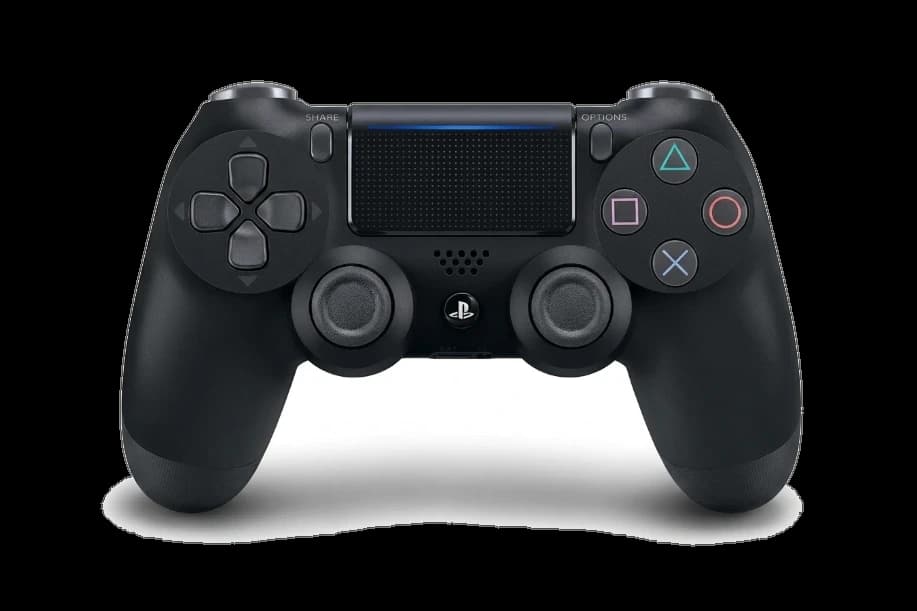
Full DualShock 4 diagnostic
The Controller Benchmark runs every relevant subsystem on your DualShock 4 — stick drift, deadzone, button response, trigger range, touchpad, gyro, rumble, latency, and connection stability — then produces a composite Controller Health Score. Drift is the most-reported DualShock 4 issue; the stick drift test catches it whether it's mild or severe.
PS4 DualShock 4 hardware specifications
| Specification | PS4 DualShock 4 |
|---|---|
| Connection | USB-A, Bluetooth |
| Button count | 17 |
| Analog stick type | Potentiometer (susceptible to drift) |
| Gyroscope | Yes |
| Rumble / haptics | ERM motors (standard rumble) |
| Impulse triggers | No |
| Adaptive triggers | No |
| Touchpad | Yes |
| Built-in microphone | No |
| Built-in speaker | Yes |
| Back paddles | No |
| Battery life | ~6 hours |
| Weight | 210 g |
| Release year | 2013 |
| MSRP | $59.99 USD |
Recommended tests for PS4 DualShock 4
Each test runs in your browser via the Gamepad API — no install, no account, no upload. Run any individually, or use the full benchmark above.
Stick Drift Test
Detect unwanted analog input at rest
Deadzone Test
Measure your stick’s deadzone radius
Button Test
Check every button responds instantly
Trigger Pressure
Verify full analog range on triggers
Touchpad Test
Test DualSense and DualShock touchpads
Gyro Test
Test 6-axis motion sensors
Vibration Test
Test both rumble motors independently
Latency Test
Measure input lag in milliseconds
Known PS4 DualShock 4 drift
Recurring problems users report with this controller, ranked by frequency. Each links to a step-by-step fix guide.
- Common
Stick drift (the defining DualShock 4 failure)
DualShock 4 drift typically develops 12–24 months into regular use due to potentiometer wear. The repair path is well-established: clean the stick housing first, recalibrate via Settings on PS4, then replace the stick module if drift persists above 0.15. Hall-effect aftermarket modules exist for the DualShock 4 and install with a single Phillips screwdriver.
View fix guide - Common
Battery life shorter than competing controllers
The 1000 mAh battery and always-on light bar mean real-world battery life is 4–8 hours — significantly shorter than the Xbox One controller's 30+ hours on AA batteries. Battery degradation after 2–3 years can drop this to 2–4 hours. Replacement Li-ion packs are inexpensive and user-installable with a Phillips screwdriver.
View fix guide - Common
Won't pair with PC over Bluetooth
On Windows, the DualShock 4 pairs but appears as a generic HID device until Steam Input or DS4Windows is configured. Steam handles it natively in Big Picture mode; outside Steam, DS4Windows emulates an Xbox 360 controller so games recognize it. Hold Share + PS button for 5 seconds to enter pairing mode (the light bar pulses white).
View fix guide - Occasional
Touchpad click feels mushy or unresponsive
The touchpad-as-button is a single dome switch under the touchpad surface. Years of use can wear the dome unevenly — clicks register from one corner but not the other. Disassembly to replace the dome requires removing 4 screws and a ribbon cable; iFixit publishes the guide.
View fix guide - Occasional
L1/R1 buttons crack at the pivot
The L1 and R1 shoulder buttons use a plastic pivot that can crack from repeated firm presses (common in fighting games and rhythm games). Cracked buttons may still register input but feel loose or rattle audibly. Replacement L1/R1 modules cost $5–10 and require partial disassembly.
View fix guide
How to pair the PS4 DualShock 4
Get your controller connected before running diagnostics — wired or wireless, mobile or desktop.
Enter pairing mode
Hold the Share button and the PS button simultaneously for about 5 seconds. The light bar on the back of the controller starts pulsing white in double-flashes — pairing mode is active.
Open your device's Bluetooth menu
On Windows: Settings → Bluetooth & devices → Add device → Bluetooth. On macOS: System Settings → Bluetooth. On iOS/Android: Settings → Bluetooth. The DualShock 4 appears as "Wireless Controller" — tap or click to pair.
Pair without entering a PIN
The DualShock 4 doesn't require a PIN. If your device asks for one, try 0000 — but most modern OS versions skip the PIN prompt entirely. The light bar stops pulsing and shows a steady color once paired.
Use Micro-USB for wired play
Both DualShock 4 revisions support wired play over Micro-USB (note: Micro-USB, NOT USB-C — even the V2 retained the older connector). Wired bypasses Bluetooth and lowers latency, useful for fighting games and rhythm games where input lag matters.
Press any button to confirm in the browser
Browsers gate gamepad access behind a user gesture. Press any button on the DualShock 4 to expose it to the Gamepad API. Both revisions present the same button mapping and trigger ranges — testing experience is identical between v1 and v2.
PS4 DualShock 4 vs the competition
Head-to-head reviews against the other controllers most buyers cross-shop.
- vs
PS5 DualSense
DualSense adds adaptive triggers, haptic feedback, built-in mic, and USB-C; DualShock 4 has Micro-USB, simpler rumble, and lighter weight at 210g vs 280g.
- vs
Xbox One Controller
Xbox One uses AA batteries (30+ hours runtime) and has a more ergonomic grip; DualShock 4 has a touchpad, built-in speaker, and integrated rechargeable battery (4–8 hours).
- vs
Switch Pro Controller
Switch Pro Controller has HD Rumble, longer battery (40+ hours), and amiibo NFC; DualShock 4 has a touchpad, light bar, and built-in speaker.
PS4 DualShock 4 definitions
Plain-language definitions for the terms used on this page. Each links to the full glossary entry with thresholds, mechanism, and FAQs.
PS4 DualShock 4 questions
Flip the controller over and check the light bar visibility. On the original (CUH-ZCT1), the light bar is only visible from the front and sides. On the V2 (CUH-ZCT2, late 2016), a thin light strip extends through the touchpad surface so you can see it from above. Both have identical buttons, layout, and testing behavior.
Yes. Connect via Bluetooth or Micro-USB cable. Steam recognizes it natively in Big Picture mode and most games via Steam Input. Outside Steam, install DS4Windows (free) — it emulates an Xbox 360 controller so any game expecting Xinput recognizes the DualShock 4. The browser also recognizes it directly via the Gamepad API.
DualShock 4 uses potentiometer-based analog sticks, which wear physically with use. The carbon contact inside the stick module degrades over thousands of hours of gameplay, causing drift. Sony's repair path is replacement; aftermarket Hall-effect stick modules (which don't wear) install with a single Phillips screwdriver and eliminate the drift recurrence permanently.
Partially. The DualShock 4 works on PS5 only with PS4 games via backward compatibility — PS5 games require the DualSense controller because they rely on adaptive triggers and haptics the DualShock 4 lacks. The PS5 enforces this at the system level; you can't bypass the restriction.
Sony rates the battery at 4–8 hours depending on use. The light bar can't be disabled and consumes significant power; vibration and the built-in speaker drain it faster. The 1000 mAh cell is also small compared to the Xbox One's AA batteries (which run 30+ hours). Battery degradation after 2–3 years can halve real-world runtime.
No. The DualShock 4 uses potentiometer-based sticks across both V1 and V2 hardware revisions, which is why drift is the most-reported DualShock 4 issue. Aftermarket Hall-effect replacement modules exist (Gulikit and others sell them) and install in about 15 minutes with a Phillips screwdriver — the most reliable permanent drift fix.
Yes, the touchpad-click registers as a button input through the Gamepad API. The touchpad's two-point capacitive surface (X/Y coordinates) is exposed only through Sony's proprietary HID protocol, not standard browsers — only Steam Input and DS4Windows can read raw touch coordinates. The click itself works in any browser-based test.
PlayStation VR (PSVR1) uses the DualShock 4 light bar for positional tracking — the PlayStation Camera reads the colored light to track controller position. Sony made the light bar always-on so VR works without configuration. You can dim it in PS4 system settings, but you can't turn it off. The PS5 DualSense moved the light bar to the front edges, partially solving this complaint.
Get a full health report for your PS4 DualShock 4
Run the Controller Benchmark to score every subsystem and generate a shareable Controller Health Score graded S through F.
Run the Benchmark