Touchpad Test - DualSense & DualShock 4 checker
A browser can only verify controller touch data directly when the controller and browser expose a controller-specific touch interface. This version of GPADLAB uses a pointer-event fallback: an 8-second coverage interaction plus 3 prompted press gestures on an in-page canvas. Because standard Pointer Events can come from a mouse, touchscreen, trackpad, stylus, or controller-to-pointer mapping, the result is a browser compatibility check rather than proof of DualSense or DualShock 4 touchpad hardware health.
Trace and press on the test canvas
Connect your controller
Plug in via USB or pair over Bluetooth and press a controller button to register the gamepad. This tester then listens for standard Pointer Events on the canvas. Some operating-system/controller setups may map the touchpad to the system pointer, but the browser does not identify which physical device generated a Pointer Event.
Swipe phase (8 seconds)
If your controller touchpad controls the system pointer, use it to move across the on-screen canvas in figure-8 patterns. The tester counts pointer updates, tracks simultaneous browser pointers, and records which of 18 grid cells (6 × 3) were covered. Mouse, touchscreen, stylus, and laptop-trackpad events would produce the same browser signals, so avoid other pointer devices during the run.
Pointer-press phase (3 attempts)
Perform the prompted touchpad press while the mapped pointer is over the canvas. The tester records a browser pointer-down/up gesture using pressure or press duration as a heuristic. This does not directly read the controller's physical touchpad switch, so a successful pointer press should not be presented as hardware click verification.
Pointer coverage analysis
After the interaction, GPADLAB shows which canvas grid cells received pointer events. Untouched cells describe the path of the mapped browser pointer; they do not prove a dead region on the controller's capacitive surface because OS pointer translation, cursor motion, acceleration, screen mapping, and user technique all affect coverage.
Pointer-fallback summary
The component summarizes pointer update rate, prompted pointer presses, simultaneous pointers, and canvas coverage using the existing four-signal heuristic. These classifications describe the browser pointer path only and must not be treated as a hardware verdict for the controller touch surface or click switch.
Check where the touch input comes from
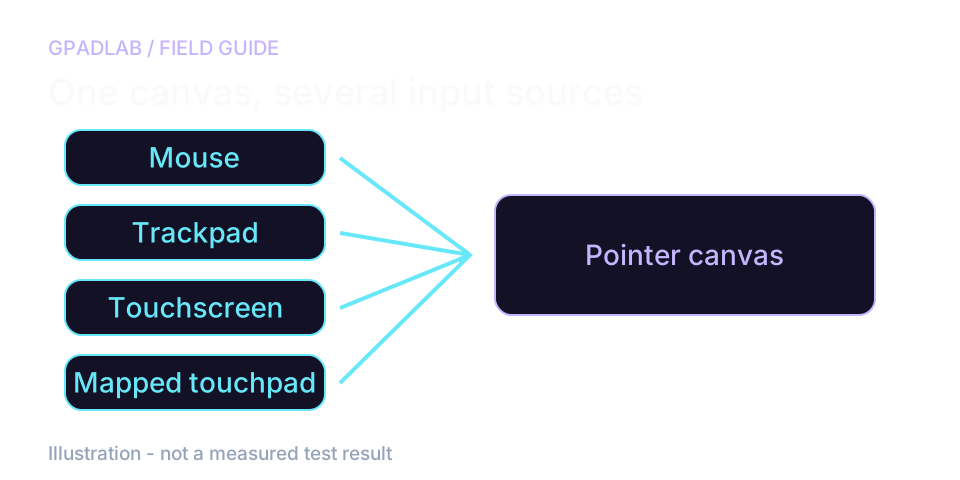
Testing a DualSense or DualShock 4 touchpad
Keep your mouse and laptop trackpad still. Move a finger on the controller touchpad and see whether the canvas responds. A controller-to-pointer mapping may be needed for this mode.
If only the mouse draws on the canvas, you have tested the mouse path. A connected controller name does not establish the source of those pointer events.
What a blank area really means
The coverage grid marks areas you reached on the page. An empty cell can mean you did not swipe through it. It is not proof of a dead region on the physical pad.
The press phase checks pointer-down and pointer-up events. For a hardware touchpad problem, also check a supported game or app that reads the controller's touch data directly.
What the metrics mean
These are pointer-fallback interaction bands, not controller hardware specifications. Pointer event rate, press gestures, simultaneous pointers, and canvas coverage can all be affected by the operating system, browser, pointer source, display, and input mapping.
| Signal | Verdict | Threshold |
|---|---|---|
| Pointer update rate | Pointer events per second during the guided interaction | Strong ≥ 60/s · Usable ≥ 30/s · Limited ≥ 15/s · No Input < 15/s in the current UI heuristic. These values are not controller polling-rate measurements: browser event frequency depends on the pointer source, OS translation, event coalescing, movement speed, browser scheduling, and display/input pipeline. |
| Pointer press success | Prompted browser press gestures of 3 attempts | Strong = 3/3 · Usable ≥ 1/3 · No Input = 0/3 in the current heuristic. This records pointer-down/up behavior and cannot diagnose the controller's physical touchpad click switch because the browser does not know which device produced the pointer event. |
| Simultaneous pointers | Maximum simultaneous Pointer Events observed | Strong ≥ 2 · Usable = 1 in the current heuristic. This is browser pointer concurrency, not proof that the controller touchpad supplied two contacts; a touchscreen or other multi-pointer device can generate the same result. |
| Untouched cells | Canvas cells that received no pointer event | Strong = 0 · Usable 1-2 · Limited 3-5 · No Input 6+ in the existing coverage heuristic when at least 10 cells were reached. Repeated untouched cells do not prove capacitive-layer damage because pointer mapping and user movement can create the same pattern. |
Compatible devices
These controllers include touch surfaces or touchpad-style controls, but pointer-fallback behavior depends on the operating system, browser, connection mode, drivers, and controller mapping. A connected gamepad alone does not guarantee that its touch surface appears as browser pointer input.
Related diagnostics
Touchpad questions
This page provides a repeatable browser interaction when a controller touchpad is mapped to pointer input, which can help you compare behavior between runs or connection modes. It is not sufficient by itself for a warranty diagnosis because generic browser Pointer Events do not identify the originating device or directly expose the controller's capacitive surface and click switch.
This v1 tester listens to standard Pointer Events on an in-page canvas. A Pointer Event contains pointer information but does not prove that the source was a DualSense or DualShock 4 touchpad. Depending on the operating system and controller setup, the controller touch surface may be mapped to the system pointer, may be exposed through a controller-specific API, or may not be available to the page at all.
The canvas is simply the region where GPADLAB listens for Pointer Events. If your controller touchpad is mapped to the system pointer, keep that pointer over the canvas while using the touchpad. The same canvas also accepts mouse, touchscreen, stylus, and trackpad events, which is why pointer-fallback results cannot identify the hardware source.
There is no universal healthy controller-touchpad rate that can be inferred from generic Pointer Events. The event frequency observed by a webpage depends on the source device, operating-system translation, event coalescing, browser scheduling, movement speed, display/input cadence, and other factors. Use repeated runs on the same setup for comparison rather than treating the number as a controller polling specification.
Seeing two simultaneous browser pointers only confirms that two Pointer Events were active on the page. It does not identify their physical source. A controller touch surface may support multiple contacts without the OS translating them into separate browser pointers, while a touchscreen can create the same two-pointer result. Direct controller touch data is needed for a stronger multi-touch claim.
The 18-cell grid measures where the browser pointer moved inside the canvas, not where your finger physically contacted the controller touch surface. An untouched cell can result from pointer acceleration, screen-to-touchpad mapping, cursor clipping, OS translation, or user movement. Use it as a repeatable coverage visualization, not as confirmation of a capacitive hardware dead zone.
The physical touchpad click is a controller button input separate from finger-position tracking, but this pointer-fallback implementation does not directly identify that gamepad button. Its press phase only observes a browser pointer gesture while you perform the prompted action. To diagnose the actual click switch, verify the touchpad button in a controller-aware gamepad input view, supported game, console test, or a direct controller API.
Yes. The Gamepad specification defines controller touch surfaces through GamepadTouch data, including touch identifiers and normalized positions, but feature support varies by browser/platform. Controller-specific WebHID parsing is another possible path on supported hardware. GPADLAB should only label input as direct controller touch when the browser or controller API itself provides that source information; until then, this page remains a pointer fallback.
How pointer-fallback mode works
The canvas records pointer events for eight seconds, then three prompted presses. It reports event rate, pointer count, and coverage of 18 cells. A mouse, trackpad, touchscreen, or mapped controller can produce those events. The test cannot identify their physical source or diagnose a controller touch surface.Dedicated methodology article not yet published; see the methodology hub for the methods currently available.
Run the GPADLAB Controller Health Score
The Controller Benchmark combines six core diagnostic stages into GPADLAB's site-defined composite score. Use the stage breakdown for diagnosis and the score for repeat comparison.
Run the Benchmark