Razer Wolverine V3 Pro Controller Test
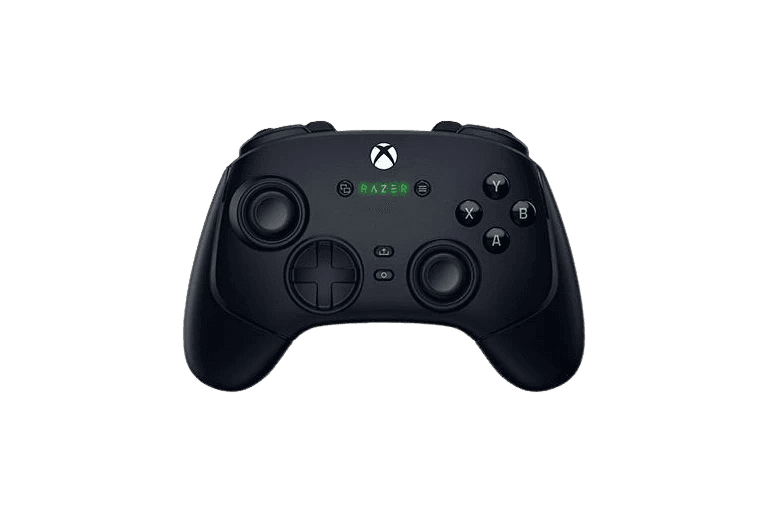
The Razer Wolverine V3 Pro controller test runs a full diagnostic on Razer's flagship Xbox-side esports pad in the browser — verifying the Hall-effect sticks for drift resistance, the six remappable buttons, mecha-tactile face button response, HyperTrigger range with stops engaged, and rumble. Connect over USB-C, Bluetooth, or the Razer 2.4GHz HyperSpeed dongle, press any button, and get a Controller Health Score graded S through F.
Full Wolverine V3 Pro diagnostic
The Controller Benchmark runs every relevant subsystem on your Wolverine V3 Pro — Hall-effect stick precision, mecha-tactile button consistency, HyperTrigger range, the four mouse-click back buttons and two claw-grip bumpers, latency, and connection stability — then produces a composite Controller Health Score. Use the polling rate test separately to verify 250Hz wireless or 1000Hz wired Tournament Mode.
Razer Wolverine V3 Pro hardware specifications
| Specification | Razer Wolverine V3 Pro |
|---|---|
| Connection | USB-C, Bluetooth, 2.4GHz Wireless Dongle |
| Button count | 23 |
| Analog stick type | Hall-effect (drift-resistant) |
| Gyroscope | No |
| Rumble / haptics | ERM motors (standard rumble) |
| Impulse triggers | No |
| Adaptive triggers | No |
| Touchpad | No |
| Built-in microphone | No |
| Built-in speaker | No |
| Back paddles | Yes |
| Battery life | ~20 hours |
| Weight | 304 g |
| Release year | 2024 |
| MSRP | $199.99 USD |
Recommended tests for Razer Wolverine V3 Pro
Each test runs in your browser via the Gamepad API — no install, no account, no upload. Run any individually, or use the full benchmark above.
Stick Drift Test
Detect unwanted analog input at rest
Deadzone Test
Measure your stick’s deadzone radius
Hall Effect Checker
Identify Hall Effect vs potentiometer sticks
Trigger Pressure
Verify full analog range on triggers
Button Test
Check every button responds instantly
Polling Rate
Measure inputs reported per second
Latency Test
Measure input lag in milliseconds
Connection Stability
Detect dropouts and signal interruptions
Known Razer Wolverine V3 Pro issues
Recurring problems users report with this controller, ranked by frequency. Each links to a step-by-step fix guide.
- Common
Polling rate drops to 250Hz over wireless
The standard Wolverine V3 Pro hits 1000Hz only in wired Tournament Mode on PC. Wireless and Xbox-connected polling tops out at 250Hz — well below what advertising materials sometimes imply. The polling rate test will show this clearly.
View fix guide - Occasional
Tournament Mode won't activate
1000Hz Tournament Mode requires wired USB connection on PC and either the Razer Controller App or a specific button shortcut to enable. Wireless or Xbox-connected sessions cannot enter Tournament Mode regardless of the toggle state.
View fix guide - Occasional
Mecha-tactile button feels mushy after heavy use
The rubber membrane component of the mecha-tactile design can compress permanently after very high cycle counts, reducing the clicky feel. The microswitch itself rarely fails — replacement is possible but requires opening the controller.
View fix guide - Occasional
Trigger stops won't engage smoothly
The two HyperTrigger lock switches on the underside can develop play after frequent toggling. The trigger pressure test will show full travel even with stops engaged if the switch hasn't fully clicked into position — push firmly to seat each side.
View fix guide - Common
Won't pair with non-Xbox consoles
The Wolverine V3 Pro is licensed for Xbox + Windows PC only. PS5, Switch, and macOS are not supported. Third-party adapters like the 8BitDo Wireless USB Adapter can bridge the signal but typically lose features like mecha-tactile feedback metadata and per-profile customization.
View fix guide
How to pair the Razer Wolverine V3 Pro
Get your controller connected before running diagnostics — wired or wireless, mobile or desktop.
Power on the controller
Press the Xbox button briefly. The Xbox button lights up solid white. The Wolverine V3 Pro has an internal Li-ion battery — no AAs to install.
Choose your connection mode
The V3 Pro supports three connection modes: Bluetooth (hold Xbox + Share for 3 seconds), 2.4GHz HyperSpeed (plug the included USB dongle), and wired USB-C. For Tournament Mode polling, you MUST use wired USB-C on PC.
Enter pairing mode (Bluetooth only)
For Bluetooth: hold the Xbox + Share buttons together for about three seconds until the Xbox button flashes rapidly. For the 2.4GHz dongle, no pairing mode is needed — the dongle is pre-paired and reconnects automatically.
Select the controller to pair
Bluetooth: open your device's Bluetooth menu, look for "Razer Wolverine V3 Pro", and tap to pair. The Xbox button stops flashing once paired. 2.4GHz: insert the dongle into any USB-A port and the controller connects within 1-2 seconds.
Press any button to confirm in the browser
Browsers gate gamepad access behind a user gesture. Press any button (or any back button) to expose the controller to the Gamepad API. The mecha-tactile buttons will feel noticeably clickier than standard Xbox face buttons.
Razer Wolverine V3 Pro vs the competition
Head-to-head reviews against the other controllers most buyers cross-shop.
- vs
Xbox Elite Series 2
Elite Series 2 has hair triggers and adjustable stick tension; Wolverine V3 Pro has Hall-effect sticks (no drift) and mecha-tactile microswitch face buttons.
- vs
SCUF Instinct Pro
Instinct Pro has on-controller profile switching and customizable faceplates; Wolverine V3 Pro has Hall-effect sticks and a more aggressive grip texture.
- vs
Razer Wolverine V3 Pro 8K PC
The 8K PC variant adds TMR sticks (more advanced than Hall-effect) and 8000Hz polling — but drops Xbox support. PC-only competitive players get the upgrade; Xbox players stay with the standard V3 Pro.
Razer Wolverine V3 Pro questions
Yes — the standard Wolverine V3 Pro uses Hall-effect analog sticks for drift resistance. (The newer Wolverine V3 Pro 8K PC variant uses TMR sticks instead, which is the next-generation step beyond Hall-effect.) Either way, this controller line is drift-resistant by design, unlike the Xbox Elite Series 2 or SCUF Instinct Pro.
1000Hz polling reports input every 1ms instead of the standard 4ms (250Hz). In competitive FPS games, that's a measurable reduction in input-to-screen latency — about 3ms saved on every press. For casual play, it's imperceptible. The polling rate test on this site can verify your actual polling rate live, confirming whether Tournament Mode is active.
The standard Wolverine V3 Pro is locked to 250Hz when connected via Bluetooth, the 2.4GHz HyperSpeed dongle, or to an Xbox console. The 1000Hz Tournament Mode is wired-USB-only on PC, and must be enabled via the Razer Controller App or a button shortcut. If you need 8000Hz wireless, the Wolverine V3 Pro 8K PC is the variant for that (PC-only).
Mecha-tactile buttons combine a microswitch with a rubber membrane. The membrane provides cushioning and a soft initial press; the microswitch underneath provides a crisp, audible click at the actuation point. The feel is closer to a mechanical keyboard than a traditional controller, and reviewers consistently describe them as the controller's standout feature.
Yes. Each of the four back buttons (two upper, two lower) registers as a Gamepad API button. By default they mirror face buttons (A, B, X, Y); after remapping via the Razer Controller App, they register as their assigned input. The button test detects each individually.
No. The V3 Pro is licensed for Xbox + Windows PC only. Razer's Xbox certification (which enables full Xbox console support) precludes PS5 or Switch compatibility. Third-party Bluetooth converters like the 8BitDo Wireless USB Adapter 2 can translate the signal, but features like Tournament Mode polling and Razer Controller App customization are unavailable through adapters.
Both work via physical trigger stops, but the actuation feel differs. Elite Series 2 hair triggers retain analog feel through the shortened range — you still feel pressure variation. Wolverine V3 Pro HyperTriggers transition to a discrete mouse-click feel when engaged — closer to a binary switch than a pressure-sensitive input. The trigger pressure test shows this clearly.
The Tournament Edition is wired-only and costs around $99 versus the V3 Pro's $199 wireless. Both share the same mecha-tactile buttons, HyperTriggers, and remappable buttons. The Tournament Edition skips Bluetooth, the 2.4GHz dongle, the internal battery, and some accessories — but supports 1000Hz polling at half the price for tournament-focused players who don't need wireless.
Get a full health report for your Razer Wolverine V3 Pro
Run the Controller Benchmark to score every subsystem and generate a shareable Controller Health Score graded S through F.
Run the Benchmark