PlayStation Portal Controls & Diagnostics
The PlayStation Portal is a handheld remote player that streams PS5 games over Wi-Fi, with full DualSense-style controls — haptic feedback and adaptive triggers in supported games — split around an 8-inch screen. Its sticks use the same potentiometer modules as the DualSense, so the same drift risks apply over time.
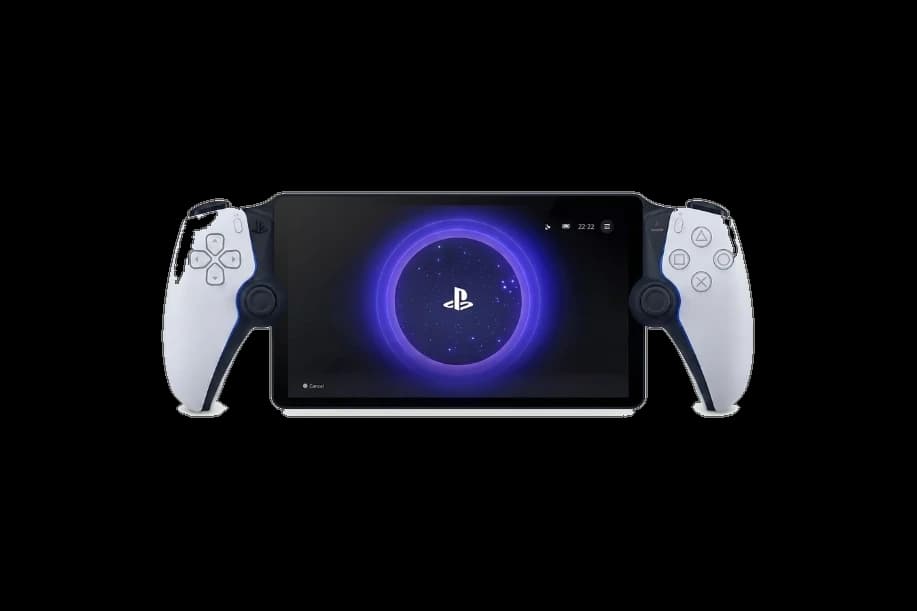
Understand the Portal's DualSense-derived hardware
The Portal streams only from a PS5 and has no PC connection mode, so browser testers can't read its inputs directly. To diagnose stick drift or trigger issues, test a paired DualSense on PC — the Portal shares the same stick and trigger hardware family.
PlayStation Portal hardware specifications
| Specification | PlayStation Portal |
|---|---|
| Connection | Proprietary Wireless, USB-C |
| Button count | 14 |
| Analog stick type | Potentiometer (susceptible to drift) |
| Gyroscope | Yes |
| Rumble / haptics | Haptic (voice-coil / LRA) |
| Impulse triggers | No |
| Adaptive triggers | Yes |
| Touchpad | No |
| Built-in microphone | Yes |
| Built-in speaker | Yes |
| Back paddles | No |
| Battery life | ~8 hours |
| Weight | 529 g |
| Release year | 2023 |
| MSRP | $199.99 USD |
Recommended tests for PlayStation Portal
Each test runs in your browser via the Gamepad API — no install, no account, no upload. Run any individually, or use the full benchmark above.
Known PlayStation Portal issues
Recurring problems users report with this controller, ranked by frequency. Each links to a step-by-step fix guide.
- Occasional
Stick drift over time (potentiometer modules)
The Portal uses the same potentiometer stick modules as the standard DualSense, which can develop drift with extended use. The same drift-diagnosis and recalibration steps apply.
View fix guide - Common
Wi-Fi streaming latency and disconnects
Because the Portal streams entirely over Wi-Fi, weak or congested networks cause input lag and dropouts. This is a network condition rather than a controller fault, but it directly affects how responsive the controls feel.
View fix guide - Rare
Adaptive trigger or haptic inconsistency
Haptic feedback and adaptive triggers only work in games that support them and over a stable stream. Missing effects are usually a game-support or streaming-quality issue rather than hardware failure.
View fix guide
How to set up the PlayStation Portal
Get your controller connected before running diagnostics — wired or wireless, mobile or desktop.
Link to your PS5
Sign in to the same PlayStation Network account on both your PS5 and the Portal. The Portal pairs to one PS5 at a time over your home Wi-Fi — there is no Bluetooth or PC pairing.
Enable Remote Play on the PS5
On the PS5, go to Settings, System, Remote Play, and turn on Enable Remote Play. Set the console to rest mode with networked features enabled so the Portal can wake and stream it.
Connect over Wi-Fi
Power on the Portal and select your PS5 from the device list. For the lowest latency, use a strong 5GHz Wi-Fi network; streaming over weak or congested networks introduces noticeable input lag.
PlayStation Portal vs the competition
Head-to-head reviews against the other controllers most buyers cross-shop.
- vs
PS5 DualSense
The Portal is a streaming handheld, not a controller — but it inherits the DualSense's haptics, adaptive triggers, and potentiometer sticks. A standard DualSense is what you'd actually test on PC.
- vs
DualSense Edge
The Edge is a premium controller with swappable sticks and back buttons; the Portal is a remote player. They serve completely different purposes despite sharing a control scheme.
PlayStation Portal definitions
Plain-language definitions for the terms used on this page. Each links to the full glossary entry with thresholds, mechanism, and FAQs.
PlayStation Portal questions
Not directly. The Portal only streams from a PS5 over Wi-Fi and has no PC or Bluetooth connection mode, so browser-based testers can't read its inputs. To diagnose stick drift, dead zones, or trigger issues, test a standard DualSense controller on a PC instead — the Portal uses the same stick and trigger hardware family, so the results are representative of what's inside the Portal.
No. The Portal uses the same potentiometer stick modules as the standard DualSense controller. Sony has not adopted Hall-effect or TMR sticks in its first-party hardware, including the Portal. This means the Portal carries the same long-term drift risk as a DualSense, since potentiometer sticks wear with use. There's no built-in way to swap to drift-resistant sticks on the Portal.
Yes, in supported games. The Portal carries over the DualSense's two signature features: voice-coil haptic feedback and resistance-based adaptive triggers. These only activate when the streamed game supports them and when your Wi-Fi connection is stable enough to carry the data. On a weak network, you may notice these effects drop out even in supported titles.
The Portal streams every frame and input over Wi-Fi between your PS5 and the device, so its responsiveness depends entirely on your network. On a strong 5GHz connection the lag is minimal, but weak signal, distance from the router, or network congestion add noticeable input delay. This is a streaming-latency issue rather than a controller fault — the controls themselves are responsive; the network round-trip is the variable.
No. The Portal is a remote player, not a standalone console or handheld. It has no internal game storage or processing for games — it streams from a PS5 you own over your home Wi-Fi, or in some regions from PS Plus cloud streaming. Without an active PS5 (or eligible cloud service) and a network connection, it can't run games. It's an accessory to a PS5, not a replacement for one.
It can, because it uses the same potentiometer stick modules. Drift develops when the contact-based sensor wears and starts reporting movement at rest. The Portal isn't immune to this — the same conditions that cause DualSense drift apply. If you notice unintended movement, the cause is the stick hardware, and the same recalibration and repair approaches as the DualSense are relevant, though the Portal is harder to service.
The Portal connects to your PS5 exclusively over Wi-Fi for remote play — there's no Bluetooth pairing to other devices and no wired controller mode to a PC. It has a USB-C port, but that's for charging (and audio with compatible accessories), not for connecting as a controller. This Wi-Fi-only design is why its performance is tied to network quality and why it can't be tested as a standard gamepad.
Get a full health report for your PlayStation Portal
Run the Controller Benchmark to score every subsystem and generate a shareable Controller Health Score graded S through F.
Run the Benchmark