Switch Pro Controller Test
The Switch Pro Controller test runs a full diagnostic on Nintendo's flagship pad in the browser — checking analog sticks for drift, the B A Y X face buttons, true 8-way D-pad, HD Rumble motors, gyroscope, and triggers. Connect over USB-C or Bluetooth, press any button, and get a Controller Health Score graded S through F.
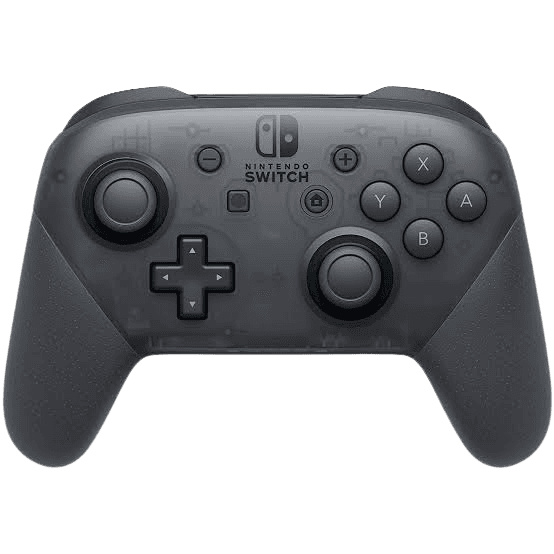
Full Switch Pro diagnostic
The Controller Benchmark runs every relevant subsystem on your Switch Pro — drift, deadzone, button response (B A Y X as labeled), 8-way D-pad, HD Rumble, gyroscope, and latency — then produces a composite Controller Health Score. Works the same whether you connect to a Switch, PC, Steam Deck, or phone.
Switch Pro Controller hardware specifications
| Specification | Switch Pro Controller |
|---|---|
| Connection | USB-C, Bluetooth |
| Button count | 18 |
| Analog stick type | Potentiometer (susceptible to drift) |
| Gyroscope | Yes |
| Rumble / haptics | Haptic (voice-coil / LRA) |
| Impulse triggers | No |
| Adaptive triggers | No |
| Touchpad | No |
| Built-in microphone | No |
| Built-in speaker | No |
| Back paddles | No |
| Battery life | ~40 hours |
| Weight | 246 g |
| Release year | 2017 |
| MSRP | $69.99 USD |
Recommended tests for Switch Pro Controller
Each test runs in your browser via the Gamepad API — no install, no account, no upload. Run any individually, or use the full benchmark above.
Stick Drift Test
Detect unwanted analog input at rest
Deadzone Test
Measure your stick’s deadzone radius
Button Test
Check every button responds instantly
Circularity Test
Visualize stick travel as a circle
Gyro Test
Test 6-axis motion sensors
Vibration Test
Test both rumble motors independently
Latency Test
Measure input lag in milliseconds
Polling Rate
Measure inputs reported per second
Known Switch Pro Controller issues
Recurring problems users report with this controller, ranked by frequency. Each links to a step-by-step fix guide.
- Common
Stick drift on left analog
The Pro Controller uses different stick modules than Joy-Cons but is not immune to drift. Failure typically develops 18–24 months into regular use — later than Joy-Cons or DualSense, but on the same root-cause failure curve (potentiometer wear).
View fix guide - Occasional
Won't pair with PC over Bluetooth
Windows occasionally fails to recognize the Pro Controller because Nintendo uses a non-standard Bluetooth HID descriptor. The controller appears in pairing but fails to bind. Steam Input handles it cleanly; raw Windows pairing is more fragile.
View fix guide - Rare
D-pad register direction wrong
Some Pro Controllers develop an issue where diagonal D-pad inputs register as the wrong cardinal direction (e.g. up-left reads as just up). Visible in the button test as a missing diagonal in the 8-direction grid.
View fix guide - Occasional
Charges very slowly over USB-C
The Pro Controller charges at only 1A regardless of charger output, leading to 4–6 hour charge times from empty. Not a defect — Nintendo's spec — but often perceived as a charging fault.
View fix guide - Occasional
Gyro drift after long sessions
Gyro readings drift over multi-hour sessions, particularly in motion-aim games. Place the controller flat and stationary and run the gyro test — readings should hover near zero on all axes. Nintendo's official fix is to recalibrate via the Switch system menu.
View fix guide
How to pair the Switch Pro Controller
Get your controller connected before running diagnostics — wired or wireless, mobile or desktop.
Power off the controller
If a Home button LED is lit, the controller is on. To force-off before pairing, disconnect from any current host or hold the small Sync button on the top edge for 5 seconds.
Press the Sync button
On the top edge of the controller, between the L and R triggers, press the small Sync button. The four player-indicator LEDs on the front start scrolling — that's pairing mode.
Open your device's Bluetooth menu
Windows: Settings → Bluetooth & devices → Add device → Bluetooth. macOS: System Settings → Bluetooth. Steam Deck: Settings → Bluetooth. The controller appears as "Pro Controller".
Select Pro Controller
Tap or click the entry. The LED scrolling stops once paired, and a single player-indicator LED stays on showing which player slot you've taken (LED 1 by default on PC).
Press any button to confirm in the browser
Browsers gate gamepad access behind a user gesture. Press any button to expose the controller to the Gamepad API. Face buttons are labeled B A Y X as printed on the hardware.
Switch Pro Controller vs the competition
Head-to-head reviews against the other controllers most buyers cross-shop.
- vs
Joy-Cons (pair)
Joy-Cons split for two-player or motion games; Pro Controller is one ergonomic unit with a real D-pad and longer battery.
- vs
8BitDo Ultimate
8BitDo Ultimate is fully drift-resistant (Hall-effect sticks) and Switch-compatible — often the smarter buy for Switch-only users.
- vs
Switch 2 Pro Controller
Switch 2 Pro adds C button (chat), refined sticks, and a 3.5mm headphone jack. Original Pro still works on Switch 2 via backwards compatibility.
Switch Pro Controller questions
Physical positions are identical to Xbox (right thumb cluster, bottom-right-top-left layout), but Nintendo labels them differently. The bottom button is B (Xbox's A position), the right is A (Xbox's B), the top is X (same as Xbox), and the left is Y (same as Xbox). The button test labels each as printed on the hardware.
No. Nintendo continues to use potentiometer-based stick modules in the Pro Controller, the original Joy-Cons, and the Switch 2 Pro. Some aftermarket modders sell Hall-effect replacement sticks for the Pro Controller, but installation requires soldering and voids the warranty.
Yes — the vibration test triggers both internal voice-coil actuators. HD Rumble is more nuanced than standard ERM rumble (similar in principle to DualSense haptics) but the browser only sends basic vibration commands, not the rich waveforms Nintendo's first-party games use.
The Pro Controller uses a true 8-direction D-pad with eight independent dome switches, not the 4-segment cross most controllers use. If a single switch fails, you lose either a cardinal direction or a diagonal. The button test shows missing inputs as gaps in the 8-direction grid.
Yes through Steam Input (Steam handles it cleanly) and through native Windows pairing on Windows 10/11 (with occasional quirks — see known issues). The Gamepad API recognizes it on all major browsers. Outside Steam, some games may need a third-party tool like BetterJoy for full feature support.
Yes. The Pro Controller exposes its gyroscope through the Gamepad API extensions. The gyro test reads pitch, yaw, and roll in real time, plus accelerometer data when the controller is moved. Useful for catching gyro drift after long Splatoon sessions before it ruins your aim.
Older macOS versions don't recognize Nintendo's Bluetooth HID descriptor and refuse to pair. macOS Sonoma (14) and newer handle the Pro Controller natively. For older Macs, third-party tools like Joystick Mapper or Enjoyable can bridge the gap.
Nintendo specifies up to 40 hours on a full charge — among the longest-lasting first-party controllers thanks to no lightbar, no speaker, and conservative HD Rumble usage. Real-world battery life with mixed rumble runs 25–35 hours. Charging takes 4–6 hours via the slower 1A USB-C rate.
Get a full health report for your Switch Pro Controller
Run the Controller Benchmark to score every subsystem and generate a shareable Controller Health Score graded S through F.
Run the Benchmark