PlayStation Vita Controls Test
The PlayStation Vita controls guide covers Sony's 2011 handheld — the only PlayStation portable with dual analog sticks. Its small sticks are a known drift point worth checking. Because the Vita is a console, not a plug-in controller, this page explains what's testable on-device and how its controls compare to standard gamepads.
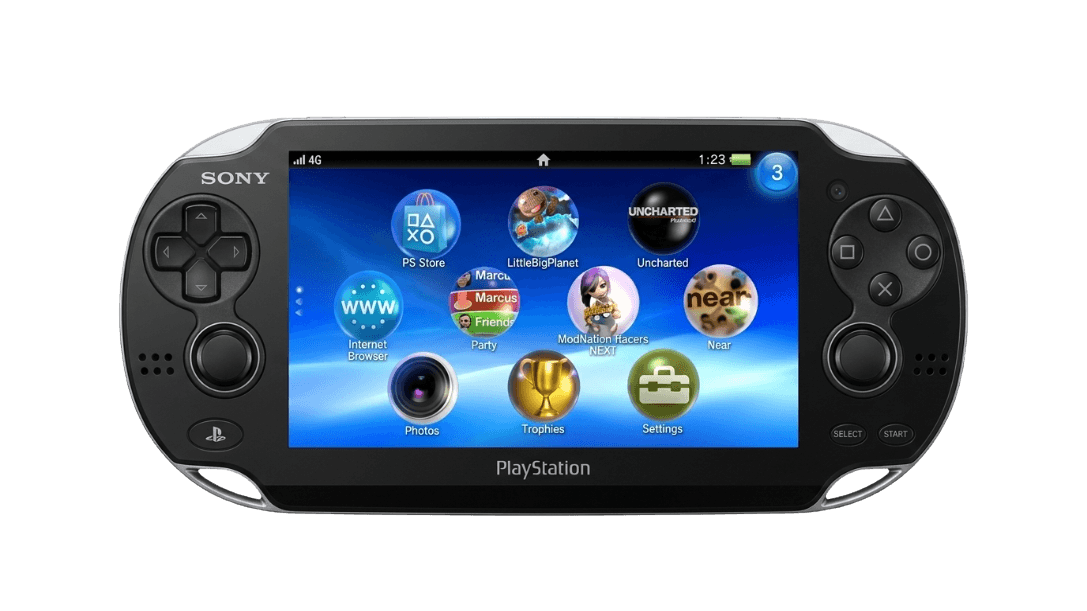
Understand your PS Vita controls
The Vita is a handheld console, so it doesn't plug into a PC as a controller the way a gamepad does — a browser Gamepad-API test isn't the right tool here. What matters for Vita owners is the health of the control hardware itself, especially the small analog sticks, which can develop drift with age. This page covers what to check on-device and how the Vita's controls stack up against standard pads.
PlayStation Vita hardware specifications
| Specification | PlayStation Vita |
|---|---|
| Connection | Bluetooth |
| Button count | 15 |
| Analog stick type | Potentiometer (susceptible to drift) |
| Gyroscope | Yes |
| Rumble / haptics | None |
| Impulse triggers | No |
| Adaptive triggers | No |
| Touchpad | Yes |
| Built-in microphone | Yes |
| Built-in speaker | Yes |
| Back paddles | No |
| Battery life | ~5 hours |
| Weight | 260 g |
| Release year | 2011 |
| MSRP | $249.99 USD |
Recommended tests for PlayStation Vita
Each test runs in your browser via the Gamepad API — no install, no account, no upload. Run any individually, or use the full benchmark above.
Known PlayStation Vita notes
Recurring problems users report with this controller, ranked by frequency. Each links to a step-by-step fix guide.
- Common
Small analog sticks develop drift with age
The Vita's compact analog sticks are a known wear point. After years of use they can drift or lose centering. On-device calibration is limited, so persistent drift usually means the stick module needs cleaning or replacement — a common repair for retro Vita owners.
View fix guide - Common
It's a console, not a plug-in controller
The Vita can't be connected to a PC and read as a gamepad through the browser Gamepad API — it has no controller-out mode. Testing its controls happens on-device or, for the homebrew community, through Vita software. This page is about understanding the hardware, not plugging it in.
View fix guide - Occasional
Rear touchpad inputs feel inconsistent
The rear touchpad is used by some games for movement or actions and can feel imprecise or accidentally triggered when gripping the device. This is a design characteristic; games that rely heavily on it (like Tearaway) are the ones where it matters most.
View fix guide
How to using it the PlayStation Vita
Get your controller connected before running diagnostics — wired or wireless, mobile or desktop.
It's used on-device
The Vita is a self-contained handheld — its controls are used directly on the unit. There's no pairing to a host console or PC for controller input.
Bluetooth is for accessories
The Vita's Bluetooth 2.1 connects audio accessories and supports some peripherals, not controller-output to another machine.
Remote Play uses it as a screen, not a pad
With PS4 Remote Play, the Vita streams and controls a PS4 over Wi-Fi — but it acts as a remote client, not as a USB/Bluetooth gamepad for the PC browser tester.
Check controls on-device
To assess stick drift or button wear, use the Vita's own menus and games. For homebrew owners, Vita test software can read raw stick and button values directly on the hardware.
PlayStation Vita vs the competition
Head-to-head reviews against the other controllers most buyers cross-shop.
- vs
PlayStation Portal
The PS Portal is Sony's modern Remote Play handheld with full DualSense controls; the Vita was a standalone handheld console with its own game library and the only PlayStation portable with dual sticks.
- vs
PS4 DualShock 4
The DualShock 4 is the standard PS4 pad with a touchpad and full-size sticks; the Vita packs similar controls into a handheld, with smaller sticks and both a front touchscreen and rear touchpad.
- vs
Switch Pro Controller
A handheld-versus-controller comparison: the Vita's integrated controls versus Nintendo's dedicated Switch gamepad, useful for retro players weighing portable input options.
PlayStation Vita definitions
Plain-language definitions for the terms used on this page. Each links to the full glossary entry with thresholds, mechanism, and FAQs.
PlayStation Vita questions
Not as a standard gamepad. The Vita is a handheld console with no controller-output mode, so it won't appear to a PC's browser Gamepad API. It can act as a Remote Play client for a PS4, but that streams a game rather than acting as a USB/Bluetooth controller.
The Vita's small analog sticks use compact potentiometer modules that wear over years of use, leading to drift or off-center input. On-device calibration is limited, so a drifting Vita usually needs the stick module cleaned or replaced.
Yes — it was the only PlayStation handheld with dual analog sticks, a major upgrade over the single-stick PSP. This made console-style shooters and action games far more playable on the go.
The original PCH-1000 has a 5-inch OLED screen; the later PCH-2000 'Slim' switched to an LCD and is lighter with longer battery life. The controls are the same between them.
Yes. It has a six-axis motion system (three-axis gyroscope plus three-axis accelerometer) and a three-axis electronic compass, used for tilt-based aiming and motion gameplay in supported titles.
The Vita has a touch-sensitive panel on its back, used by some games for movement, actions, or unique mechanics — Tearaway and Gravity Rush are notable examples. It complements the front capacitive touchscreen.
No. The Vita handheld has no rumble motors — vibration feedback isn't part of its control set, unlike Sony's home-console DualShock and DualSense controllers.
Get a full health report for your PlayStation Vita
Run the Controller Benchmark to score every subsystem and generate a shareable Controller Health Score graded S through F.
Run the Benchmark