Sony Access Controller Input Test
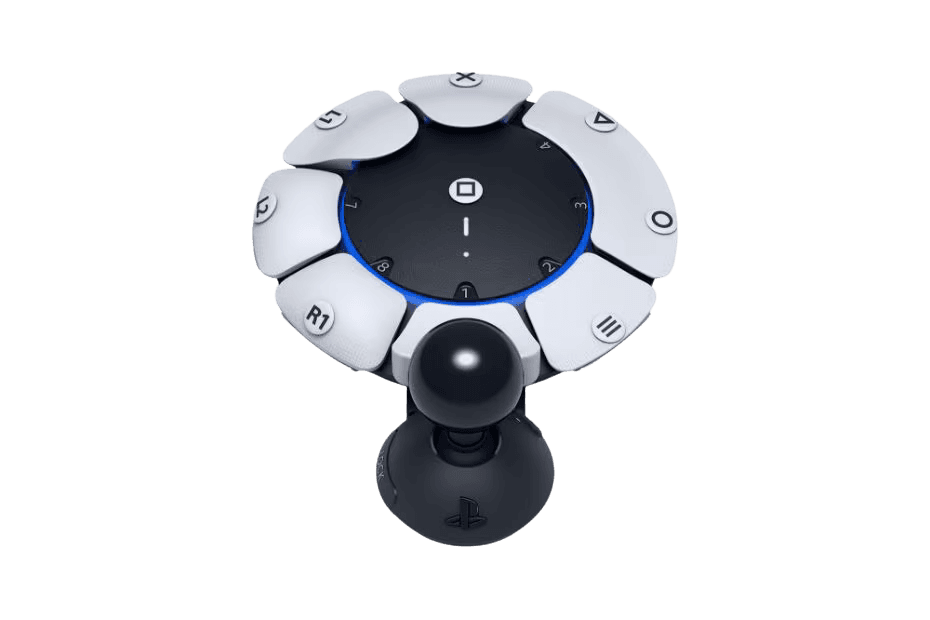
The Sony Access Controller test checks that every input on Sony's PS5 accessibility kit registers correctly in your browser — the eight large remappable buttons, the swappable analog stick, and any switches connected to the four 3.5mm AUX ports. Connect over USB-C or Bluetooth, press each input, and confirm your custom layout works before you game.
Verify every Access Controller input
The button test reads each input the Access Controller sends and lights it up on screen — ideal for confirming a remapped or AUX-expanded layout registers correctly. Press each large button, move the analog stick, and trigger any external switches plugged into the 3.5mm ports. Anything that lights up is being seen by the system; anything that doesn't needs a remap or reseat.
Sony Access Controller hardware specifications
| Specification | Sony Access Controller |
|---|---|
| Connection | USB-C, Bluetooth |
| Button count | 8 |
| Analog stick type | Potentiometer (susceptible to drift) |
| Gyroscope | No |
| Rumble / haptics | None |
| Impulse triggers | No |
| Adaptive triggers | No |
| Touchpad | No |
| Built-in microphone | No |
| Built-in speaker | No |
| Back paddles | No |
| Battery life | ~12 hours |
| Weight | 322 g |
| Release year | 2023 |
| MSRP | $89.99 USD |
Recommended tests for Sony Access Controller
Each test runs in your browser via the Gamepad API — no install, no account, no upload. Run any individually, or use the full benchmark above.
Known Sony Access Controller notes
Recurring problems users report with this controller, ranked by frequency. Each links to a step-by-step fix guide.
- Occasional
AUX-port switch not registering
Each of the four 3.5mm AUX ports must be mapped to a function in the PS5's Accessibility settings before a connected switch does anything. A switch that seems dead is usually unmapped, not faulty — open Settings → Accessibility → Controllers → Access Controller and assign the port. The button test confirms whether the input reaches the system once mapped.
View fix guide - Occasional
Two Access Controllers / Access + DualSense not linking
The Access Controller can be paired with a second Access Controller or a DualSense to act as a single combined controller, letting two people or two hands share inputs. If they aren't combining, both must be assigned to the same player profile in the PS5 controller settings — pairing alone isn't enough.
View fix guide - Rare
Stick cap or button cap feels loose
The swappable button caps and analog stick caps are designed for tool-free changes and can occasionally seat loosely after frequent swapping. Press the cap firmly until it clicks fully into the radial slot; a loose cap can cause intermittent or missed inputs.
View fix guide
How to set up the Sony Access Controller
Get your controller connected before running diagnostics — wired or wireless, mobile or desktop.
Connect over USB-C first
Plug the Access Controller into the PS5 with a USB-C cable for initial setup. The PS5 recognizes it automatically and walks you through assigning it to a player profile.
Set up your layout in Accessibility settings
Go to Settings → Accessibility → Controllers → Access Controller. Here you assign each of the eight buttons, the analog stick, and the four AUX ports to PS5 functions, and save up to multiple control profiles you can switch between.
Pair over Bluetooth for wireless use
Once set up, hold the device's pairing control to make it discoverable, then pair it in the PS5 Bluetooth menu. The controller remembers your saved profiles wirelessly.
Press any input to confirm in the browser
Browsers gate gamepad access behind a user gesture. Connect the Access Controller over USB-C, press any mapped button to expose it to the Gamepad API, then verify each input on the page. Note: AUX-port switches register as whatever PS5 function they're mapped to.
Sony Access Controller vs the competition
Head-to-head reviews against the other controllers most buyers cross-shop.
- vs
Xbox Adaptive Controller
The Xbox Adaptive Controller is primarily a hub for external switches; the Access Controller works standalone out of the box with on-device buttons and a stick, while still supporting AUX expansion.
- vs
Xbox Adaptive Joystick
The Xbox Adaptive Joystick is a single-stick add-on for the Xbox accessibility ecosystem; the Access Controller is a complete standalone PS5 kit with buttons, a stick, and four expansion ports.
- vs
PS5 DualSense
The DualSense is the standard PS5 gamepad; the Access Controller trades haptics and adaptive triggers for a flat, surface-resting, fully remappable layout built for players with motor disabilities.
Sony Access Controller definitions
Plain-language definitions for the terms used on this page. Each links to the full glossary entry with thresholds, mechanism, and FAQs.
Sony Access Controller questions
It's Sony's official PS5 accessibility controller kit, launched in December 2023. Codenamed Project Leonardo during development, it's a circular, flat device that rests on a table, lap, or wheelchair tray, with large swappable buttons, one swappable analog stick, and four 3.5mm ports for external switches — designed for players with limited mobility.
The Xbox Adaptive Controller is mainly a hub: it has two large buttons but is built to connect external switches and accessories. The Access Controller is a complete standalone device that works out of the box with eight remappable buttons and an analog stick, while still offering four AUX ports for expansion.
Yes. The Access Controller has four 3.5mm AUX ports that accept industry-standard accessibility switches, specialty triggers, and external analog sticks. Each port is mapped to a PS5 function in the Accessibility settings, so you can build a layout around whatever inputs work best for you.
Yes. Two Access Controllers can be combined to act as a single controller, or one Access Controller can be paired with a DualSense. This lets two people share control of one character, or one player spread inputs across two devices — both assigned to the same player profile.
The Access Controller is designed for the PS5 and its accessibility software. It can be detected on PC over USB as a generic input device for basic testing, but its full remapping and profile features live in the PS5 system software, so PC functionality is limited.
After building a custom layout — remapped buttons, AUX switches, a chosen stick cap — it helps to confirm every input actually registers before a long session. The browser button test lights up each input the controller sends, so you can catch an unmapped port or a loose cap quickly.
Extensively. You can swap button caps and stick caps, reposition inputs radially, remap every button and port, adjust the analog stick orientation, and save multiple profiles to switch between. The kit is built so a layout can be tailored to an individual's specific range of motion.
Get a full health report for your Sony Access Controller
Run the Controller Benchmark to score every subsystem and generate a shareable Controller Health Score graded S through F.
Run the Benchmark