Qanba Obsidian 2 Fightstick Test
The Qanba Obsidian 2 test verifies this Sony-licensed Sanwa arcade fightstick in your browser — confirming all eight OBSF-30 pushbuttons register, every JLF lever direction fires through the square gate, and input latency stays tournament-low. Connect over USB, set the PS5/PS4/PC input switch, press any button, and check every input on the panel.
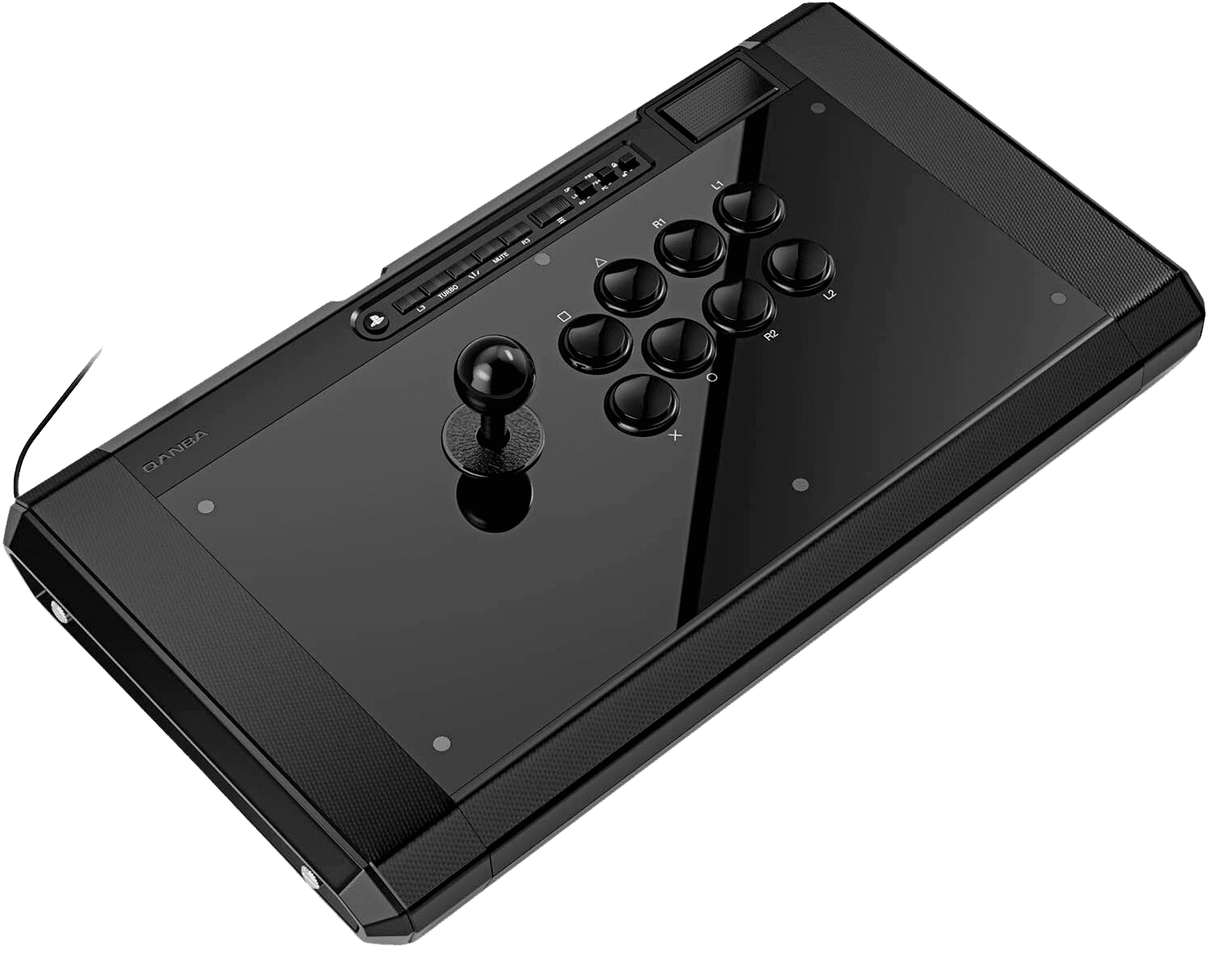
Qanba Obsidian 2 button & lever check
On a fightstick, the tests that matter are button response, lever direction coverage, and latency — not stick drift or deadzone (the JLF is a digital lever with no analog sensor). Run the Button Test to confirm all eight Sanwa OBSF-30 buttons and all four lever microswitches register cleanly, then the Latency Test to verify tournament-grade input lag over the wired connection.
Qanba Obsidian 2 hardware specifications
| Specification | Qanba Obsidian 2 |
|---|---|
| Connection | USB-C |
| Button count | 8 |
| Analog stick type | Potentiometer (susceptible to drift) |
| Gyroscope | No |
| Rumble / haptics | None |
| Impulse triggers | No |
| Adaptive triggers | No |
| Touchpad | Yes |
| Built-in microphone | No |
| Built-in speaker | No |
| Back paddles | No |
| Battery life | ~0 hours |
| Weight | 3350 g |
| Release year | 2023 |
| MSRP | $249.99 USD |
Recommended tests for Qanba Obsidian 2
Each test runs in your browser via the Gamepad API — no install, no account, no upload. Run any individually, or use the full benchmark above.
Known Qanba Obsidian 2 issues
Recurring problems users report with this controller, ranked by frequency. Each links to a step-by-step fix guide.
- Common
No analog sticks — drift/deadzone tests don't apply
The Obsidian 2 uses a digital Sanwa JLF lever (four microswitches, square restrictor gate), not analog thumbsticks. Stick-drift, deadzone, and circularity tests are meaningless here — what matters is that each lever direction and each of the eight Sanwa buttons registers in the button test.
View fix guide - Common
Wired-only, no wireless or rumble
This is a wired tournament stick — there's no Bluetooth, no 2.4G, and no rumble motors. Use the input switch to select PS5, PS4, or PC. If it isn't detected, reseat the USB cable (stored in the left side compartment) and confirm the input mode matches your platform.
View fix guide - Occasional
PS5 native compatibility is game-dependent
As a Sony-licensed stick it works on PS5, but some PS5 titles only accept fightstick input within supported games; outside those, PS5 may limit functionality. This is a platform policy, not a fault with the stick.
View fix guide
How to connect the Qanba Obsidian 2
Get your controller connected before running diagnostics — wired or wireless, mobile or desktop.
Set the platform input switch
Flip the input switch on the control panel to PS5, PS4, or PC to match your system before plugging in.
Connect the USB cable
Retrieve the USB cable from the left side compartment (thumb-screw access) and plug it into your console or PC. The Obsidian 2 is wired-only — there's no wireless mode.
Engage the tournament lock if needed
Use the tournament lock switch to disable the menu/option buttons during competitive play, preventing accidental pauses mid-match.
Press any button to confirm in the browser
Browsers gate gamepad access behind a user gesture. Press any Sanwa button on the Obsidian 2 to expose it to the Gamepad API, then run the button and latency tests to verify every input.
Qanba Obsidian 2 vs the competition
Head-to-head reviews against the other controllers most buyers cross-shop.
- vs
Qanba Drone 2
The Drone 2 is Qanba's compact budget stick; the Obsidian 2 steps up to full Sanwa Denshi parts, a tournament-grade aluminum-backed panel, swappable lever tops, and a much heavier, more stable chassis.
- vs
Razer Kitsune
The Kitsune is a leverless (all-button) controller; the Obsidian 2 is a traditional lever stick with a Sanwa JLF — the choice comes down to leverless versus classic arcade lever preference.
- vs
Victrix Pro FS
Both are premium Sanwa-equipped tournament sticks; the Victrix Pro FS leans on modular tool-free maintenance, while the Obsidian 2 offers integrated cable/top storage and a larger arm-friendly footprint.
Qanba Obsidian 2 definitions
Plain-language definitions for the terms used on this page. Each links to the full glossary entry with thresholds, mechanism, and FAQs.
Qanba Obsidian 2 questions
Neither — it's an arcade fightstick with a digital Sanwa JLF lever (four microswitches, square gate), not an analog thumbstick. There's no drift or deadzone to measure; the lever is either pressing a direction or it isn't.
PS5, PS4, and PC. It's an officially licensed Sony product with an input switch to select your platform. It's wired-only — there's no wireless mode.
Tournament-standard Sanwa Denshi components: a JLF joystick lever and eight OBSF-30 30mm pushbuttons in the Vewlix layout. Both the lever and buttons can be swapped or modded.
Yes. The Sanwa JLF top is interchangeable, and Qanba includes both a ball top and a bat top, stored in the thumb-screw side compartment along with the USB cable.
It disables the menu and option buttons during competitive play so you can't accidentally pause or open a menu mid-match — a standard requirement at sanctioned events.
No. Like all arcade fightsticks, the Obsidian 2 has no rumble motors and no gyro — it's a pure precision input device focused on lever and button response.
Yes — it's built for it. The all-Sanwa parts, aluminum-backed panel (for snappier, deeper-sounding buttons), heavy non-slip 3.35kg chassis, and tournament lock make it a common sight at competitive fighting-game events.
Get a full health report for your Qanba Obsidian 2
Run the Controller Benchmark to score every subsystem and generate a shareable Controller Health Score graded S through F.
Run the Benchmark