Hori Split Pad Pro Controller Test
The Hori Split Pad Pro test checks this wired, handheld-only Switch grip in your browser — verifying its full-size analog sticks, class-leading D-pad, programmable rear triggers, and turbo. Attach it to your Switch rails, press any button, and confirm every input registers. Note it has no rumble or gyro by design — those tests don't apply.
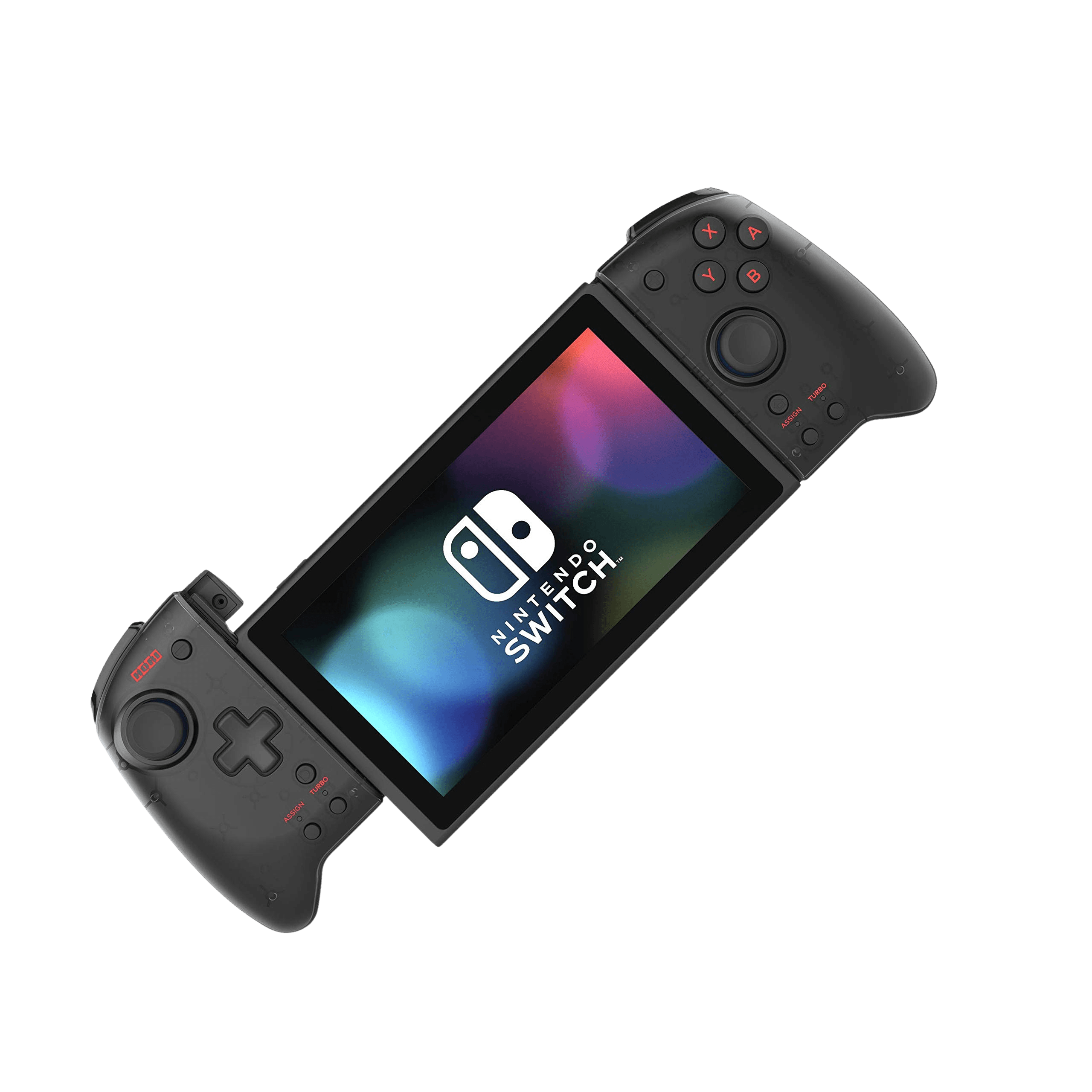
Full Hori Split Pad Pro diagnostic
The Controller Benchmark checks every applicable subsystem on your Split Pad Pro — potentiometer sticks, deadzone, circularity, button response, trigger range, rear triggers, latency, and connection stability — then produces a composite Controller Health Score. Rumble and gyro are skipped because this controller doesn't have them; run the stick-drift test periodically since the sticks are potentiometer-based.
Hori Split Pad Pro hardware specifications
| Specification | Hori Split Pad Pro |
|---|---|
| Connection | USB-C |
| Button count | 16 |
| Analog stick type | Potentiometer (susceptible to drift) |
| Gyroscope | No |
| Rumble / haptics | None |
| Impulse triggers | No |
| Adaptive triggers | No |
| Touchpad | No |
| Built-in microphone | No |
| Built-in speaker | No |
| Back paddles | Yes |
| Battery life | ~0 hours |
| Weight | 200 g |
| Release year | 2019 |
| MSRP | $49.99 USD |
Recommended tests for Hori Split Pad Pro
Each test runs in your browser via the Gamepad API — no install, no account, no upload. Run any individually, or use the full benchmark above.
Known Hori Split Pad Pro issues
Recurring problems users report with this controller, ranked by frequency. Each links to a step-by-step fix guide.
- Common
No rumble, gyro, NFC, or IR — by design
The Split Pad Pro deliberately omits HD Rumble, gyro/motion controls, amiibo NFC, and the IR camera to hit its price and comfort goals. This is expected, not a fault — vibration and gyro tests won't register because the hardware isn't there.
View fix guide - Common
Handheld-only and wired — can't be used detached or docked
It works only while attached to the Switch's side rails and is wired through that connector — there's no Bluetooth, no battery, and no detached or docked play. If it isn't detected, reseat both halves fully onto the rails until they click.
View fix guide - Occasional
Sticks are potentiometers — watch for long-term drift
Unlike Hall-effect controllers, the original Split Pad Pro uses potentiometer sticks, which can develop drift after heavy use. Run the stick-drift test periodically; if drift appears, recalibrate in Switch System Settings before considering a replacement.
View fix guide
How to connect the Hori Split Pad Pro
Get your controller connected before running diagnostics — wired or wireless, mobile or desktop.
Attach both halves to the Switch
Slide each half straight down the Switch's side rails until it clicks into place. The Split Pad Pro powers and communicates entirely through the rail connector — there's nothing to charge or pair.
Set turbo and rear triggers if needed
Use the turbo controls to set rapid input at 5, 12, or 20 presses per second, and assign the two programmable rear triggers to whichever inputs suit your game.
Play in handheld mode
The Split Pad Pro only works in handheld mode. You can rest the Switch in a stand to charge while the halves stay attached, but it won't function when the console is docked to a TV.
Press any button to confirm in the browser
If you connect the Switch for testing, browsers gate gamepad access behind a user gesture. Press any button on the Split Pad Pro to expose it to the Gamepad API, then run the button, stick, and latency tests.
Hori Split Pad Pro vs the competition
Head-to-head reviews against the other controllers most buyers cross-shop.
- vs
Mobapad M6 HD
The M6 HD adds the features the Split Pad Pro lacks — Hall sticks, HD rumble, gyro, NFC, and wireless play — at a higher price. The Split Pad Pro counters with a class-leading D-pad and a lower cost for handheld-only players.
- vs
Hori Split Pad Compact
The Split Pad Compact shrinks the design for smaller hands and travel; the Split Pad Pro keeps the larger, more comfortable full-size grip for bigger hands and long sessions.
- vs
Nintendo Joy-Con
The Split Pad Pro trades the Joy-Con's rumble, gyro, NFC, and wireless detachment for a far more comfortable full-size grip, a real D-pad, rear triggers, and turbo — a handheld-comfort upgrade, not a feature-for-feature swap.
Hori Split Pad Pro definitions
Plain-language definitions for the terms used on this page. Each links to the full glossary entry with thresholds, mechanism, and FAQs.
Hori Split Pad Pro questions
No. The Split Pad Pro has no rumble or vibration of any kind, along with no gyro, NFC, or IR camera. Hori dropped these to keep it comfortable and affordable — it's a known trade-off, not a defect.
No. It's wired through the Switch's side rails and works only in handheld mode with both halves attached. There's no battery, no Bluetooth, and no docked or detached play.
No — the original Split Pad Pro uses standard potentiometer sticks, which can drift after heavy use. If you want drift-immune Hall sticks in this form factor, the Mobapad M6 HD is the alternative.
Comfort and controls. It offers full-size analog sticks, one of the best D-pads on any Switch controller, large buttons and triggers, programmable rear triggers, and turbo — a big ergonomic upgrade over Joy-Cons for handheld play.
Turbo lets you set a button to fire automatically at 5, 12, or 20 presses per second. Turbo Hold keeps it firing without holding the button down — handy for arcade shooters and grinding.
Yes. The two rear triggers are programmable, so you can assign frequently used inputs to them for faster access during play.
They can — they're potentiometers. Many owners report years of trouble-free use, but if drift appears, recalibrate in Switch System Settings first. Run the stick-drift test periodically to catch wear early.
Get a full health report for your Hori Split Pad Pro
Run the Controller Benchmark to score every subsystem and generate a shareable Controller Health Score graded S through F.
Run the Benchmark