Razer Wolverine V3 TE Controller Test
The Razer Wolverine V3 Tournament Edition is the wired, half-price version of the V3 Pro, keeping Hall-effect sticks and triggers, Mecha-Tactile buttons, six extra controls, and a 1000Hz PC mode. Run a stick drift and trigger test to confirm its drift-resistant Hall-effect hardware reads clean.
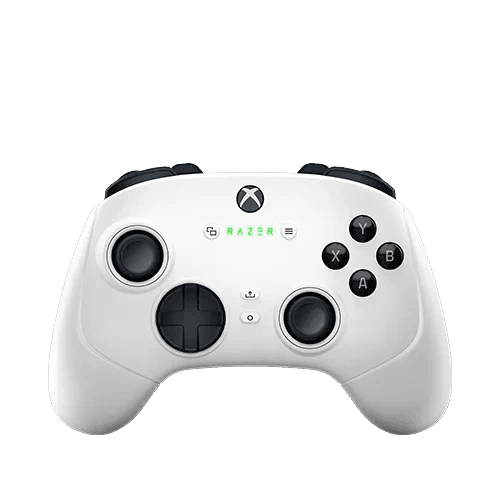
Run a full diagnostic on your Wolverine V3 TE
Hall-effect sticks and triggers should hold near-zero drift. Run the full benchmark to score the V3 TE's sticks, Mecha-Tactile buttons, trigger range, back buttons, and bumpers.
Razer Wolverine V3 TE hardware specifications
| Specification | Razer Wolverine V3 TE |
|---|---|
| Connection | USB-C |
| Button count | 17 |
| Analog stick type | Hall-effect (drift-resistant) |
| Gyroscope | No |
| Rumble / haptics | ERM motors (standard rumble) |
| Impulse triggers | No |
| Adaptive triggers | No |
| Touchpad | No |
| Built-in microphone | No |
| Built-in speaker | No |
| Back paddles | Yes |
| Battery life | Wired (no internal battery) |
| Weight | 252 g |
| Release year | 2024 |
| MSRP | $99.99 USD |
Recommended tests for Razer Wolverine V3 TE
Each test runs in your browser via the Gamepad API — no install, no account, no upload. Run any individually, or use the full benchmark above.
Known Razer Wolverine V3 TE issues
Recurring problems users report with this controller, ranked by frequency. Each links to a step-by-step fix guide.
- Occasional
Reported disconnects and firmware issues
Post-launch user reports describe intermittent disconnects, rumble-related input loss, and in some cases firmware-update problems. Keeping firmware current via the Razer app and using a quality USB port helps; affected units may need RMA.
View fix guide - Common
Wired-only — no wireless option
The V3 TE is wired only over a detachable USB-C cable; there's no Bluetooth or dongle. If it isn't detected, check the cable, the USB-A adapter, and the port rather than looking for wireless pairing.
View fix guide - Rare
Non-removable sticks (unlike the V3 Pro)
To hit its price, the V3 TE uses fixed, non-removable analog sticks where the V3 Pro's are swappable. The sticks are Hall-effect so drift is unlikely, but a damaged stick can't be swapped out the way it can on the Pro.
View fix guide
How to connect the Razer Wolverine V3 TE
Get your controller connected before running diagnostics — wired or wireless, mobile or desktop.
Connect to Xbox
Plug the detachable USB-C cable into the controller and a USB port on your Xbox Series X|S or Xbox One. It's recognized as an officially licensed controller immediately.
Connect to PC and enable Tournament Mode
Plug into a Windows PC over USB-C (a USB-A adapter is included). It registers as a standard XInput controller. Use the Razer Controller App to switch on PC Tournament Mode for a 1000Hz polling rate.
Customize in the Razer app
Use the Razer Controller App (Xbox) or Razer Synapse (PC) to remap the six extra controls — four back buttons and two bumpers — set trigger stops, adjust stick sensitivity and deadzones, and save profiles.
Razer Wolverine V3 TE vs the competition
Head-to-head reviews against the other controllers most buyers cross-shop.
- vs
Razer Wolverine V3 Pro
The V3 Pro adds wireless, removable sticks, a Chroma logo, and a premium case for double the price; the V3 TE keeps the Hall-effect sticks, Mecha-Tactile buttons, and 1000Hz mode for $100.
- vs
Xbox Elite Series 2
The Elite Series 2 is wireless with swappable components but uses potentiometer sticks; the V3 TE is wired only but adds drift-resistant Hall-effect sticks and microswitch back buttons.
Razer Wolverine V3 TE definitions
Plain-language definitions for the terms used on this page. Each links to the full glossary entry with thresholds, mechanism, and FAQs.
Razer Wolverine V3 TE questions
The Tournament Edition is the wired, more affordable version at $99.99, half the V3 Pro's $199.99. It drops wireless connectivity, the lit Chroma logo, removable analog sticks, and the premium carrying case. But it keeps the core pro hardware: Hall-effect sticks and triggers, Mecha-Tactile face buttons, the floating D-pad, six extra controls, and a 1000Hz PC mode. For wired players, the TE delivers most of the Pro's performance for half the cost.
Yes — both the thumbsticks and the triggers use Hall-effect sensing. The contactless magnetic sticks resist drift and offer adjustable sensitivity and deadzones through the Razer app. The Hall-effect triggers pair with mouse-click stops for instant actuation. This drift-resistant hardware is one of the main reasons the V3 TE is recommended over the potentiometer-stick Xbox Elite Series 2 at a similar price.
Mecha-Tactile is Razer's face-button design that combines a microswitch with a cushioned rubber membrane underneath — giving the fast, clicky actuation of a microswitch with a softer feel. The result is quicker inputs that are still comfortable to press repeatedly. It's the same button technology found on the pricier V3 Pro, carried over to the TE, and it's a meaningful upgrade over standard membrane face buttons for fast-input games.
It's a strong performer, but post-launch user reports have flagged reliability concerns on some units — including intermittent disconnects, rumble-related input loss, and occasional firmware-update problems. Many owners have no issues, but the reports are widespread enough to note. Keeping the firmware current through the Razer app and using a quality USB connection helps; if you hit persistent problems, the unit may need a warranty replacement.
Six remappable extra controls: four mouse-click back buttons built into the rubberized handles, plus two claw-grip bumpers above them. The mouse-click actuation gives a fast, tactile feel similar to a gaming mouse. All six are remappable through the Razer app, letting claw-grip players keep their thumbs on the sticks while triggering extra actions — a layout Razer has refined since the original Onza in 2011.
Yes, on PC. When connected wired to a PC, you can enable Tournament Mode through the Razer Controller App to run a 1000Hz polling rate — inputs reported up to 1000 times per second for highly responsive play. On Xbox console it runs at the standard console rate. A polling-rate test on PC confirms the controller is actually reporting at 1000Hz with Tournament Mode active.
Yes. It's officially licensed for Xbox Series X|S and Xbox One and also works on Windows PC over USB-C, registering as a standard XInput controller (a USB-A adapter is included for older ports). It works in Steam, Game Pass, and most PC games automatically. On PC you also get Razer Synapse support and the 1000Hz Tournament Mode, which the console version doesn't offer.
Get a full health report for your Razer Wolverine V3 TE
Run the Controller Benchmark to score every subsystem and generate a shareable Controller Health Score graded S through F.
Run the Benchmark