Thrustmaster eSwap X2 H.E. Controller Test
The Thrustmaster eSwap X2 H.E. is a modular wired controller with Hall-effect H.E.A.R.T. stick modules, hot-swappable sticks, D-pad, and face buttons, four back buttons, and mechanical face buttons. Its Hall-effect sticks resist drift — run a stick drift and trigger test to confirm clean readings across full travel.
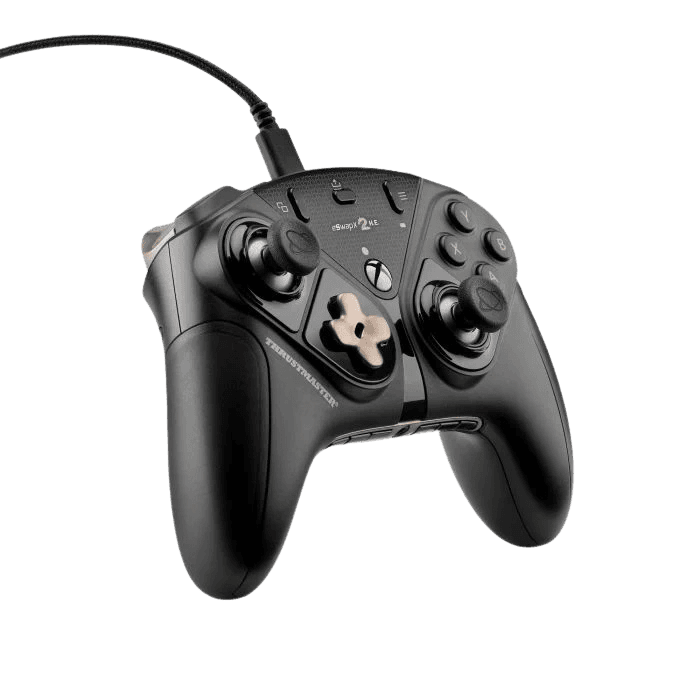
Run a full diagnostic on your eSwap X2 H.E.
The H.E.A.R.T. Hall-effect modules should show near-zero drift. Run the full benchmark to score the eSwap's sticks, mechanical buttons, trigger range, and back buttons before competition.
Thrustmaster eSwap X2 H.E. hardware specifications
| Specification | Thrustmaster eSwap X2 H.E. |
|---|---|
| Connection | USB-C |
| Button count | 15 |
| Analog stick type | Hall-effect (drift-resistant) |
| Gyroscope | No |
| Rumble / haptics | ERM motors (standard rumble) |
| Impulse triggers | No |
| Adaptive triggers | No |
| Touchpad | No |
| Built-in microphone | No |
| Built-in speaker | No |
| Back paddles | Yes |
| Battery life | Wired (no internal battery) |
| Weight | 280 g |
| Release year | 2025 |
| MSRP | $169.99 USD |
Recommended tests for Thrustmaster eSwap X2 H.E.
Each test runs in your browser via the Gamepad API — no install, no account, no upload. Run any individually, or use the full benchmark above.
Known Thrustmaster eSwap X2 H.E. issues
Recurring problems users report with this controller, ranked by frequency. Each links to a step-by-step fix guide.
- Common
Wired-only — no wireless option
The eSwap X2 H.E. is wired only over USB-C; there's no Bluetooth or dongle mode. If it isn't detected, check the detachable cable and USB port rather than looking for wireless pairing.
View fix guide - Occasional
Module swaps require the included tool
Swapping the stick, D-pad, or face-button modules needs the included square screwdriver. A loose or improperly seated module after a swap can cause input issues; reseat it fully and confirm with a button test.
View fix guide - Rare
Mechanical buttons may need break-in
The short-travel mechanical face buttons (0.3mm activation) feel different from membrane buttons and can occasionally register a double input until you adapt to the lighter actuation. A button test confirms clean single registration.
View fix guide
How to connect the Thrustmaster eSwap X2 H.E.
Get your controller connected before running diagnostics — wired or wireless, mobile or desktop.
Connect to Xbox
Plug the detachable USB-C cable into the controller and a USB port on your Xbox Series X|S or Xbox One. It's recognized as an officially licensed controller immediately — no pairing needed.
Connect to PC
Plug into a Windows PC over USB-C. It registers as a standard XInput controller automatically and works in Steam, Game Pass, and other PC titles without drivers.
Customize in THRUSTMAPPERX
Install Thrustmaster's THRUSTMAPPERX software to remap the four back buttons and adjust settings. Module swaps (sticks, D-pad, face buttons) are done physically with the included screwdriver.
Thrustmaster eSwap X2 H.E. vs the competition
Head-to-head reviews against the other controllers most buyers cross-shop.
- vs
Victrix Pro BFG Reloaded
Both are modular pads with swappable parts; the Victrix adds wireless and an included fightpad module, while the eSwap X2 H.E. counters with deeper module options and Hall-effect sticks in the box.
- vs
Xbox Elite Series 2
The Elite Series 2 is wireless and cheaper but uses potentiometer sticks; the eSwap X2 H.E. is wired only but adds drift-resistant Hall-effect sticks and full module swapping.
Thrustmaster eSwap X2 H.E. definitions
Plain-language definitions for the terms used on this page. Each links to the full glossary entry with thresholds, mechanism, and FAQs.
Thrustmaster eSwap X2 H.E. questions
Yes — that's the defining feature of the H.E. version. It ships with Thrustmaster's H.E.A.R.T. Hall-effect stick modules, which use magnetic contactless sensing to eliminate stick drift, with tracking down to a hundredth of a degree. This is the key difference from the standard eSwap X2 Pro, whose S5 NXG mini-sticks are not Hall-effect and remain drift-prone. If you're choosing between the two, the H.E. is the drift-resistant one.
The H.E. (Hall Effect) version includes Thrustmaster's H.E.A.R.T. Hall-effect stick modules in the box, which resist drift. The standard eSwap X2 Pro uses S5 NXG mini-sticks that are not Hall-effect and are prone to the same drift as conventional sticks. Otherwise the two are broadly identical — same modular design, mechanical buttons, and wired connection. At the same or similar price, the H.E. is the better buy for its drift resistance.
No — it's wired only, connecting over a roughly 3-meter detachable USB-C cable. Thrustmaster has kept the eSwap line wired for minimal latency and stable data transmission, which suits competitive play, though some reviewers note a controller at this price point would benefit from a wireless option. Wired does mean zero wireless lag and no battery to manage.
The eSwap line's signature feature is full modularity: you can hot-swap the mini-stick modules, the D-pad module, and the face-button modules using the included square screwdriver. This lets you replace worn parts, change stick heights, or even reposition modules for a symmetric stick layout. It's one of the most repairable and customizable controllers available, since individual modules can be replaced rather than the whole pad.
Yes. The face buttons are mechanical with a very short 0.3mm (0.01 inch) activation travel, giving fast, tactile, clicky presses similar to a gaming mouse rather than the softer feel of membrane buttons. Thrustmaster cites a significant reaction-speed advantage over membrane pads. The short travel takes some adjustment, but it's prized for fast-input games. A button test confirms each registers cleanly.
Yes. It's officially licensed for Xbox Series X|S and Xbox One and also works on Windows PC over USB-C, registering as a standard XInput controller. That means automatic support in Steam, Game Pass, and most PC games. Thrustmaster's THRUSTMAPPERX software, available on PC, handles remapping the four back buttons and adjusting controller settings.
It depends on your priorities. The Elite Series 2 is wireless, cheaper, and includes a case, but uses potentiometer sticks that can drift. The eSwap X2 H.E. is wired only but adds drift-resistant Hall-effect sticks and full module swapping for repairability. If you value drift resistance and the ability to replace individual modules, the eSwap is compelling; if wireless and price matter more, the Elite has the edge.
Get a full health report for your Thrustmaster eSwap X2 H.E.
Run the Controller Benchmark to score every subsystem and generate a shareable Controller Health Score graded S through F.
Run the Benchmark