Xbox Adaptive Joystick Button Test
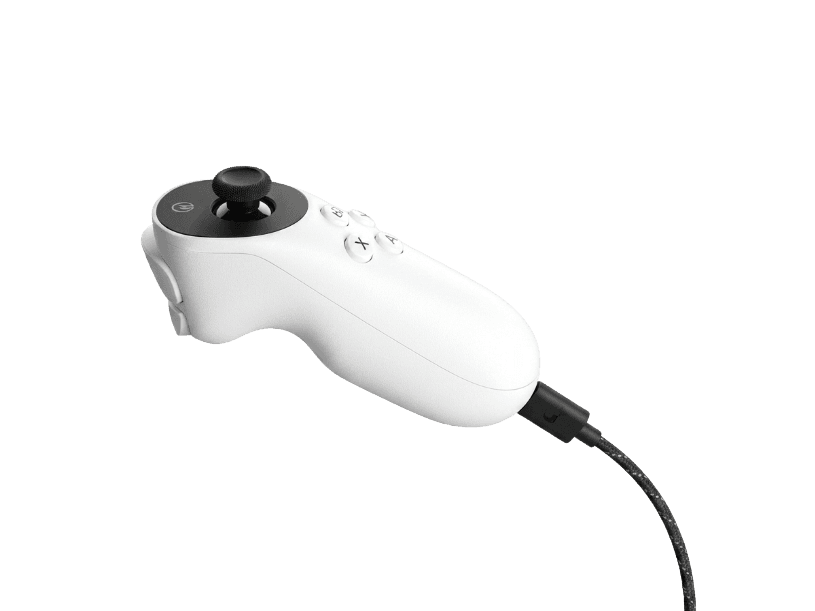
The Xbox Adaptive Joystick (XAJ) is Microsoft's $29.99 wired one-handed accessibility controller, released March 18, 2025. It features one analog stick (clickable) and seven digital buttons — four face buttons below the stick, two back buttons, and the stick-click — designed to be held in either hand or mounted via the 1/4-20" tripod thread. The XAJ works standalone on Xbox Series X|S, Xbox One, and Windows, or as a companion plugged into the Xbox Adaptive Controller. This browser test verifies every input responds correctly.
Verify all 7 buttons + stick respond
The button test runs through all 7 digital buttons on the Xbox Adaptive Joystick — 4 face buttons, 2 back buttons (the bumper-and-trigger pair, both digital), and the stick-click — plus the analog stick's X and Y axes. Each input lights up on press. Useful after first setup, after remapping in the Xbox Accessories app, after connecting to the Xbox Adaptive Controller, or whenever a button feels unresponsive. For caregivers helping someone set up a new XAJ, this is the fastest way to confirm everything works before configuring assistive switches.
Xbox Adaptive Joystick hardware specifications
| Specification | Xbox Adaptive Joystick |
|---|---|
| Connection | USB-C |
| Button count | 7 |
| Analog stick type | Potentiometer (susceptible to drift) |
| Gyroscope | No |
| Rumble / haptics | None |
| Impulse triggers | No |
| Adaptive triggers | No |
| Touchpad | No |
| Built-in microphone | No |
| Built-in speaker | No |
| Back paddles | No |
| Battery life | Wired (no internal battery) |
| Weight | — |
| Release year | 2025 |
| MSRP | $29.99 USD |
Recommended tests for Xbox Adaptive Joystick
Each test runs in your browser via the Gamepad API — no install, no account, no upload. Run any individually, or use the full benchmark above.
Known Xbox Adaptive Joystick considerations
Recurring problems users report with this controller, ranked by frequency. Each links to a step-by-step fix guide.
- Common
No rumble, gyro, or analog triggers — by design
The XAJ omits rumble motors, gyroscope, and analog triggers as deliberate accessibility design choices. Rumble can cause unintended movement and fatigue for users with limited mobility; gyro is impractical for users who use the device mounted rather than held; analog triggers require sustained variable pressure that may be inaccessible. The two back buttons function as digital bumper/trigger inputs only. This is by design, not a defect — but it means the XAJ cannot replace a standard controller for games that require analog trigger pressure (driving games, certain shooters).
View fix guide - Common
Half-controller — needs a partner controller for most games
The XAJ provides 7 buttons and 1 stick, roughly half the inputs of a standard Xbox controller. Many games require both sticks, all 4 face buttons, both shoulder buttons, and both triggers — the XAJ alone can play simpler games, but most modern titles need either a partner controller (via Xbox Controller Assist feature) or a connection to an Xbox Adaptive Controller with additional switches/buttons. Microsoft's design intent is the XAJ as one piece of a customized accessibility setup, not as a standalone gaming solution for every game.
View fix guide - Occasional
Microsoft Store exclusive — limited regional availability
The XAJ is sold exclusively through the Microsoft Store and is not stocked by third-party retailers like Amazon, Best Buy, or GameStop. Availability is also limited in certain regions — Microsoft has launched the XAJ in select markets, and users in unsupported regions may need to import. The $29.99 USD price reflects Microsoft's commitment to keeping accessibility hardware affordable (the original XAC also stayed under $100 by design), but the Store exclusivity adds friction.
View fix guide - Occasional
Wired only — no wireless option
The XAJ uses USB-C wired connection only, with a 9-foot braided USB-A cable included. This is a deliberate choice — wireless adds weight (battery), cost, and pairing complexity that conflict with the accessibility-and-affordability mission. The long cable accommodates mounted positions and seated-distance setups, but if you need wireless one-handed input, the 8BitDo Lite SE for Xbox is the alternative ($59.99, Hall-effect sticks, 2.4G wireless, also accessibility-focused).
View fix guide - Rare
Stick is potentiometer, not Hall-effect
Microsoft has not announced Hall-effect stick technology in the XAJ. Like the standard Xbox Wireless Controller and Elite Series 2, the XAJ uses traditional potentiometer thumbsticks, which can develop drift after extended use. Microsoft does not publish a stick-life rating, but if drift develops on a heavily-used XAJ, options include warranty replacement (within the standard 1-year Microsoft warranty), the Xbox Accessories app's deadzone adjustment, or — for permanent drift — the 8BitDo Lite SE for Xbox alternative which has Hall-effect sticks.
View fix guide
How to set up the Xbox Adaptive Joystick
Get your controller connected before running diagnostics — wired or wireless, mobile or desktop.
Connect the USB-C cable to the joystick
The XAJ has a single USB-C port on the bottom edge. Connect the USB-C end of the included 9-foot braided cable to this port. The cable connects firmly with a slight click — no twist or alignment beyond standard USB-C orientation. The cable can route from a mounted XAJ to a console or PC across a room.
Plug the USB-A end into Xbox console or PC
Connect the USB-A end of the cable to an Xbox Series X|S front USB port, an Xbox One USB port, or any USB-A port on a Windows 10/11 PC. The XAJ is recognized automatically — no driver installation required on Xbox or Windows. On Xbox, the controller is assigned to a player slot the first time you press any button.
(Optional) Plug into an Xbox Adaptive Controller
If using the XAJ as part of a larger accessibility setup, plug the USB-A end into one of the XAC's two USB ports instead of directly into the console. The XAJ will function as the left or right stick input on the XAC (depending on which USB port you use), and the XAC's own face buttons and 3.5mm jacks add additional inputs. This is the most common professional accessibility setup configuration.
Install Xbox Accessories app for remapping (optional)
On Xbox, install the Xbox Accessories app from the Microsoft Store. On Windows, install Xbox Accessories from the Microsoft Store. The app exposes button remapping, stick deadzone adjustment, profile creation (up to 3 profiles per XAJ), and the Xbox Controller Assist pairing feature. The app is not required for basic use — the XAJ works with default mappings out of the box.
Press any button to confirm in the browser
Browsers gate gamepad access behind a user gesture. Press any of the 7 buttons or move the stick to expose the XAJ to the Gamepad API. The button test should immediately register all 4 face buttons, both back buttons, the stick-click, and the analog stick's X/Y axes. If any input fails to register, try a different USB port first — some PC front-panel USB ports have power delivery issues that can affect the XAJ.
Xbox Adaptive Joystick vs the competition
Head-to-head reviews against the other controllers most buyers cross-shop.
- vs
Xbox Adaptive Controller (XAC)
XAC ($99.99) is a large hub controller with 2 big domed buttons, a D-pad, and 19 3.5mm jacks for assistive switches — it's the foundation of an accessibility setup. XAJ ($29.99) is a focused one-handed joystick that plugs INTO the XAC's USB ports OR works standalone. They're complementary, not alternatives — many accessibility setups use both together.
- vs
8BitDo Lite SE 2.4G for Xbox
8BitDo Lite SE for Xbox ($59.99) is a full two-handed controller with Hall-effect sticks, low-resistance buttons, and 2.4G wireless — designed for users who can hold a standard-shape controller but need lighter inputs. XAJ ($29.99) is a one-handed half-controller for users with more limited mobility. Different target users — XAJ for one-handed/mounted use, Lite SE for two-handed-but-low-force use.
- vs
Xbox Wireless Controller
Standard Xbox Wireless Controller ($64.99) is a full two-handed controller with 2 sticks, 4 face buttons, 2 analog triggers, 2 bumpers, rumble, and wireless. XAJ ($29.99) is a one-handed accessibility companion that pairs with the standard controller via Xbox Controller Assist — letting two people contribute inputs to a single player, or one user split inputs across two devices for ergonomic relief.
Xbox Adaptive Joystick definitions
Plain-language definitions for the terms used on this page. Each links to the full glossary entry with thresholds, mechanism, and FAQs.
Xbox Adaptive Joystick questions
The Xbox Adaptive Joystick (XAJ) is Microsoft's $29.99 wired one-handed accessibility controller, released March 18, 2025. It's designed for players with limited mobility — users who cannot comfortably hold a standard two-handed controller, users who need mounted input (for users without functional hand grip), or users who play in non-traditional positions (using feet, mouth, or other body parts). It's designed as a companion to the Xbox Adaptive Controller for full accessibility setups, but works standalone for simpler games.
The XAJ has 7 digital buttons plus 1 clickable analog stick. The button layout is: 4 face buttons below the stick (arranged in the standard ABXY pattern), 2 back buttons (a bumper-and-trigger pair, both digital), and a stick-click. The analog stick provides X and Y axis input. This is roughly half the inputs of a standard Xbox Wireless Controller — by design, since the XAJ is intended for one-handed use.
Yes — the XAJ was designed as a companion to the Xbox Adaptive Controller (XAC). The XAJ's USB-A cable end can plug into one of the XAC's two USB ports, in which case the XAJ becomes the XAC's left or right stick input. The XAC's own face buttons and 19 3.5mm jacks for assistive switches add additional inputs. Many professional accessibility setups configured by SpecialEffect and similar organizations use this XAC+XAJ combination as the foundation.
Yes — the XAJ has a standard 1/4-20" screw thread on the bottom (the same thread used by most camera tripods and arm mounts). This allows mounting to tabletop tripods, Manfrotto Variable Friction Arms (used by SpecialEffect), wheelchair-mounted arms, or any other 1/4-20" compatible mount. The included 9-foot cable accommodates the controller being mounted at a distance from the console or PC.
Both are deliberate accessibility-and-affordability design choices. Rumble motors can cause fatigue and unintended movement for users with limited mobility — many accessibility users disable rumble on standard controllers anyway. Wireless adds battery weight, cost, and pairing complexity that conflict with the $29.99 price point and the goal of mountable, predictable behavior. The 9-foot cable accommodates mounted and remote positioning without wireless.
The XAJ works on Xbox Series X|S, Xbox One, and Windows 10/11 PCs. It is plug-and-play via USB on all three platforms — no driver installation required. It does not work on PlayStation, Nintendo Switch, macOS, iOS, or Android. The XAJ is part of Microsoft's accessibility ecosystem and is licensed for those platforms specifically.
Install the Xbox Accessories app from the Microsoft Store on Xbox or Windows. The app exposes button remapping, stick deadzone adjustment, stick sensitivity curves, and profile creation (up to 3 onboard profiles per XAJ). The XAJ stores profiles in onboard memory, so once configured, you can use it on any compatible Xbox or PC without reconfiguring. The app is free and does not require any subscription.
Xbox Controller Assist is a system-level feature that lets two physical controllers act as a single player. For example, an XAJ + a standard Xbox Wireless Controller can be paired together — one user holds the XAJ (handling the stick and face buttons one-handed), while a caregiver or friend uses the standard controller for triggers and other inputs. Both controllers contribute to the same player slot. Configure this in Xbox Settings → Accessibility → Controller Assist.
Get a full health report for your Xbox Adaptive Joystick
Run the Controller Benchmark to score every subsystem and generate a shareable Controller Health Score graded S through F.
Run the Benchmark