GameSir Tarantula Pro Controller Test
The GameSir Tarantula Pro is a tri-mode multi-platform controller with Mag-Res TMR sticks, Hall-effect triggers, microswitch face buttons, and a mechanical Xbox-to-Switch layout switcher. Its TMR sticks resist drift — run a stick drift and polling-rate test to confirm clean readings and full wireless speed.
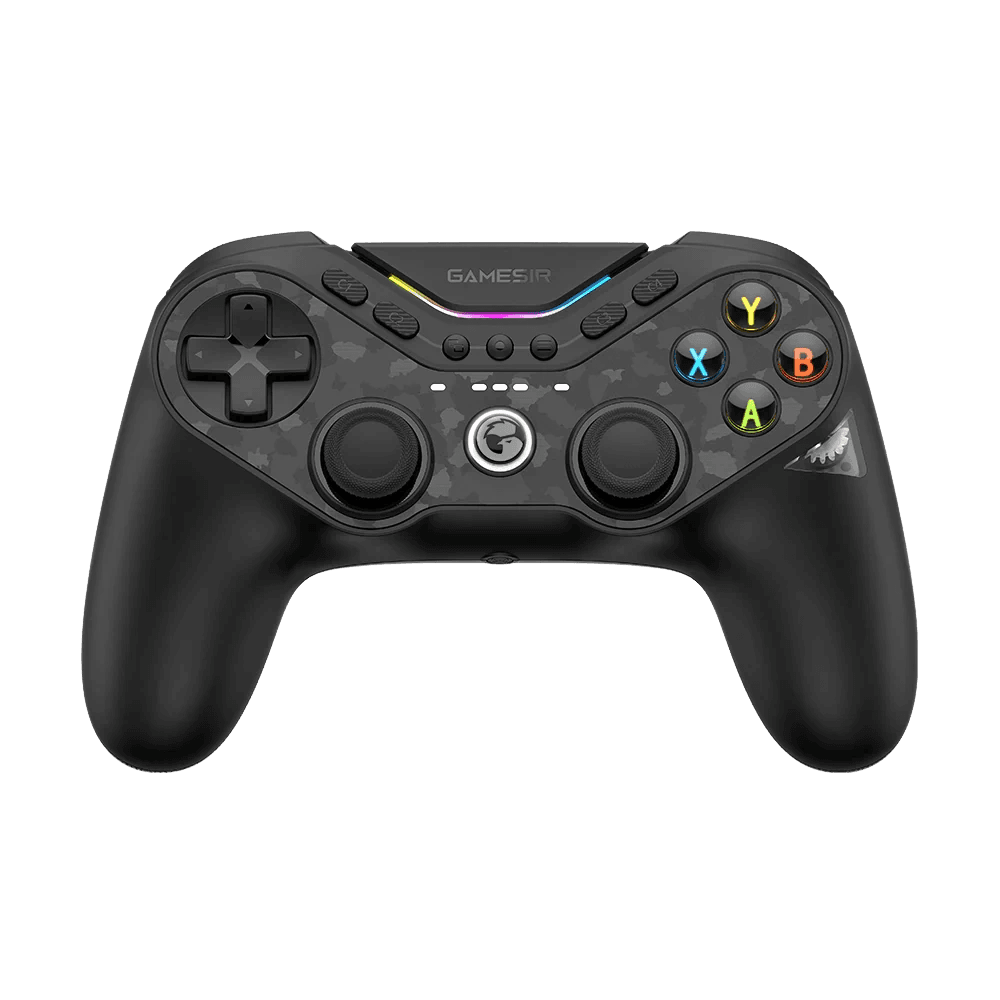
Run a full diagnostic on your Tarantula Pro
TMR sticks should show near-zero drift. Run the full benchmark to score the Tarantula Pro's sticks, microswitch buttons, dual-mode triggers, gyro, and polling rate across its connection modes.
GameSir Tarantula Pro hardware specifications
| Specification | GameSir Tarantula Pro |
|---|---|
| Connection | Bluetooth, 2.4GHz Wireless Dongle, USB-C |
| Button count | 15 |
| Analog stick type | TMR (drift-resistant, low-power) |
| Gyroscope | Yes |
| Rumble / haptics | Haptic (voice-coil / LRA) |
| Impulse triggers | No |
| Adaptive triggers | No |
| Touchpad | No |
| Built-in microphone | No |
| Built-in speaker | No |
| Back paddles | Yes |
| Battery life | ~15 hours |
| Weight | 235 g |
| Release year | 2025 |
| MSRP | $69.99 USD |
Recommended tests for GameSir Tarantula Pro
Each test runs in your browser via the Gamepad API — no install, no account, no upload. Run any individually, or use the full benchmark above.
Known GameSir Tarantula Pro issues
Recurring problems users report with this controller, ranked by frequency. Each links to a step-by-step fix guide.
- Common
Not compatible with Xbox consoles
The wireless Tarantula Pro supports Switch, PC, iOS, Android, and Steam — but not Xbox consoles. If you need Xbox support, GameSir's wired Tarantula Pro for Xbox is the separate SKU; this one won't pair to an Xbox.
View fix guide - Occasional
Bluetooth polling lower than dongle
Like most tri-mode pads, the Tarantula Pro hits its highest polling rate on the 2.4GHz dongle or wired, while Bluetooth runs lower. For the most responsive play, use the dongle; reserve Bluetooth for casual or mobile sessions.
View fix guide - Rare
Lightweight shell feel
Reviewers note the casing feels light, almost cheap, despite strong internals. This is cosmetic and doesn't affect performance, but the microswitch buttons can feel different from membrane; a button test confirms clean single registration.
View fix guide
How to pair the GameSir Tarantula Pro
Get your controller connected before running diagnostics — wired or wireless, mobile or desktop.
2.4GHz dongle (PC / Switch)
Plug the 2.4GHz receiver into a USB port (or the charging dock's built-in port). Power on the controller and it connects automatically at the highest polling rate — the recommended mode for responsive play.
Bluetooth (mobile / Switch / Steam)
Hold the pair button until the LEDs flash, then select the controller in your device's Bluetooth menu. Use the ABXY layout switcher to match Xbox or Switch button positions for the platform you're on.
Wired (PC)
Connect with the USB-C cable for a wired connection and charging. On PC it presents as a standard controller; use GameSir Connect software to remap buttons, set the trigger mode, and adjust RGB and gyro.
GameSir Tarantula Pro vs the competition
Head-to-head reviews against the other controllers most buyers cross-shop.
- vs
GameSir Cyclone 2
Both are tri-mode TMR pads; the Tarantula Pro adds microswitch face buttons, the ABXY layout switcher, and a DualShock-style symmetric layout, while the Cyclone 2 uses an Xbox-style offset layout.
- vs
8BitDo Ultimate 2
The Ultimate 2 uses Hall-effect sticks and a charging dock with broad platform support; the Tarantula Pro counters with TMR sticks, microswitch buttons, and a switchable button layout.
GameSir Tarantula Pro definitions
Plain-language definitions for the terms used on this page. Each links to the full glossary entry with thresholds, mechanism, and FAQs.
GameSir Tarantula Pro questions
TMR — GameSir's Mag-Res TMR sticks. TMR (Tunnel Magnetoresistance) is a magnetic, contactless sensing technology like Hall-effect, but it's a refinement that GameSir says offers smoother, more responsive feel and lower power draw while still eliminating stick drift. So the Tarantula Pro is drift-resistant in the same way a Hall-effect controller is, using the newer TMR variant. Its triggers, separately, use Hall-effect sensing.
No — this wireless multi-platform Tarantula Pro supports Switch, PC, iOS, Android, and Steam, but not Xbox consoles. GameSir sells a separate wired 'Tarantula Pro for Xbox' SKU if you need Xbox support. It's an easy point of confusion since the names are similar, so check the platform listing before buying: the wireless version is the Switch/PC/mobile one.
It's a mechanical feature that physically swaps the face-button labels and positions between Xbox layout (where A is on the bottom) and Switch layout (where B is on the bottom), so muscle memory carries over whichever platform you came from. There's a satisfying whir of gears and even a little window beneath the face buttons showing it happen. It's an over-engineered but genuinely useful touch for players who switch between ecosystems.
The Hall-effect triggers can switch between two modes: full analog input for nuanced control (driving, throttle), or a hair-trigger micro-switch mode for instant binary actuation in shooters. You toggle hair-trigger mode by holding M plus the trigger. This lets one controller serve both racing/sim games that need analog range and FPS games that want the fastest possible fire input. A trigger pressure test shows the difference between the modes.
Yes — most of its buttons, including the ABXY face buttons and the D-pad, use microswitches rather than membrane. This gives a crisp, tactile, clicky press similar to a gaming mouse button, with faster actuation than membrane. Combined with the TMR sticks, it makes the Tarantula Pro feel notably more responsive than typical budget controllers. The clicky feel takes a moment to adjust to if you're coming from membrane pads.
Tri-mode: a 2.4GHz dongle for low-latency wireless, Bluetooth for mobile and casual use, and USB-C for wired play and charging. It hits its highest polling rate (up to 1000Hz) on the dongle or wired, with Bluetooth running lower, so use the dongle for competitive play. The included (or bundled) charging dock has a built-in port for the dongle so you don't tie up two USB ports.
Reviewers rate it highly for the price — around $69.99, or $79.99 with the charging dock. For that you get TMR sticks, Hall-effect triggers, microswitch buttons, gyro, tri-mode connectivity, RGB, and the layout switcher — a feature set that undercuts many pricier 'pro' controllers. The main knock is a lightweight, slightly cheap-feeling shell, but the internals and feel are widely praised. For Switch and PC players, it's a strong all-rounder.
Get a full health report for your GameSir Tarantula Pro
Run the Controller Benchmark to score every subsystem and generate a shareable Controller Health Score graded S through F.
Run the Benchmark