PowerA FUSION Pro 3 Controller Test
The PowerA FUSION Pro 3 controller test runs a full diagnostic on this premium wired Xbox controller in your browser — verifying the swappable analog sticks, 3-way trigger locks, four mappable back buttons, and dual rumble. Connect over the wired USB-C cable, press any button, and get a Controller Health Score graded S through F.
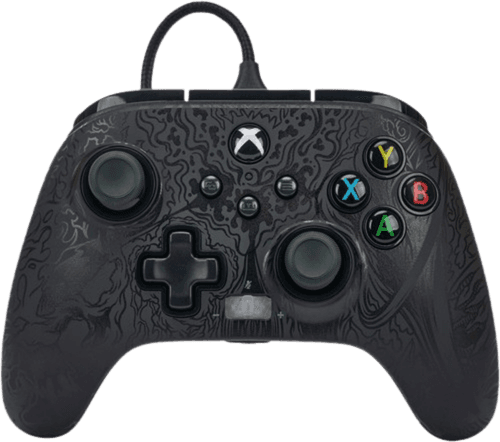
Full PowerA FUSION Pro 3 diagnostic
The Controller Benchmark runs every subsystem on your FUSION Pro 3 — potentiometer sticks, deadzone, circularity, button response, trigger range, back buttons, dual rumble, latency, and connection stability — then produces a composite Controller Health Score. Since the Pro 3 uses potentiometer sticks rather than Hall, run the stick-drift test periodically to catch wear early.
PowerA FUSION Pro 3 hardware specifications
| Specification | PowerA FUSION Pro 3 |
|---|---|
| Connection | USB-C |
| Button count | 19 |
| Analog stick type | Potentiometer (susceptible to drift) |
| Gyroscope | No |
| Rumble / haptics | ERM motors (standard rumble) |
| Impulse triggers | Yes |
| Adaptive triggers | No |
| Touchpad | No |
| Built-in microphone | No |
| Built-in speaker | No |
| Back paddles | Yes |
| Battery life | ~0 hours |
| Weight | 280 g |
| Release year | 2023 |
| MSRP | $79.99 USD |
Recommended tests for PowerA FUSION Pro 3
Each test runs in your browser via the Gamepad API — no install, no account, no upload. Run any individually, or use the full benchmark above.
Stick Drift Test
Detect unwanted analog input at rest
Deadzone Test
Measure your stick’s deadzone radius
Circularity Test
Visualize stick travel as a circle
Trigger Pressure
Verify full analog range on triggers
Button Test
Check every button responds instantly
Vibration Test
Test both rumble motors independently
Latency Test
Measure input lag in milliseconds
Known PowerA FUSION Pro 3 issues
Recurring problems users report with this controller, ranked by frequency. Each links to a step-by-step fix guide.
- Common
Potentiometer sticks — not Hall-effect
The FUSION Pro 3 uses potentiometer sticks (with swappable tall/short caps), not Hall-effect. They can develop drift after heavy use. If you want drift-immune Hall sticks from PowerA, the successor FUSION Pro 4 added them — run the stick-drift test periodically on the Pro 3 to track wear.
View fix guide - Occasional
Wired-only — no wireless mode
The Pro 3 is wired-only over USB-C; there's no Bluetooth or dongle and no battery. If Xbox or PC doesn't detect it, reseat the cable and try a different USB port — a loose braided cable connection is the usual culprit.
View fix guide - Occasional
Back buttons can be pressed accidentally
The four mappable back buttons sit where fingers naturally rest, so unmapped or unfamiliar users can trigger them by accident. If you see unexpected inputs in the button test, check your back-button mapping in the PowerA app.
View fix guide
How to connect the PowerA FUSION Pro 3
Get your controller connected before running diagnostics — wired or wireless, mobile or desktop.
Connect the USB-C cable
Plug the braided USB-C cable into your Xbox Series X|S, Xbox One, or PC. The FUSION Pro 3 is wired-only — there's no pairing or charging step.
Set trigger locks and swap sticks if desired
Flip the 3-way trigger locks for shorter pulls in shooters, and swap in the tall or short thumbstick caps (concave/convex) to match your grip before playing.
Map the back buttons
Use the PowerA Gamer HQ app or on-controller mapping to assign the four back buttons, so you can reach key inputs without leaving the sticks.
Press any button to confirm in the browser
Browsers gate gamepad access behind a user gesture. Press any button on the FUSION Pro 3 to expose it to the Gamepad API, then run the benchmark or any individual test.
PowerA FUSION Pro 3 vs the competition
Head-to-head reviews against the other controllers most buyers cross-shop.
- vs
PowerA FUSION Pro 4
The Pro 4 is the direct successor: it adds Hall-effect sticks and triggers plus Quick-Twist height-adjustable sticks, trading the Pro 3's swappable caps for drift-immune sensors at a similar price.
- vs
Xbox Elite Series 2
The Pro 3 undercuts the Elite Series 2 on price with similar back buttons and trigger locks, but the Elite adds wireless, adjustable-tension swappable sticks, and a more premium build — though both use potentiometer sticks.
- vs
GameSir G7 Pro
The G7 Pro brings TMR sticks, wireless, and gyro; the wired Pro 3 counters with four back buttons and swappable stick caps, but its potentiometer sticks lack the G7 Pro's drift immunity.
PowerA FUSION Pro 3 definitions
Plain-language definitions for the terms used on this page. Each links to the full glossary entry with thresholds, mechanism, and FAQs.
PowerA FUSION Pro 3 questions
No — the Pro 3 uses potentiometer sticks with swappable tall/short caps. Hall-effect sticks and triggers are the headline upgrade of the successor FUSION Pro 4; the Pro 3 predates them.
Wired only, over a braided USB-C cable, with no battery. The wired connection gives consistent low-latency response on Xbox Series X|S, Xbox One, and PC.
Four mappable back buttons, configurable through PowerA's app or on-controller, so you can assign frequently used inputs without moving your thumbs off the sticks.
The 3-way trigger locks shorten the trigger pull for faster firing in shooters, with three positions ranging from full analog travel to a short click.
Yes — the Pro 3 includes swappable thumbstick caps in tall and short heights with concave and convex options, letting you tune the feel. The newer Pro 4 replaces this with twist-to-adjust Quick-Twist sticks.
They can, since they're potentiometers. Many last for years, but if drift appears, recalibrate and run the stick-drift test. For guaranteed drift immunity, the FUSION Pro 4's Hall sticks are the upgrade path.
The Pro 3 is a more affordable wired alternative with similar back buttons and trigger locks. The Elite adds wireless and adjustable-tension sticks, but both rely on potentiometer sticks that can eventually drift.
Get a full health report for your PowerA FUSION Pro 3
Run the Controller Benchmark to score every subsystem and generate a shareable Controller Health Score graded S through F.
Run the Benchmark