Xbox Adaptive Controller Accessibility Test
The Xbox Adaptive Controller test verifies Microsoft's accessibility hub and the assistive devices connected to it — checking the 19 3.5mm input jacks, two USB 2.0 ports, two large programmable face buttons, D-pad, and Xbox/View/Menu/Profile buttons. Connect any external switches or joysticks you use, then press them to confirm each is registering correctly through the XAC.
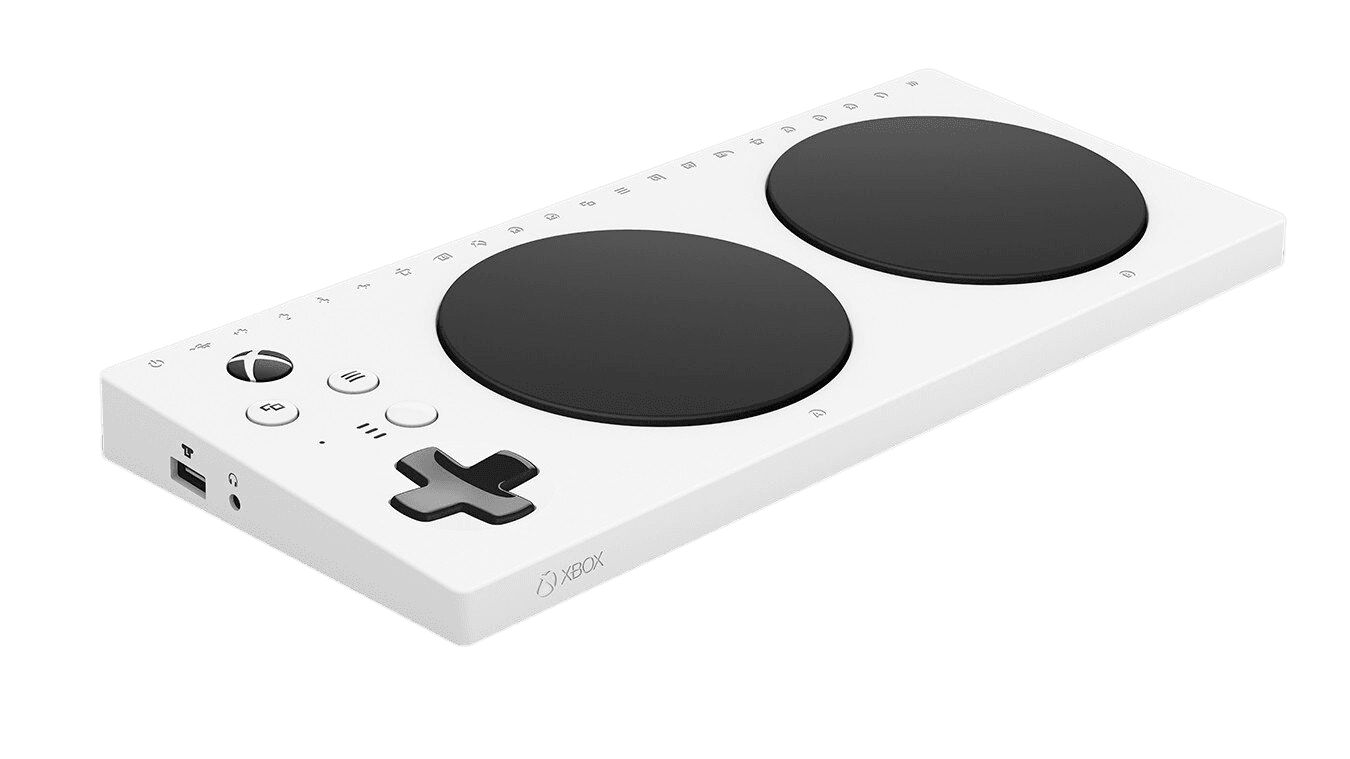
Test the Xbox Adaptive Controller's inputs
The Button Test is the most useful diagnostic for the Xbox Adaptive Controller because it shows you exactly which inputs the XAC is receiving from your external switches and joysticks. Plug in your assistive devices first, then press each one — the test highlights the corresponding standard Xbox input (A, B, X, Y, LB, RB, LT, RT, sticks) as it fires. If a switch you press doesn't highlight anything, the issue is the switch or its cable, not the XAC.
Xbox Adaptive Controller hardware specifications
| Specification | Xbox Adaptive Controller |
|---|---|
| Connection | USB-C, Bluetooth |
| Button count | 10 |
| Analog stick type | Hall-effect (drift-resistant) |
| Gyroscope | No |
| Rumble / haptics | None |
| Impulse triggers | No |
| Adaptive triggers | No |
| Touchpad | No |
| Built-in microphone | No |
| Built-in speaker | No |
| Back paddles | No |
| Battery life | ~25 hours |
| Weight | 415 g |
| Release year | 2018 |
| MSRP | $99.99 USD |
Recommended tests for Xbox Adaptive Controller
Each test runs in your browser via the Gamepad API — no install, no account, no upload. Run any individually, or use the full benchmark above.
Button Test
Check every button responds instantly
Deadzone Test
Measure your stick’s deadzone radius
Stick Drift Test
Detect unwanted analog input at rest
Trigger Pressure
Verify full analog range on triggers
Polling Rate
Measure inputs reported per second
Latency Test
Measure input lag in milliseconds
Connection Stability
Detect dropouts and signal interruptions
Known Xbox Adaptive Controller issues
Recurring problems users report with this controller, ranked by frequency. Each links to a step-by-step fix guide.
- Common
Most diagnostic tests need external devices plugged in to fire
The XAC is an input hub, not a self-contained controller. Without external switches or joysticks plugged into the 3.5mm and USB ports, the only inputs that register in browser tests are the two large face buttons, the D-pad, and the system buttons. This is correct behavior — plug in your assistive devices first, then run the tests with everything connected as you'd use it.
View fix guide - Occasional
External USB joystick not recognized
The XAC's two USB 2.0 ports are designed for assistive joysticks like the Logitech G Adaptive Gaming Kit, Xbox Adaptive Joystick, or Quadstick. Generic USB gamepads may not be recognized — the XAC checks for specific HID device classes. If your USB stick doesn't work, verify it's on Microsoft's compatible-device list at xbox.com/adaptive-controller before assuming hardware failure.
View fix guide - Occasional
Bluetooth pairing fails on Windows 7 or 8.1
Microsoft's documentation explicitly states the XAC works with Windows 7 and 8.1 but with limited functionality — Bluetooth and the Xbox Accessories app are not supported on those operating systems. Wired USB-C connection still works. If accessibility setup requires the Accessories app for profile creation, the user needs Windows 10 or 11.
View fix guide - Occasional
Profile button switches profiles unexpectedly
The Profile button on the XAC cycles between three stored configurations. Some users with limited motor control find the button can be triggered accidentally by hand position changes. The Xbox Accessories app lets you disable the Profile button or remap it to a less-reachable position to prevent accidental cycling.
View fix guide - Rare
Battery cannot be replaced by the user
Unlike standard Xbox controllers, the XAC has an internal rechargeable battery that's not user-serviceable. After approximately 3–5 years of regular use, the battery may degrade — Microsoft offers warranty/replacement options for accessibility hardware. The controller still functions when plugged into USB-C power, so battery degradation doesn't immediately disable the device.
View fix guide - Common
No internal rumble motors or built-in analog sticks
The XAC is intentionally minimal as a hub — it has no internal rumble motors, no built-in analog sticks, no gyro, and no touchpad. The vibration test will report no rumble unless you have a rumble-capable USB device plugged in. Analog stick tests will report no input unless you have an external joystick (like the Xbox Adaptive Joystick or Quadstick) connected. This is the XAC's design philosophy — features come from what you plug in.
View fix guide
How to set up the Xbox Adaptive Controller
Get your controller connected before running diagnostics — wired or wireless, mobile or desktop.
Connect your external switches and joysticks first
Plug your assistive devices into the 19 3.5mm ports (labeled A, B, X, Y, LB, RB, LT, RT, View, Menu, etc.) and the two USB 2.0 ports on the back of the XAC. Each 3.5mm port corresponds to one Xbox button. The USB ports accept compatible joysticks like the Xbox Adaptive Joystick, Quadstick, or Logitech G Adaptive Gaming Kit.
Choose your connection method
The XAC supports three connection types: Xbox Wireless (works on Xbox consoles), Bluetooth (works on PC and mobile), and wired USB-C (works on everything). Bluetooth requires Windows 10/11 — Windows 7 and 8.1 only support wired connection.
Press the small Bind button on the back
For wireless pairing to an Xbox console: press the Bind button on the back of the XAC, then press the matching Pair button on your Xbox console. For Bluetooth: hold Bind for 3 seconds until the Xbox button flashes, then pair from your PC's Bluetooth settings as 'Xbox Adaptive Controller'.
Install the Xbox Accessories app on Xbox or PC
On Xbox or Windows 10/11, install the Xbox Accessories app from the Microsoft Store. Connect the XAC via USB-C the first time. The app lets you remap any of the 19 jack inputs to any Xbox button, configure analog stick deadzones for external joysticks, and save up to three profiles to the controller's onboard memory.
Press any connected input to expose to the browser
Browsers gate gamepad access behind a user gesture. Press any input — the large A or B button, the D-pad, or an external switch — to expose the XAC to the Gamepad API. The browser sees the XAC as a standard Xbox controller; external switches appear as their mapped buttons (a switch in the A port shows as A).
Xbox Adaptive Controller vs the competition
Head-to-head reviews against the other controllers most buyers cross-shop.
- vs
PlayStation Access Controller
PS Access Controller is Sony's 2023 accessibility controller for PS5 at $89.99 — designed as a more configurable single-unit kit with swappable buttons. XAC at $99.99 is the older but more open hub-and-spoke design with broader third-party assistive device compatibility.
- vs
Xbox Wireless Controller
Standard Xbox Wireless Controller is the $59.99 conventional gamepad. XAC at $99.99 is the accessibility-focused input hub designed to work alongside or instead of a standard controller, depending on the user's needs.
- vs
Xbox Adaptive Joystick (companion)
Released March 2025 at $29.99. A wired single-hand joystick designed to plug into the XAC's USB port or be used alongside a standard controller for one-handed gameplay. Sold as a complementary accessory, not a replacement.
Xbox Adaptive Controller definitions
Plain-language definitions for the terms used on this page. Each links to the full glossary entry with thresholds, mechanism, and FAQs.
Xbox Adaptive Controller questions
The XAC is an input hub designed primarily for gamers with limited mobility. Rather than functioning as a traditional gamepad, it provides 19 3.5mm jacks and 2 USB ports that let users connect external switches, buttons, joysticks, and assistive devices in whatever configuration works for their physical needs. Two large built-in face buttons handle common A/B inputs. Microsoft developed it in partnership with AbleGamers, Cerebral Palsy Foundation, SpecialEffect, and Warfighter Engaged.
Yes, but with limited functionality. The two large face buttons, the D-pad, and the system buttons (View, Menu, Xbox, Profile) all work standalone. However, the XAC was designed to be configured with external assistive devices — a game requiring stick movement or triggers won't be playable until those inputs are plugged into the back of the controller.
Microsoft maintains a partner list including Logitech G Adaptive Gaming Kit, Quadstick (sip-and-puff input), Xbox Adaptive Joystick (Microsoft's own 2025 companion), 8BitDo's accessibility-focused devices, Hori Flex, and many specialized switches from PCEye, AbleNet, and RJ Cooper. Generic 3.5mm switches and TRS-cable assistive buttons work in the 3.5mm jacks. The two USB ports accept compatible HID-class joysticks.
Both are accessibility-focused controllers, but they take different approaches. The XAC is an input hub designed for users to plug in their own choice of external switches and joysticks. The PS Access Controller (released 2023) is a more self-contained kit with swappable button caps, designed for users who want a more pre-configured accessibility experience. The XAC's design tends to suit users with already-established assistive hardware setups; the PS Access suits users starting fresh.
Yes. The XAC has an internal rechargeable battery (not removable AA batteries like standard Xbox controllers) and charges via the included USB-C cable. The orange indicator light shows charging status. Microsoft doesn't publish a specific battery-life figure because real-world usage varies significantly based on which external assistive devices are powered through the XAC's USB ports.
Natively, no — the XAC is licensed for Xbox One, Xbox Series X|S, and Windows 10/11 (with limited Windows 7/8.1 support). It does not pair with PS5, Switch, or mobile devices directly. However, third-party adapters exist that translate Xbox controller signals to other platforms. The CronusZen, Mayflash MagicNS, and similar adapters can route XAC inputs to PlayStation or Switch with some configuration.
Install the Xbox Accessories app (free, available on Xbox and Windows 10/11) and connect the XAC via USB-C the first time. The app lets you remap any 3.5mm port or USB device to any Xbox button — for example, you could route the A button to a sip-and-puff switch in the LT jack, or remap the D-pad to two USB joysticks. You can save up to three profiles to the controller's onboard memory and cycle between them with the Profile button.
As of mid-2026, Microsoft has not announced a successor to the XAC. The 2018 hardware remains the current model and continues to receive firmware updates. Microsoft expanded the accessibility ecosystem in March 2025 with the Xbox Adaptive Joystick ($29.99), and the Xbox Accessibility Guidelines initiative continues to grow. For news on hardware updates, the Xbox Accessibility Insiders League (XAIL) is the official channel.
Get a full health report for your Xbox Adaptive Controller
Run the Controller Benchmark to score every subsystem and generate a shareable Controller Health Score graded S through F.
Run the Benchmark