Last updated: August 24, 2026
The Genki Manta controller is the kind of product that can make a normal gamepad look surprisingly basic.
Genki has packed it with adjustable TMR sticks, analog inductive face buttons, three trigger modes, six rear buttons, strong haptics, a color screen, its own MantaOS interface, and a claimed polling rate of up to 8,000Hz over USB-C.
That list is enough to get attention. It is also exactly why Manta needs to be judged carefully.
A controller does not become good simply because it has more technology inside it. Polling rate does not tell you total input latency. TMR sensors do not automatically guarantee accurate sticks. A screen is only useful if it saves more time than it adds complexity.
There is also the price. Manta started with a $189 Kickstarter tier, while Genki has indicated a planned retail price of $279. At that level, buyers should expect much more than an interesting specification sheet.
And there is one more important point: Manta is not a finished retail controller yet. The crowdfunding campaign launched in August 2026, with Genki currently targeting a 2027 shipment window. That means nobody can yet give a proper long-term verdict on production-unit reliability.
So instead of asking whether Manta has impressive specs, we should ask a harder question:
Do those specs actually solve problems that controller players have?
Keep these points in mind throughout the article:
- Manta is still a crowdfunded product.
- Its 8,000Hz claim does not equal 0.125ms total controller latency.
- Adjustable TMR sticks could be more useful than the headline polling figure.
- MantaOS may be its most important feature if it removes the need for companion software.
- The planned $279 price puts much more pressure on build quality and reliability.
- PC and Nintendo users currently appear to be a much stronger fit than Xbox or PlayStation players.
Manta's Best Idea Might Be Removing the Setup Hassle
Many premium controllers have a strange problem. They give you more settings, but accessing those settings can become work.
You may need a Windows program to change dead zones. Another controller may use a mobile app. Some settings are hidden behind button combinations that are difficult to remember. Profiles may behave differently depending on whether the software is running.
Manta tries to move that work onto the controller itself.
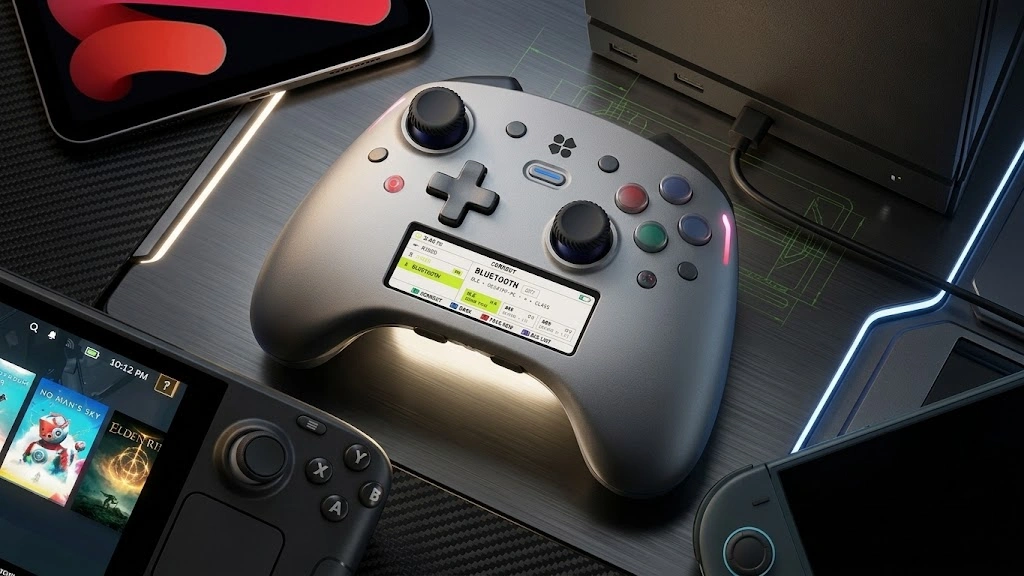
A 2.79-inch color screen sits between the controls and runs Genki's MantaOS. It is meant to provide direct access to profiles, mappings, stick settings, trigger behavior, haptics and other controller functions.
That could be much more important than having a screen simply for the sake of having one.
Imagine switching between three games in one evening.
For a racing game, you might want:
- Full analog trigger travel
- Softer stick tension
- A smoother steering response curve
- Stronger haptic feedback
Then you load a competitive shooter and want:
- Short trigger activation
- Firmer right-stick tension
- A smaller aiming dead zone
- Different rear-button assignments
Then you open a platformer and want a completely different profile.
A normal premium controller may force you back into an app to make some of those changes. Manta's goal is to let you handle them directly from the pad.
That is useful because good controller customization should reduce friction rather than create more of it.
The risk is equally clear. MantaOS needs to be fast.
If changing a dead zone means going through six menus, waiting for animations and finding poorly named settings, the screen becomes a problem rather than a solution.
What will matter in the finished controller:
- How quickly profiles can be switched
- Whether common settings are easy to reach
- How clearly dead zones and response curves are shown
- Whether settings save correctly between devices
- How quickly MantaOS starts
- Whether firmware updates remain stable
- Whether the screen can be ignored when you simply want to play
A screen on a controller is not automatically useful. A good controller interface is useful. That distinction will matter when production units arrive.
Do Not Confuse 8,000Hz Polling With Total Input Latency
The number most likely to appear in Manta marketing is 8,000Hz.
Genki says Manta can reach up to 8,000Hz when connected by USB, with a lower rate over its wireless connections.
At 8,000Hz, one polling interval is about 0.125 milliseconds. At 1,000Hz, an interval is 1ms. At 250Hz, it is 4ms.
Those numbers are real mathematics, but they are easy to misuse.
A controller running at 8,000Hz does not automatically have 0.125ms total input latency.
Polling rate tells us how often input reports can be sent or checked. Total response time also depends on other parts of the input chain, including sensing, controller processing, firmware, the connection, the operating system and finally the game.
USB Human Interface Devices use standardized report mechanisms for sending input between a device and host. The technical foundation is documented by the USB Implementers Forum's HID specifications.
Genki makes a similar distinction in its own FAQ, saying that polling rate is only one part of controller responsiveness.
That is the right way to think about Manta.
If you eventually get one, you should test its real behavior rather than simply trust the number printed on the box. GPADLAB's Controller Polling Rate Test is built for exactly that purpose. It measures the reports your system is actually receiving rather than assuming the advertised figure is what your setup is producing.
When Manta reaches production, useful testing should look at:
- Actual wired polling rate
- 2.4GHz wireless polling rate
- Polling stability
- Input jitter
- Button response consistency
- Stick update consistency
- End-to-end response measurements
There is another practical question: how much difference will most people notice between 1,000Hz and 8,000Hz?
The reporting interval drops from roughly 1ms to 0.125ms, a theoretical difference of 0.875ms at that stage of the chain. That can matter when chasing every possible source of latency, but it is not an eight-times improvement in the complete gaming experience.
A stable 1,000Hz controller with excellent firmware can easily be more convincing than an 8,000Hz controller with inconsistent processing.
The number matters.
It just does not matter by itself.
Adjustable TMR Sticks Are a More Useful Reason to Watch Manta
The stick system may be the more important part of the Genki Manta controller.
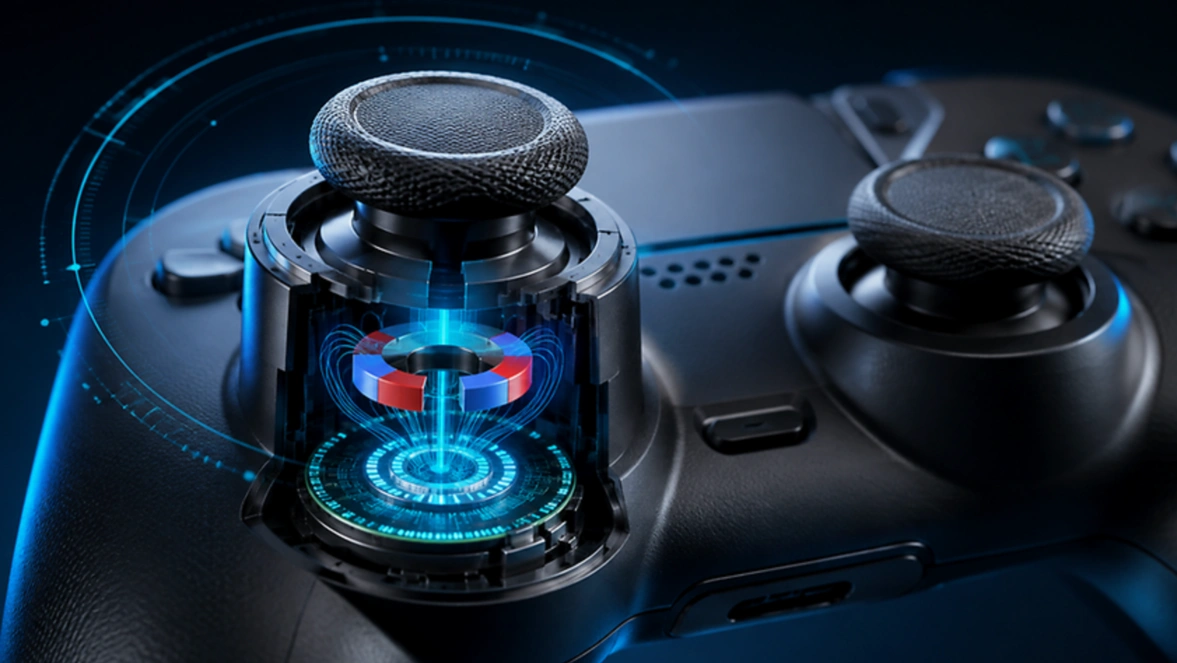
Manta uses TMR, or tunneling magnetoresistance, sensing. TMR sticks read magnetic-field changes rather than depending on the contact surfaces used by traditional potentiometer-based joystick sensors.
That reduces one of the major physical wear points associated with traditional stick sensing.
The underlying TMR effect is not gaming-specific technology. It is part of a wider class of magnetic sensing systems used for highly sensitive field measurements. Research published in npj Spintronics by Nature discusses tunnel magnetoresistance sensors and their use in high-performance magnetic-field sensing.
But the sensor label alone is not what makes Manta interesting.
Genki is combining TMR sensing with adjustable physical stick tension.
That means a player could change how much force is required to move a stick rather than only changing its software response.
This creates some useful combinations.
For example:
- A player could use more resistance on the right stick for small aiming movements.
- The left stick could remain lighter for fast directional movement.
- Physical tension could be paired with a custom response curve.
- Different profiles could use different dead-zone settings.
- TMR sensing removes the same contact-wear mechanism found in traditional potentiometer sensing.
If you want the technical difference between the major magnetic stick systems, GPADLAB's TMR vs Hall Effect Sticks guide explains where TMR actually improves on Hall effect and where the practical difference is smaller than marketing can make it sound.
There is still an important warning here.
TMR does not automatically mean perfect sticks.
A controller can use a very good sensor and still have poor stick behavior because the complete mechanism matters.
Production testing should check:
- Center-point stability
- Inner dead zone
- Outer dead zone
- Circularity
- Snapback
- Mechanical centering
- Stick resolution
- Firmware filtering
- Tension consistency
- Long-term wear of the physical gimbal
This is why buying controllers only by sensor type is a bad shortcut.
TMR gives Manta a strong starting point. Genki still needs to build a good joystick around it.
Pulse Buttons Could Be the Feature Nobody Is Talking About Enough
Manta's ABXY buttons are unusual.
Instead of treating each face button only as a simple on/off switch, Genki's Pulse Button system is designed around analog inductive inputs that can detect more than a simple on/off press.
That gives Manta the possibility of controlling when a press registers based on how far the button has moved.
Think of the difference between these two setups.
A normal button:
- Button starts moving
- Button reaches its activation point
- Electrical input registers
A travel-sensing button can potentially give the controller more information about what happens between the top and bottom of that movement.
That could allow a player to use a shallow actuation point for fast presses or different behavior where analog input is supported.
The interesting part is not whether the button contains more technology. It is whether that extra information creates a better input.
A shallow activation point could feel very fast, for example, but it could also produce accidental presses if the button activates too easily.
The finished controller therefore needs testing for:
- Initial actuation depth
- Reset point
- Repeated tapping speed
- Accidental activation
- Consistency between A, B, X and Y
- Long-term button feel
- Differences between profiles
- Actual analog support on different platforms
The reset point may be especially important.
A button that activates quickly but requires almost full release before another press can register may be worse for rapid tapping than a normal mechanical button with a clean reset.
That is the sort of detail a specification sheet cannot answer.
TriStage Triggers Make Sense Because Games Need Different Inputs
Manta's triggers are another example of customization that has a clear use rather than simply adding another number to the box.
Genki calls the system TriStage Triggers.
The current design allows separate trigger behavior including Digital, Rapid and Analog settings, with each trigger able to use its own mode.
That matters because different games ask completely different things from the same trigger.
In a racing game, gradual movement is useful. You may want the entire trigger range so throttle or braking can be controlled carefully.
In an FPS, you may prefer a very short action because a long trigger pull provides no obvious advantage for firing a weapon.
Possible setups include:
- Full analog travel for racing
- Shorter activation for shooters
- Different left and right trigger behavior
- Separate trigger profiles for individual games
- Digital-style input where full analog travel is unnecessary
The important word here is feel.
Three trigger modes sound useful, but the mechanical change between them needs to feel solid. Loose stops, inconsistent resistance or movement after activation would quickly make the feature less impressive.
Manta therefore needs to prove:
- Consistent activation points
- Clean physical stops
- Accurate analog range
- Low trigger dead zones
- Matching left and right trigger behavior
- Reliable switching between modes
More trigger settings are useful only when the trigger underneath them is good.
Six Rear Buttons Could Make Manta Especially Useful on PC
Manta is also aimed heavily at players who want more inputs than a standard controller provides.
The controller has six rear buttons, although Genki says it will document exactly how those controls behave and what they can output on each platform before shipping.
For PC users, extra controls can be far more useful than simply duplicating A, B, X or Y.
Games designed around a keyboard may have far more useful commands than a standard gamepad can expose at once.
Extra controls can help with:
- Push-to-talk
- Weapon switching
- Map shortcuts
- Screenshot commands
- Movement actions
- Inventory controls
- Media shortcuts
- Keyboard commands
- Functions normally assigned to stick clicks
Manta also includes its Action Timeline system for programmable input sequences and has keyboard and mouse-style functions on supported systems.
That strengthens the impression that this is not simply a Switch controller with premium parts. PC use appears to be central to the design.
It could also help players using a PC from a television.
One annoying part of couch-based PC gaming is reaching for a keyboard or mouse just to pass a launcher, enter text or handle something outside the game.
If Manta can reduce those interruptions, that is a real quality-of-life improvement.
The details still need checking:
- Which rear buttons can act as unique inputs
- Which inputs are limited to remapping existing controller buttons
- How keyboard assignments work
- Which functions require specific connection modes
- How profiles behave across operating systems
- Whether macro functions can be fully disabled for competitive use
Those details will determine whether Manta is genuinely flexible or simply appears flexible on its feature list.
PC and Switch Players Make More Sense Than Xbox or PlayStation Buyers
Platform compatibility could immediately decide whether Manta is relevant to you.
Genki's current plans focus on systems including Windows, SteamOS, Nintendo Switch, Switch 2 and Apple devices including iPhone, iPad, Mac, Apple TV and Vision Pro.
Xbox and PlayStation are not currently part of the official supported-platform list.
That is important because spending close to $279 on a premium controller becomes harder to justify if one of your main gaming systems cannot use it properly.
The strongest Manta user right now looks something like this:
- Plays primarily on PC
- Also owns a Switch or Switch 2
- Uses SteamOS or a handheld PC
- Wants one controller across several non-Xbox platforms
- Likes changing controller settings between games
- Wants wired, 2.4GHz wireless and Bluetooth choices
It is a weaker match for someone who:
- Mainly plays on Xbox
- Mainly plays on PlayStation
- Wants one pad for every major console
- Does not use advanced remapping
- Rarely changes controller settings
Compatibility should always be checked before buying a premium pad. The more expensive a controller gets, the less acceptable major platform gaps become.
The $279 Price Is Where the Hype Meets Reality
Manta becomes much harder to judge once you move past the Kickstarter price and look at its planned $279 retail figure.
At that price, being technically interesting is not enough.
A $279 gamepad needs to feel excellent every time you pick it up.
The screen needs to be useful.
The sticks need to stay accurate.
The buttons need to feel consistent.
The firmware needs to work.
Profiles need to save properly.
Wireless performance needs to remain stable.
The battery should remain serviceable.
The shell, grips, triggers and rear controls need to survive heavy use.
Manta makes the most sense for buyers who will actually use its unusual features.
That includes players who:
- Change profiles often
- Tune stick response
- Use rear controls
- Play across PC and Nintendo hardware
- Want adjustable stick tension
- Care about trigger behavior
- Prefer settings stored on the controller
- Like testing unusual controller technology
The value becomes much weaker for somebody who plugs a controller in and leaves every option at its default setting.
If that describes you, a large part of Manta's price may be paying for features you never touch.
This is the mistake people often make when shopping for premium controllers.
They count features instead of counting features they will actually use.
Kickstarter Success Is Not the Same as a Finished Controller
Manta attracted strong early interest and moved beyond its original crowdfunding target quickly.
That is a positive sign for demand. It is not proof of final hardware quality.
The campaign is still funding a product that has not gone through years of public use.
Genki currently indicates a 2027 shipping schedule. Its FAQ says the optimistic goal is to begin shipping in January 2027, with a more conservative January-to-April 2027 delivery window depending on final engineering, testing and production.
Several things can still change between a campaign prototype and the controller buyers eventually receive.
Potential changes include:
- Firmware behavior
- Platform support
- Button mapping rules
- Software features
- Manufacturing tolerances
- Final stick feel
- Screen behavior
- Shipping dates
There is also a major testing gap that cannot be solved today: time.
Nobody currently has two years of daily-use data for a production Manta because production controllers have not existed for two years.
That matters for a $279 device.
Once retail units exist, GPADLAB's Controller Latency Test can help check software-visible response timing, while physical testing will still be needed for full button-to-host latency, durability and long-term mechanical behavior.
Early buyers are therefore making a different decision from future retail buyers.
A Kickstarter backer is partly betting on what Manta will become.
A retail buyer will eventually be able to judge what it actually became.
Is the Genki Manta Controller Worth the Hype?
The Genki Manta controller deserves attention.
It does not yet deserve an unquestioned recommendation.
The encouraging part is that several of its ideas target real controller problems.
MantaOS could make advanced settings less annoying to manage. Adjustable TMR sticks combine software tuning with actual physical control. Pulse Buttons could change how face-button actuation is handled. TriStage Triggers make sense for people who regularly switch between genres. Extra inputs and keyboard functions could make it unusually useful for PC players.
Those are better reasons to care about Manta than simply saying 8K polling.
The 8,000Hz figure is technically interesting, but it should be treated as one measurement rather than a quality score.
When Manta reaches final hardware, these are the questions that should decide its reputation:
- Does MantaOS make setup genuinely faster?
- Are the TMR sticks accurate at low dead zones?
- Does adjustable tension remain consistent?
- Are the analog face buttons better than good mechanical buttons?
- Is wired latency actually excellent?
- Is wireless performance stable?
- Do the six rear controls work the way advanced users expect?
- Is the controller comfortable during long sessions?
- Does the hardware remain reliable?
- Does it still feel worth nearly $300 after the novelty wears off?
What looks strongest right now
- Most useful idea: controller-side configuration through MantaOS
- Most practical hardware feature: adjustable TMR sticks
- Most unusual feature: analog inductive Pulse Buttons
- Best audience: PC, SteamOS and Nintendo players who actively tune controls
- Most misleading number if viewed alone: 8,000Hz polling
- Biggest obstacle: the planned $279 retail price
- Biggest unanswered question: real production-unit performance over time
The Manta does not need to win a specification contest.
It needs to prove that all of this technology makes playing games easier, faster or more comfortable.
If Genki gets that part right, the Genki Manta controller could become one of the more important premium gamepads to come out of this new wave of controller hardware.
If it does not, it may become something much less interesting: a very expensive controller with an excellent specification sheet.
Common questions
What is the Genki Manta controller?+
When will the Genki Manta controller ship?+
How much will the Genki Manta controller cost?+
Does the Genki Manta use TMR joysticks?+
Does TMR mean the Genki Manta cannot develop stick problems?+
What is the Genki Manta polling rate?+
Does 8000Hz mean 0.125ms total controller latency?+
What is MantaOS?+
Are the Genki Manta face buttons analog?+
What are the Genki Manta TriStage Triggers?+
How many rear buttons does the Genki Manta have?+
Which platforms will the Genki Manta support?+
Will the Genki Manta work on Xbox or PlayStation?+
Can the Genki Manta work as a keyboard and mouse on PC?+
Is the Genki Manta controller worth buying?+
Founder of GPADLAB and the lead author behind our testing methodology. Twelve years building consumer hardware diagnostics and a long-time competitive shooter on PC.