PS3 DualShock 3 Controller Test
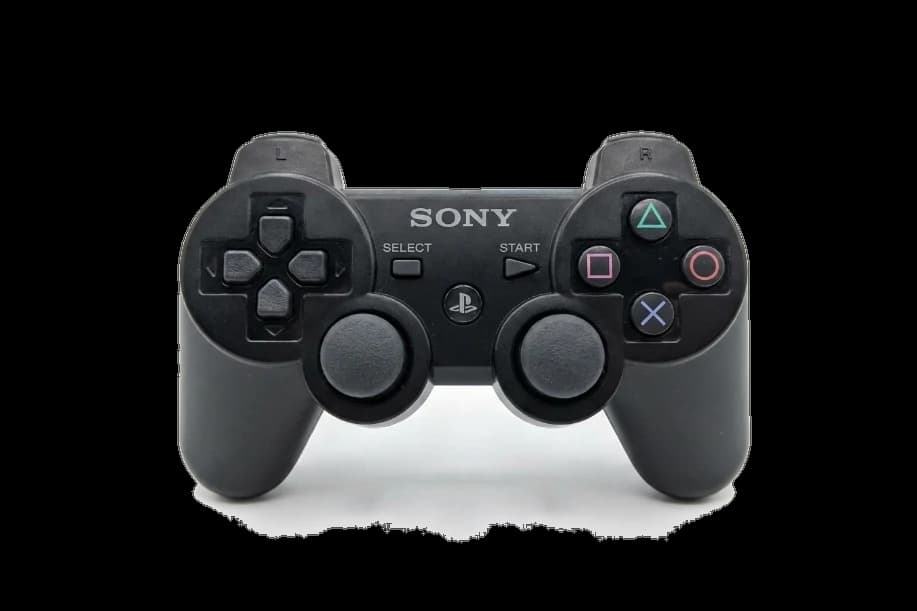
The DualShock 3 controller test runs a full diagnostic on Sony's PS3 controller in your browser — verifying analog stick drift, pressure-sensitive face buttons, trigger range, SIXAXIS motion controls, and rumble. Connect via mini-USB cable (the most reliable PC path), press any button, and get a Controller Health Score graded S through F.
Full DualShock 3 diagnostic
The Controller Benchmark runs every relevant subsystem on your DualShock 3 — stick drift, deadzone, button response, trigger range, SIXAXIS motion, rumble, latency, and connection stability — then produces a composite Controller Health Score. After 18+ years in circulation, drift on every used DualShock 3 is likely; the stick drift test catches it whether it's mild or severe.
PS3 DualShock 3 hardware specifications
| Specification | PS3 DualShock 3 |
|---|---|
| Connection | USB-A, Bluetooth |
| Button count | 17 |
| Analog stick type | Potentiometer (susceptible to drift) |
| Gyroscope | Yes |
| Rumble / haptics | ERM motors (standard rumble) |
| Impulse triggers | No |
| Adaptive triggers | No |
| Touchpad | No |
| Built-in microphone | No |
| Built-in speaker | No |
| Back paddles | No |
| Battery life | ~30 hours |
| Weight | 192 g |
| Release year | 2007 |
| MSRP | $54.99 USD |
Recommended tests for PS3 DualShock 3
Each test runs in your browser via the Gamepad API — no install, no account, no upload. Run any individually, or use the full benchmark above.
Stick Drift Test
Detect unwanted analog input at rest
Deadzone Test
Measure your stick’s deadzone radius
Button Test
Check every button responds instantly
Trigger Pressure
Verify full analog range on triggers
Gyro Test
Test 6-axis motion sensors
Vibration Test
Test both rumble motors independently
Circularity Test
Visualize stick travel as a circle
Latency Test
Measure input lag in milliseconds
Known PS3 DualShock 3 drift
Recurring problems users report with this controller, ranked by frequency. Each links to a step-by-step fix guide.
- Common
Stick drift after 18+ years
Every DualShock 3 in circulation today is 18+ years old. Potentiometer wear is universal; the only question is severity on your specific unit. The fix flow matches the DualShock 4 — clean the stick housing, recalibrate via SCP Toolkit or DS3 Tool on PC, then replace the stick if drift persists. Aftermarket Hall-effect modules exist but are harder to source than DualShock 4 versions.
View fix guide - Common
Doesn't connect to Windows over Bluetooth without drivers
Windows does not natively recognize the DualShock 3 as a generic Bluetooth controller. Connection requires SCP Toolkit, DS3 Tool, or similar community-maintained drivers — none of which are officially supported by Sony. Mini-USB cable connection works without drivers via standard HID, which is the most reliable PC path. Steam Input handles DS3 via USB only.
View fix guide - Common
Battery swells over time
The internal Li-ion battery (LIP1359 or LIP1472) can swell with age, particularly after 10+ years in storage. A swollen battery can deform the controller's plastic shell or push the analog sticks out of alignment. Replace immediately if the battery cover bulges; iFixit sells the replacement battery and provides a free disassembly guide. Required tools: Phillips screwdriver.
View fix guide - Occasional
Pressure-sensitive face buttons fail asymmetrically
The face buttons (Cross, Circle, Square, Triangle) use pressure-sensitive analog sensors that wear differently from each other based on usage patterns. The button you press hardest tends to fail first. Symptoms include the button registering full press at light touch, or producing inconsistent analog values. PCSX2 and RPCS3 expose the analog values; the button test in this browser only shows binary on/off.
View fix guide - Occasional
Mini-USB port loosens with repeated use
The mini-USB port on the DualShock 3 was a 2007-era standard with smaller, more fragile contacts than modern USB-C. Repeated cable insertion can loosen the port's solder joints, causing intermittent connection — symptoms include the cable falling out unexpectedly or charging failing despite a connected cable. Repair requires removing the back panel and resoldering the port; not beginner-friendly.
View fix guide
How to pair the PS3 DualShock 3
Get your controller connected before running diagnostics — wired or wireless, mobile or desktop.
Use mini-USB for reliable connection (recommended)
Connect the controller to your PC with a mini-USB cable. Windows recognizes the DualShock 3 as a generic HID device immediately — no drivers needed for browser testing. This is the most reliable path; Bluetooth on PC requires third-party drivers and is significantly more fragile.
If you need Bluetooth on PC, install a driver
Bluetooth pairing requires either SCP Toolkit (the original community driver, now legacy), DS3 Tool (modern alternative), or ScpToolkit (community fork). None are officially supported by Sony. Follow the installer prompts; the driver handles authentication that Windows doesn't natively perform.
Press the PS button to power on
Press the central PS (PlayStation) button. The four player-indicator LEDs above the PS button blink while the controller searches for a paired host. On PC, the leftmost LED stays lit once paired; on PS3, the LEDs indicate which controller slot was assigned.
PS3 console pairing (if needed)
On the PS3, connect the controller to the console via mini-USB cable, then press the PS button. The controller registers automatically and can be used wirelessly after disconnecting the cable. No pairing prompt or PIN required on PS3 — the cable connection performs the initial bind.
Press any button to confirm in the browser
Browsers gate gamepad access behind a user gesture. Press any button on the DualShock 3 to expose it to the Gamepad API. The browser sees the controller with standard button mapping (Cross=A, Circle=B, Square=X, Triangle=Y in the Xbox-equivalent layout). SIXAXIS motion data is exposed only through Sony's proprietary HID protocol, not standard browsers.
PS3 DualShock 3 vs the competition
Head-to-head reviews against the other controllers most buyers cross-shop.
- vs
PS4 DualShock 4
DualShock 4 added a touchpad, light bar, and built-in speaker but dropped pressure-sensitive face buttons; DualShock 3 has SIXAXIS motion controls, pressure-sensitive face buttons, and 4× the battery life (30h vs 4–8h).
- vs
Xbox 360 Controller
Xbox 360 has better trigger range and more reliable PC connection out of the box; DualShock 3 has SIXAXIS motion, pressure-sensitive face buttons, and full Bluetooth (vs Xbox 360's proprietary 2.4GHz).
- vs
PS5 DualSense
DualSense has adaptive triggers, haptic feedback, USB-C, and a touchpad; DualShock 3 has SIXAXIS motion, pressure-sensitive face buttons, and dramatically longer battery life (30h vs 4–6h).
PS3 DualShock 3 definitions
Plain-language definitions for the terms used on this page. Each links to the full glossary entry with thresholds, mechanism, and FAQs.
PS3 DualShock 3 questions
Windows does not natively recognize the DualShock 3 over Bluetooth — Sony never released official Windows drivers for it. Use a mini-USB cable instead (works immediately with no drivers), or install a community-maintained Bluetooth driver like SCP Toolkit or DS3 Tool. Steam Input also handles the controller over USB but not Bluetooth on Windows.
No. Standard browsers expose face buttons as binary on/off through the Gamepad API. Pressure-sensitive analog values are available only through Sony's proprietary HID protocol, which PCSX2 and RPCS3 use for PS2/PS3 emulation. The browser test shows whether each face button registers correctly, but cannot measure the analog pressure value.
No. Sony does not support the DualShock 3 on PS4 or PS5 — the consoles enforce controller authentication and only accept DualShock 4 (PS4) or DualSense (PS5). The DualShock 3 works on PS3 console and on PC (via mini-USB cable or third-party Bluetooth driver), and that's it.
The DualShock 3 lacks the power-hungry components Sony added to the DualShock 4: the always-on light bar, the touchpad's capacitive sensor, the built-in mono speaker, and the larger gyroscope. The DS3's 1800 mAh battery powers only the sticks, buttons, basic motion sensor, and Bluetooth radio — giving it about 30 hours of real-world runtime compared to the DualShock 4's 4–8 hours.
Sony's marketing name for the DualShock 3's combined 3-axis gyroscope + 3-axis accelerometer. SIXAXIS detects tilt, rotation, and acceleration in three dimensions, enabling motion-based controls in PS3 games. Famous SIXAXIS games include LittleBigPlanet (tilt-to-balance), Heavy Rain (gesture inputs), and Killzone 3 (motion-aim adjustment). The browser cannot read SIXAXIS data because it's exposed only through Sony's proprietary HID protocol.
A swollen battery, almost certainly. The internal Li-ion cell (LIP1359 or LIP1472) can swell with age, especially in controllers stored for 5+ years between uses. Stop using the controller immediately — a swollen Li-ion battery is a fire risk. iFixit sells the LIP1359 replacement battery for under $10; replacement requires a Phillips screwdriver and about 15 minutes.
No. Every DualShock 3 uses potentiometer-based sticks, the same family of sensors responsible for drift on every PlayStation controller through the DualSense. Aftermarket Hall-effect modules for the DualShock 3 exist but are significantly harder to source than for the DualShock 4 — the device is old enough that aftermarket support is thinning out.
Yes via a USB OTG cable, and on some Android versions via Bluetooth using third-party apps like Sixaxis Controller (requires root) or DS3 Controller BT. Native Android Bluetooth pairing typically fails for the same reason it fails on Windows — Sony's authentication handshake isn't part of standard Bluetooth HID. USB OTG is the most reliable path.
Get a full health report for your PS3 DualShock 3
Run the Controller Benchmark to score every subsystem and generate a shareable Controller Health Score graded S through F.
Run the Benchmark