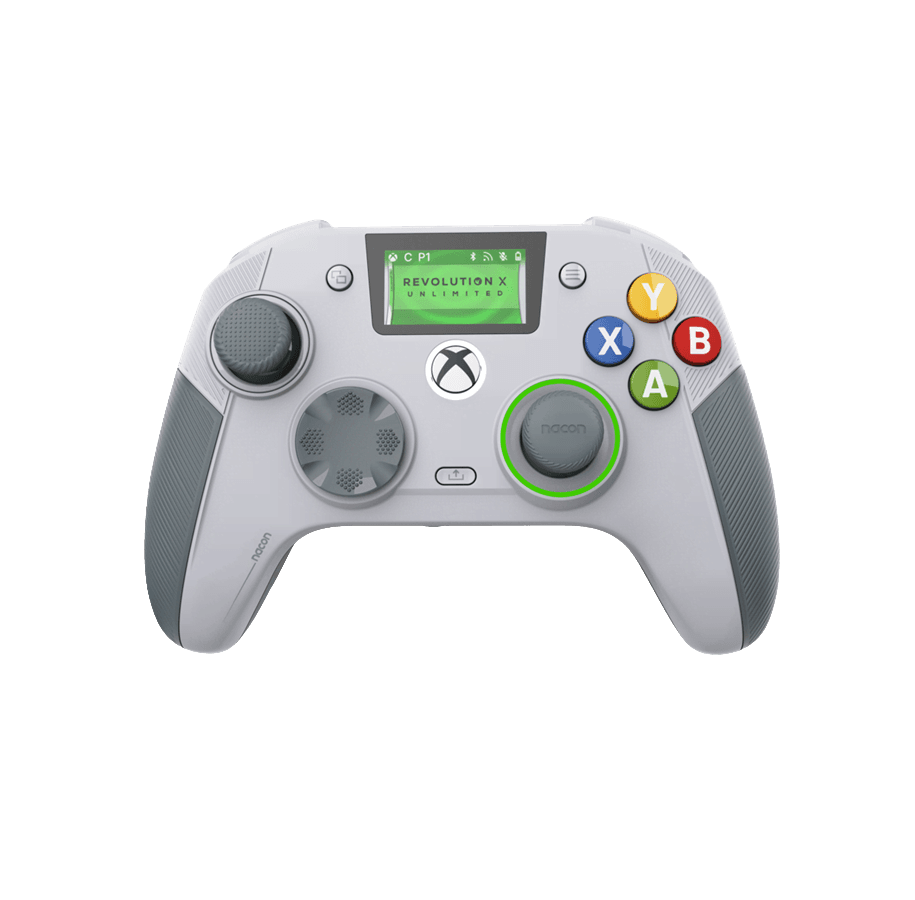
Nacon Revolution X Unlimited Controller Test
The Nacon Revolution X Unlimited test runs a full diagnostic on Nacon's wireless Xbox flagship in your browser — verifying the Hall-effect sticks and triggers, micro-switch instant triggers, gyroscope, and programmable shortcuts. Connect over the 2.4G dongle, Bluetooth, or USB-C, press any button, and get a Controller Health Score graded S through F.
Full Revolution X Unlimited diagnostic
The Controller Benchmark runs every subsystem on your Revolution X Unlimited — Hall sticks, deadzone, button response, micro-switch instant triggers, shortcut buttons, gyro, rumble, latency, and connection stability — then produces a composite Controller Health Score. The Hall sticks and triggers should test exceptionally clean; fine-tune stick curves and deadzones afterward in the Nacon Companion app.
Nacon Revolution X Unlimited hardware specifications
| Specification | Nacon Revolution X Unlimited |
|---|---|
| Connection | 2.4GHz Wireless Dongle, Bluetooth, USB-C |
| Button count | 19 |
| Analog stick type | Hall-effect (drift-resistant) |
| Gyroscope | Yes |
| Rumble / haptics | ERM motors (standard rumble) |
| Impulse triggers | No |
| Adaptive triggers | No |
| Touchpad | No |
| Built-in microphone | No |
| Built-in speaker | No |
| Back paddles | Yes |
| Battery life | ~10 hours |
| Weight | 290 g |
| Release year | 2025 |
| MSRP | $199.99 USD |
Recommended tests for Nacon Revolution X Unlimited
Each test runs in your browser via the Gamepad API — no install, no account, no upload. Run any individually, or use the full benchmark above.
Stick Drift Test
Detect unwanted analog input at rest
Deadzone Test
Measure your stick’s deadzone radius
Hall Effect Checker
Identify Hall Effect vs potentiometer sticks
Trigger Pressure
Verify full analog range on triggers
Button Test
Check every button responds instantly
Gyro Test
Test 6-axis motion sensors
Vibration Test
Test both rumble motors independently
Latency Test
Measure input lag in milliseconds
Known Nacon Revolution X Unlimited issues
Recurring problems users report with this controller, ranked by frequency. Each links to a step-by-step fix guide.
- Common
Does not work on PlayStation
The Revolution X Unlimited is an Xbox-licensed controller — it works on Xbox Series X|S, Xbox One, PC, and Android, but not on PS5 or PS4. Nacon's PlayStation equivalent is the Revolution 5 Pro.
View fix guide - Occasional
Controller unresponsive on PC after a firmware update
Nacon documents that after a firmware update the controller can stop responding when connected to PC. Unplug and replug it to force re-recognition; if that fails, reconnect via a different USB port or contact Nacon support.
View fix guide - Occasional
Weight distribution feels top-light
The adjustable weights install in the handles, so adding weight makes the grips heavier while the top stays light — reviewers note the balance can feel uneven. This is a design characteristic, not a fault; choose weight sets to taste.
View fix guide - Occasional
6 shortcut buttons only fully usable in PC mode
The six programmable shortcut buttons can be mapped to keyboard keys in PC mode; on Xbox the mapping options are more limited. If a shortcut isn't doing what you expect on console, confirm the mapping is supported for the platform you're on.
View fix guide
How to pair the Nacon Revolution X Unlimited
Get your controller connected before running diagnostics — wired or wireless, mobile or desktop.
Xbox: 2.4G dongle or wired
On Xbox Series X|S or Xbox One, connect via the 2.4G RF dongle for wireless play, or plug in the USB-C cable. The controller is recognized as a licensed Xbox controller.
PC: dongle, Bluetooth, or wired
On Windows, use the 2.4G dongle for the lowest latency (1ms PC mode), Bluetooth for convenience, or USB-C wired. PC mode unlocks gyro aiming and the full shortcut-button mapping.
Customize on the LCD screen or Companion app
Use the built-in LCD screen for quick calibration and profile swaps, or the Nacon Companion app (PC and Xbox) for stick curves, deadzones, audio, and saved profiles.
Press any button to confirm in the browser
Browsers gate gamepad access behind a user gesture. Press any button on the Revolution X Unlimited to expose it to the Gamepad API, then run the benchmark or any individual test.
Nacon Revolution X Unlimited vs the competition
Head-to-head reviews against the other controllers most buyers cross-shop.
- vs
Nacon Revolution 5 Pro
The Revolution 5 Pro is Nacon's PlayStation-side flagship; the Revolution X Unlimited is the Xbox/PC counterpart, adding a built-in LCD screen and charging dock to the same Hall-effect, customization-heavy formula.
- vs
Xbox Elite Series 2
The Elite Series 2 is the first-party premium standard with potentiometer sticks; the Revolution X Unlimited counters with drift-free Hall sticks and triggers, gyro, and an on-controller LCD at a similar price.
- vs
Turtle Beach Stealth Pivot
Both are premium Hall-effect Xbox controllers with on-controller screens; the Stealth Pivot leans on rotating button modules, while the Revolution X Unlimited emphasizes weights, swappable sticks, and gyro.
Nacon Revolution X Unlimited definitions
Plain-language definitions for the terms used on this page. Each links to the full glossary entry with thresholds, mechanism, and FAQs.
Nacon Revolution X Unlimited questions
Yes — both. Nacon uses magnetic Hall-effect sensors on the joysticks and the triggers, so they resist the drift that wears out potentiometer sticks and give consistent analog trigger input over time.
No. The Revolution X Unlimited is licensed for Xbox Series X|S, Xbox One, PC, and Android. For PlayStation, Nacon makes the Revolution 5 Pro, which has a similar Hall-effect, customization-focused design.
The Revolution X Pro is wired-only and cheaper. The Revolution X Unlimited is the wireless flagship: it adds 2.4G RF and Bluetooth, a built-in LCD configuration screen, gyro aiming, and a charging dock, at a higher price.
Instant triggers use micro-switch components and a hair-trigger setting that shortens the trigger's travel for an immediate, button-like press — useful in shooters. The triggers are also Hall-effect for drift-free analog input when not in instant mode.
Yes. Gyroscopic aiming is available, especially in PC mode, for finer aim in FPS and TPS games. Pair it through the game's motion support or PC mode for the most precise control.
Very. The kit includes three sets of weights, six joystick heads, two D-pads, and four rings, plus a carrying case — Nacon advertises over 60 customization combinations. Software adds full remapping, stick curves, and profiles via the Companion app.
Yes. There's a 3.5mm jack for a headset with Dolby Atmos for Headphones included, plus on-controller audio mixing — a competitive advantage for positional audio in shooters.
Get a full health report for your Nacon Revolution X Unlimited
Run the Controller Benchmark to score every subsystem and generate a shareable Controller Health Score graded S through F.
Run the Benchmark