Turtle Beach Stealth Pivot Controller Test
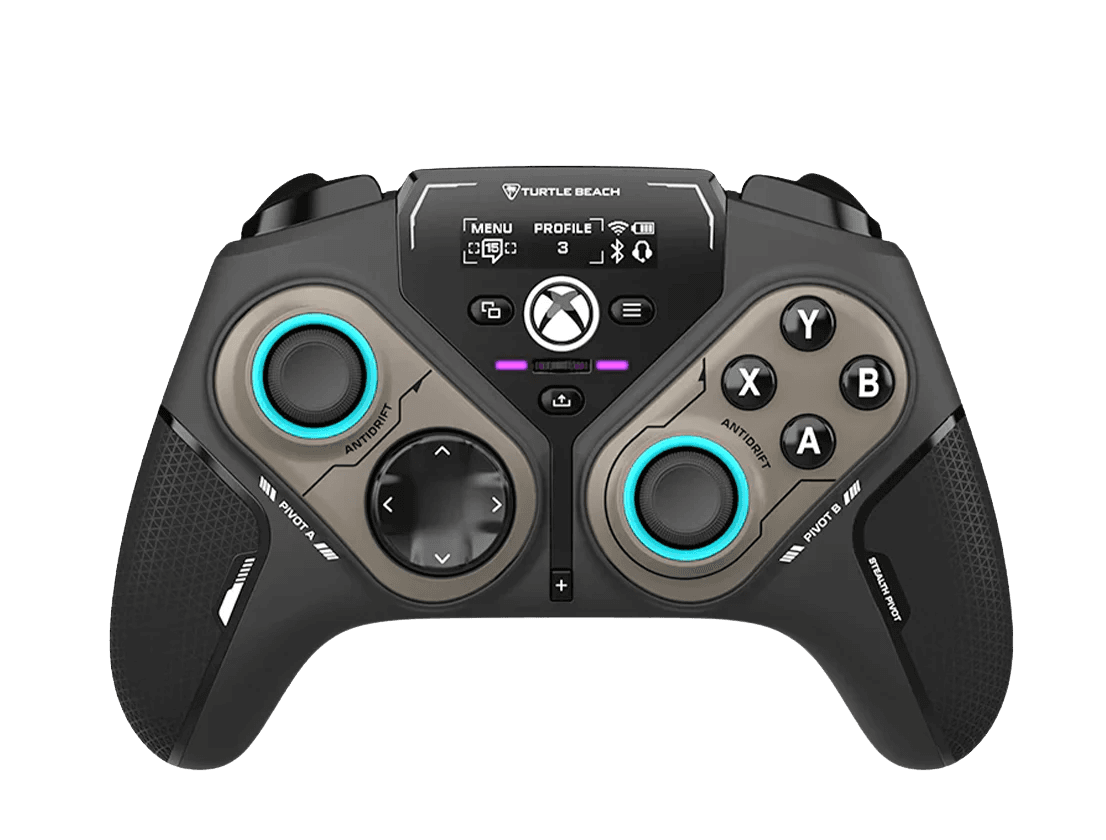
The Turtle Beach Stealth Pivot test runs a full diagnostic on this convertible controller in your browser — verifying the Hall-effect sticks and triggers, both rotating button-module layouts, the rear paddles, and trigger stops. Connect over USB-C (Xbox or PC) or the PC-only wireless modes, press any button, and get a Controller Health Score graded S through F.
Full Stealth Pivot diagnostic
The Controller Benchmark runs every subsystem on your Stealth Pivot — Hall sticks, deadzone, button response across both module layouts, Hall trigger range, rear paddles, rumble, latency, and connection stability — then produces a composite Controller Health Score. Test both the core and revolved module layouts; each maps its buttons differently, and the benchmark confirms every input registers in whichever configuration you run.
Turtle Beach Stealth Pivot hardware specifications
| Specification | Turtle Beach Stealth Pivot |
|---|---|
| Connection | USB-C, 2.4GHz Wireless Dongle, Bluetooth |
| Button count | 18 |
| Analog stick type | Hall-effect (drift-resistant) |
| Gyroscope | No |
| Rumble / haptics | ERM motors (standard rumble) |
| Impulse triggers | No |
| Adaptive triggers | No |
| Touchpad | No |
| Built-in microphone | No |
| Built-in speaker | No |
| Back paddles | Yes |
| Battery life | ~20 hours |
| Weight | 290 g |
| Release year | 2024 |
| MSRP | $129.99 USD |
Recommended tests for Turtle Beach Stealth Pivot
Each test runs in your browser via the Gamepad API — no install, no account, no upload. Run any individually, or use the full benchmark above.
Stick Drift Test
Detect unwanted analog input at rest
Deadzone Test
Measure your stick’s deadzone radius
Hall Effect Checker
Identify Hall Effect vs potentiometer sticks
Trigger Pressure
Verify full analog range on triggers
Button Test
Check every button responds instantly
Vibration Test
Test both rumble motors independently
Latency Test
Measure input lag in milliseconds
Polling Rate
Measure inputs reported per second
Known Turtle Beach Stealth Pivot issues
Recurring problems users report with this controller, ranked by frequency. Each links to a step-by-step fix guide.
- Common
Wireless works on PC only — Xbox requires a wired connection
The 2.4GHz dongle and Bluetooth modes connect to PC only. To use the Stealth Pivot on an Xbox Series X|S or Xbox One, you must connect with the USB-C cable — there is no wireless Xbox mode. A controller that 'won't connect wirelessly to Xbox' is working as designed; switch to wired.
View fix guide - Occasional
Impulse-trigger rumble only in wired Xbox mode
The triggers' impulse rumble is supported only over the wired Xbox connection. In PC wireless or Bluetooth modes you get the standard handle-motor rumble but not trigger rumble. This is a firmware/platform limitation, not a fault.
View fix guide - Occasional
Lower polling rate than the Stealth Ultra on PC
Reviewers note the Stealth Pivot's polling rate is lower than its Stealth Ultra sibling, which can matter on high-refresh PC setups. For most players it's imperceptible, but competitive PC users chasing minimum latency should weigh this against the convertible modules.
View fix guide - Occasional
Module not registering after a rotation
After rotating a button module, it must click fully into place for all inputs to register. If buttons in the new layout seem dead, re-seat the module until it locks, then run the button test to confirm every input in that configuration works.
View fix guide
How to pair the Turtle Beach Stealth Pivot
Get your controller connected before running diagnostics — wired or wireless, mobile or desktop.
Xbox: connect with the USB-C cable
On Xbox Series X|S or Xbox One, plug in the included USB-C cable. The Stealth Pivot is recognized as a licensed Xbox controller. Wireless modes do not work on Xbox — wired is the only Xbox path.
PC wireless: use the 2.4GHz dongle
On Windows, plug the 2.4GHz dongle into a USB port for a low-latency wireless connection. Bluetooth is also available on PC (and works on mobile and Linux/SteamOS).
Pick a button-module layout
Rotate the modules to choose the core layout (thumbstick + D-pad/ABXY) or the revolved 6-button layout for fighting and arcade games. Save up to five onboard profiles via the Command Display or Control Center 2.
Press any button to confirm in the browser
Browsers gate gamepad access behind a user gesture. Connect over USB-C (or the PC dongle), press any button to expose the controller to the Gamepad API, then test each module layout.
Turtle Beach Stealth Pivot vs the competition
Head-to-head reviews against the other controllers most buyers cross-shop.
- vs
Turtle Beach Stealth Ultra
The Stealth Ultra has a higher polling rate and a sharper Command Display; the Stealth Pivot trades some of that for its rotating button modules — effectively two controllers in one for multi-genre players.
- vs
Victrix Pro BFG Reloaded
Both are modular Turtle Beach/PDP Xbox controllers with Hall-effect sticks; the Pro BFG Reloaded swaps physical modules including a fightpad, while the Pivot rotates built-in modules on the fly.
- vs
Xbox Elite Series 2
The Elite Series 2 is the first-party premium benchmark with potentiometer sticks; the Stealth Pivot answers with drift-free Hall sticks and triggers plus its convertible layout, at a similar price.
Turtle Beach Stealth Pivot definitions
Plain-language definitions for the terms used on this page. Each links to the full glossary entry with thresholds, mechanism, and FAQs.
Turtle Beach Stealth Pivot questions
No. The 2.4GHz dongle and Bluetooth are PC-only. On Xbox Series X|S or Xbox One, the Stealth Pivot must be connected with the USB-C cable. It's a licensed Xbox controller, but only in wired mode.
The Stealth Pivot's signature feature: the button clusters physically rotate to switch between a core layout (thumbstick plus D-pad or ABXY) and a revolved six-button fightpad-style layout. Retractable analog sticks make the rotation possible, giving you up to four configurations for different genres.
Yes — both. Turtle Beach states Hall-effect explicitly for the Stealth Pivot's thumbsticks and triggers, so they resist drift and the triggers give drift-free analog input. The triggers also have adjustable stops for shorter, faster presses.
The Ultra has a higher polling rate and a higher-resolution Command Display. The Pivot adds the rotating button modules — effectively two controllers in one — at the cost of a lower polling rate. Multi-genre players favor the Pivot; raw-latency PC players may prefer the Ultra.
Yes. The Connected Command Display shows battery, profiles, and phone notifications, and lets you adjust settings and swap among five saved profiles directly on the controller. It's a lower-resolution screen than the Stealth Ultra's.
Yes. There's a 3.5mm stereo jack for headphones or a headset, with on-controller volume, chat balance, and EQ profile adjustments — useful given Turtle Beach's audio focus.
The impulse-trigger rumble is supported only over the wired Xbox connection. On PC, whether wireless or Bluetooth, you still get the standard handle-motor rumble, just not the in-trigger rumble effect.
Get a full health report for your Turtle Beach Stealth Pivot
Run the Controller Benchmark to score every subsystem and generate a shareable Controller Health Score graded S through F.
Run the Benchmark