Mouse Test - click, scroll & polling rate checker
Use this mouse test to check buttons, wheel events, nearby repeat clicks, and browser-visible movement rate. Try each control, then move the mouse during the timed sample. Timing flags are clues to repeat and investigate. They do not prove switch damage or measure the mouse's raw USB polling rate.
Check clicks before movement timing
Phase 1 - Buttons and wheel (untimed)
Click each of the five buttons (LMB, MMB, RMB, M4 back, M5 forward) and scroll in every direction on the test surface. The visual mouse diagram lights up violet when a button is held and emerald when released. M4 and M5 are absent on basic office mice - missing those does not fail the test.
Chatter detection (inline)
The tester tracks the timestamp of every mousedown event per button. If two clicks on the same button arrive within 50 milliseconds of each other, that is flagged as chatter - the #1 mechanical failure mode on gaming mice. An amber warning surfaces immediately so you can re-click to verify, and the count contributes to the final verdict.
Click bounce detection (inline)
For each click, the tester measures the duration between mousedown and mouseup. Healthy clicks register 50-150 milliseconds depending on how firmly you press. Sub-20-millisecond clicks indicate switch bounce - the contact is registering an extra phantom click on press or release.
Phase 2 - Polling rate (5 seconds)
After clicking Continue, move the mouse continuously inside the larger surface for 5 seconds. The tester captures every mousemove timestamp, computes the median interval between events, and derives Hz from 1000 / median_ms. A live counter updates so you can watch the rate stabilize.
Browser-rate disclosure
Browser mousemove events are throttled by the renderer. Chromium typically caps mousemove at 250-500 Hz regardless of mouse hardware. The result panel shows the measured polling rate alongside the browser frame rate so you can see when you are measuring the browser ceiling rather than the mouse ceiling. Premium 4kHz+ gaming mice cannot be fully measured in-browser.
What the measurements mean
Five signals classified independently. The overall verdict is the worst of the five.
| Signal | Verdict | Threshold |
|---|---|---|
| Button coverage | Buttons that registered both press and release | Healthy 5/5 · Functional 4/5 (M4 or M5 may be absent on basic mice) · Partial 3/5 · Faulty < 3/5. Missing M4/M5 is not penalized harshly because many mice physically lack them. |
| Wheel coverage | Scroll directions plus middle-click | Healthy 3/3 (vertical + horizontal + middle-click) · Functional 2/3 · Partial 1/3 · Faulty 0/3. Most mice support vertical and middle-click but lack horizontal scroll wheels. |
| Polling rate | Hz from median mousemove interval | Healthy ≥ 500 Hz · Functional ≥ 250 Hz · Partial ≥ 125 Hz · Faulty < 125 Hz. Limited by browser mousemove throttling - premium 4kHz+ mice will measure at the browser ceiling. |
| Chatter detection | Paired clicks under 50ms apart | Healthy 0 events · Partial 1 event (may be noise) · Faulty 2+ events. Chatter is the most common gaming mouse failure - caused by oxidized switch contacts or worn mechanical springs. |
| Click bounce | Clicks under 20ms duration | Healthy 0 events · Faulty any. Bounce means the switch contact is registering on press AND release simultaneously, producing phantom double-clicks. Indicates failing switches; replace with hot-swappable switches if your mouse supports it. |
Separate a repeat click from a movement-rate limit
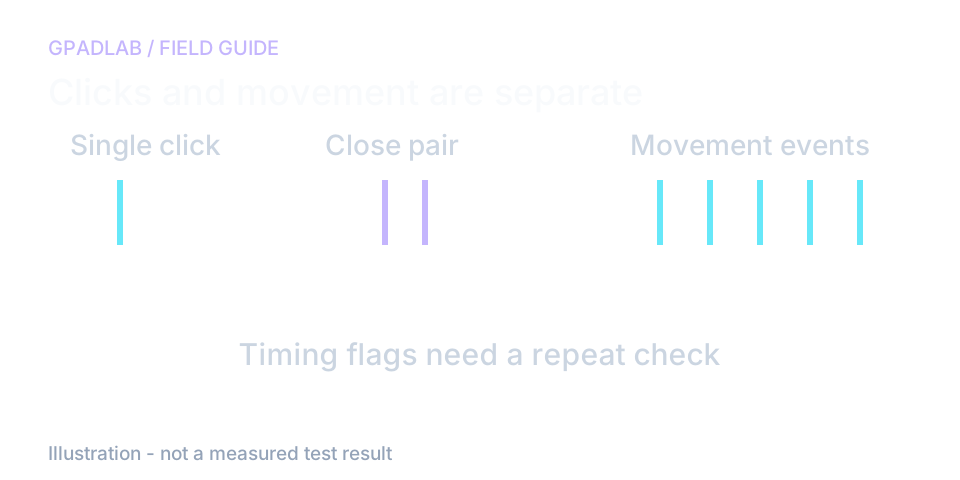
Repeat a suspect click slowly
Press and release the same button with clear pauses. If one deliberate click repeatedly produces a pair, note which button and check it in another app.
Very short clicks and close pairs are timing flags. They do not identify a worn switch on their own. Side buttons may also trigger browser navigation or a software shortcut.
Why an 8000 Hz mouse can show less here
The tool counts mouse events delivered to the page. The browser can limit or combine movement updates, so the result may be below the rate selected in the mouse software.
Keep movement steady during the five-second sample. Compare repeat runs on the same setup. This test does not measure DPI or certify the device's advertised polling rate.
Compatible mice
The mouse test works with any pointing device your operating system recognizes. Common categories:
Related diagnostics
Mouse questions
When the test surface is focused, the browser fires mousedown, mouseup, wheel, and mousemove events. Our tester reads event.button to identify which physical button was pressed (0=LMB, 1=MMB, 2=RMB, 3=back/M4, 4=forward/M5), event.deltaY and deltaX for scroll direction, and timestamps every mousemove event for polling rate calculation. All processing happens in your browser tab - nothing is uploaded.
Chatter usually means one intended click appears as more than one input. This page flags close pairs, but it cannot prove their cause. Repeat slow single clicks, check any button assignments, and compare another app before concluding that a switch needs repair.
Chatter happens between separate clicks - two physical presses arrive too close together in software (under 50ms apart in our test). Bounce happens within a single click - the press and release register within 20ms because the contact is bouncing on press, before the user releases. Both indicate switch failure but require different fixes: chatter sometimes resolves with contact cleaning; bounce almost always means the switch needs replacement.
Browser mousemove events are throttled by the renderer to prevent CPU saturation. Chromium typically caps the mousemove event rate at 250-500 Hz regardless of how fast your mouse polls at the hardware level. This is not a hardware fault and not a limitation of your mouse - it is a browser implementation detail. To verify true polling rate above 1 kHz, use your mouse manufacturer software (Logitech G HUB, Razer Synapse, SteelSeries GG) which reads directly from the HID device.
Probably not. Many basic mice - office mice, laptop trackpads, small portable wireless mice - physically do not have M4 and M5 buttons. Our test does not penalize you for missing M4/M5; the verdict treats 4 of 5 buttons as Functional rather than Faulty. If your mouse advertises 5+ buttons and only 3 register, that is a real issue - typically a driver/software conflict (Logitech Options or Razer Synapse can intercept side buttons before the browser sees them).
Run this test. If you see 2+ chatter events on the same button across normal clicking, your switches are failing. If your mouse supports hot-swappable switches (most premium gaming mice 2023+ do), you can replace them yourself for $5-10 in parts and 15 minutes of work - no soldering needed. Hot-swappable Kailh GM 8.0 and Huano switches are popular replacements. If your mouse is soldered, the cost-benefit usually favors replacing the whole mouse over repair.
No, not directly. DPI (dots per inch) is a hardware setting baked into the mouse sensor - the browser receives mouse movement as pixel deltas after the OS has already applied DPI scaling, so we cannot read the underlying DPI value. To verify DPI, use your mouse manufacturer software, which reads the sensor directly via the HID device. Some manufacturers offer DPI test pages where you move the mouse a measured physical distance and confirm the on-screen distance matches.
For most users, the failure pattern is: stick drift on controller, switch chatter on mouse, then individual key failures on keyboard. Mouse switches fail first because gaming use concentrates clicks on LMB at 5-15 actuations per minute under competitive use. If you suspect a peripheral problem and are not sure which device is at fault, run all three tests (mouse, keyboard, controller diagnostic suite) - the test that reports the lowest tier is your problem device.
How we measure mouse health
The page listens for button, wheel, and movement events. It flags nearby clicks and short holds, then estimates event rate during a five-second movement sample. Those flags cannot diagnose a switch by themselves. Event delivery may differ from raw device polling. This tool does not measure DPI.Dedicated methodology article not yet published; see the methodology hub for the methods currently available.