8BitDo Pro 2 Controller Test
The 8BitDo Pro 2 controller test runs a full diagnostic on 8BitDo's retro-styled Hall-effect controller in the browser — verifying the drift-resistant analog sticks, two back paddles, motion controls, and rumble. Connect over Bluetooth or USB-C, press any button, and get a Controller Health Score graded S through F.
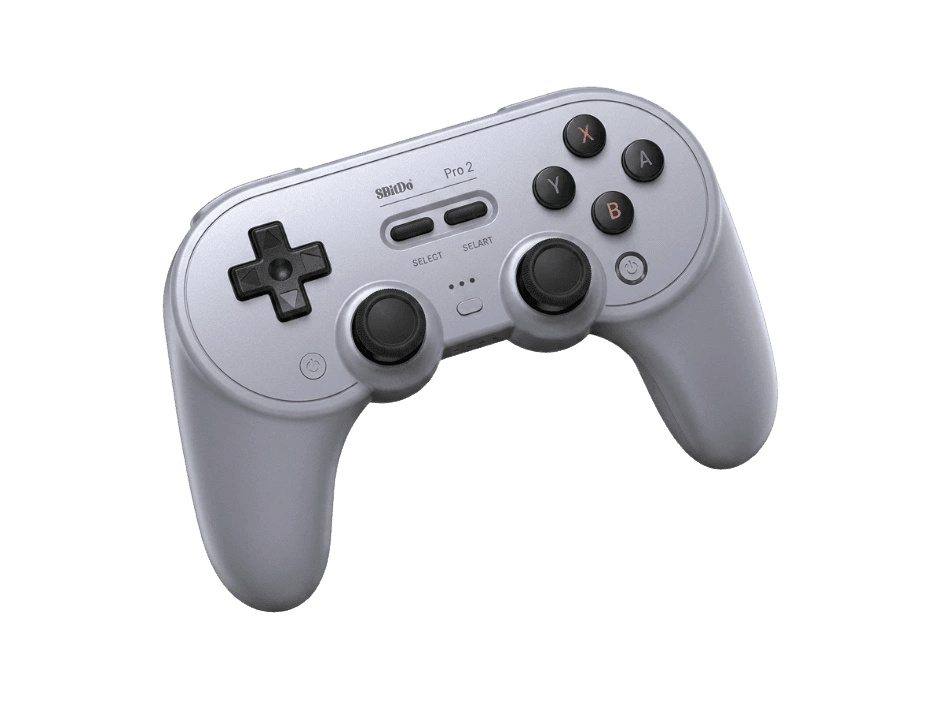
Full 8BitDo Pro 2 diagnostic
The Controller Benchmark runs every relevant subsystem on your 8BitDo Pro 2 — Hall-effect sticks, deadzone, button response, back paddles, trigger range, rumble, latency, and connection stability — then produces a composite Controller Health Score. Hall-effect sticks should test exceptionally clean for drift; if they don't, the magnet alignment may need attention.
8BitDo Pro 2 hardware specifications
| Specification | 8BitDo Pro 2 |
|---|---|
| Connection | USB-C, Bluetooth |
| Button count | 17 |
| Analog stick type | Hall-effect (drift-resistant) |
| Gyroscope | Yes |
| Rumble / haptics | ERM motors (standard rumble) |
| Impulse triggers | No |
| Adaptive triggers | No |
| Touchpad | No |
| Built-in microphone | No |
| Built-in speaker | No |
| Back paddles | Yes |
| Battery life | ~20 hours |
| Weight | 228 g |
| Release year | 2024 |
| MSRP | $49.99 USD |
Recommended tests for 8BitDo Pro 2
Each test runs in your browser via the Gamepad API — no install, no account, no upload. Run any individually, or use the full benchmark above.
Stick Drift Test
Detect unwanted analog input at rest
Deadzone Test
Measure your stick’s deadzone radius
Hall Effect Checker
Identify Hall Effect vs potentiometer sticks
Trigger Pressure
Verify full analog range on triggers
Button Test
Check every button responds instantly
Circularity Test
Visualize stick travel as a circle
Vibration Test
Test both rumble motors independently
Gyro Test
Test 6-axis motion sensors
Known 8BitDo Pro 2 issues
Recurring problems users report with this controller, ranked by frequency. Each links to a step-by-step fix guide.
- Common
Mode switch confusion on first connect
The Pro 2 has a 4-way mode switch on the back (Switch / Android / X-input / D-input). If the switch isn't on the right mode for your host, pairing succeeds but the controller appears with the wrong button mapping or refuses to be recognized. Flip the switch before pairing rather than after.
View fix guide - Occasional
Doesn't work on Xbox consoles
The wireless Pro 2 (Bluetooth/Hall Effect model) does not support Xbox consoles — that requires a separate Xbox-licensed wired variant. The wireless Pro 2 covers Switch, Switch 2, PC, Mac, iOS, Android, Steam Deck, and Raspberry Pi.
View fix guide - Common
Back paddles unmapped out of the box
The two back paddles produce no input by default. Install the 8BitDo Ultimate Software (PC, Android, or iOS), connect via USB-C or Bluetooth, and assign any button to each paddle. Three onboard profiles let you switch mappings on the fly via the profile-switch button.
View fix guide - Occasional
Battery drains faster than rated after long-term use
The 1000 mAh Li-ion battery is rated for 20 hours new but degrades with charge cycles. After 2+ years of regular use, expect real-world battery life to drop to 12–15 hours. The battery is replaceable — the controller accepts standard AA batteries as a backup option.
View fix guide - Rare
HD Rumble unavailable on Switch
The Pro 2 uses standard ERM rumble motors, not Nintendo's voice-coil HD Rumble. Games that rely heavily on HD Rumble effects (1-2-Switch, Astro Bot via emulation) will feel less nuanced. The rumble itself works correctly; it's a hardware capability limit, not a fault.
View fix guide
How to pair the 8BitDo Pro 2
Get your controller connected before running diagnostics — wired or wireless, mobile or desktop.
Set the mode switch on the back
Find the 4-way mode switch on the back of the controller. Set it to S (Switch) for Switch / Switch 2, A (Android) for Android / iOS, X (X-input) for Windows / Steam Deck, or D (D-input) for older PC games and macOS. Setting this wrong is the most common pairing-failure cause.
Hold the Pair button on the back
On the back of the controller near the mode switch, hold the small Pair button for about three seconds. The LEDs on the front will start flashing rapidly, indicating pairing mode is active.
Open your device's Bluetooth menu
On Windows, Mac, iOS, or Android, open Bluetooth settings and scan for new devices. The controller appears as "8BitDo Pro 2" — tap or click to pair. On Switch, use Controllers menu → Change Grip/Order, then press a button on the Pro 2.
Use USB-C for wired play
Plug the included USB-C cable into any USB-A port for wired play. Wired bypasses Bluetooth entirely, giving 1000Hz polling instead of the 125Hz Bluetooth cap. The mode switch still determines which host type the controller identifies as.
Press any button to confirm in the browser
Browsers gate gamepad access behind a user gesture. Press any button on the Pro 2 to expose it to the Gamepad API. Button labels match the Switch hardware print: B A Y X, not Xbox-style A B X Y.
8BitDo Pro 2 vs the competition
Head-to-head reviews against the other controllers most buyers cross-shop.
- vs
8BitDo Ultimate
Ultimate is the Xbox-style modern layout with a charging dock; Pro 2 is the retro Nintendo/PlayStation-style layout with mode switching and AA-battery backup.
- vs
Switch Pro Controller
Switch Pro Controller has HD Rumble, NFC, and longer battery; Pro 2 adds Hall-effect sticks, back paddles, multi-platform mode switching, and a lower price.
- vs
PS5 DualSense
DualSense has haptics and adaptive triggers for PS5 native support; Pro 2 has Hall-effect sticks (no drift), back paddles, and broader OS compatibility at a lower price.
8BitDo Pro 2 definitions
Plain-language definitions for the terms used on this page. Each links to the full glossary entry with thresholds, mechanism, and FAQs.
8BitDo Pro 2 questions
The Hall Effect variant (released April 2024) uses magnetic Hall-effect sensors in the analog sticks instead of the original Pro 2's ALPS potentiometers. Same shape, same buttons, same battery — but the new sticks don't develop drift over time. If your Pro 2 has the Hall Effect logo on the box or packaging, you have the newer variant.
Not the wireless model. The Bluetooth Pro 2 supports Switch, PC, Mac, iOS, Android, Steam Deck, and Raspberry Pi — but not Xbox consoles. 8BitDo sells a separate Pro 2 Wired model specifically for Xbox, which has impulse triggers and a 3.5mm jack the wireless model lacks.
The mode switch on the back determines which host type the controller identifies as. If it's set to S (Switch) but you're connecting to a PC expecting X-input, the buttons will appear in the wrong order. Flip the mode switch to match your host before pairing, and re-pair if the mapping is already wrong.
Yes. The Pro 2 works fully via USB-C even with no internal battery installed. Wired mode also bypasses the Bluetooth 125Hz polling cap, giving you 1000Hz polling for lower latency — useful for competitive play, since the polling rate test will show the difference clearly.
No. NFC and amiibo reading are exclusive to the official Switch Pro Controller and Joy-Cons. The Pro 2 works on Switch but cannot scan amiibo figures.
Connect the Pro 2 to a PC via USB-C, then run the 8BitDo Ultimate Software on Windows or macOS. The software checks for firmware updates and applies them in about two minutes. Firmware updates have added Switch 2 compatibility and improved stick calibration since the Hall Effect launch.
Both back paddles are unassigned out of the box. Install the 8BitDo Ultimate Software, connect the controller, and assign each paddle to any button on the controller. Three onboard profiles store separate paddle mappings for different games — switch profiles on the fly via the dedicated profile-switch button.
Yes. Pop off the rear battery cover and the controller accepts the included rechargeable battery pack or two AA batteries as backup. AA-powered Pro 2 controllers have shorter runtime (about 8–12 hours depending on the cells), but you'll never be stranded by a flat battery on a long trip.
Get a full health report for your 8BitDo Pro 2
Run the Controller Benchmark to score every subsystem and generate a shareable Controller Health Score graded S through F.
Run the Benchmark