Hori Wireless Fighting Commander OCTA Pro Controller Test
The Hori Wireless Fighting Commander OCTA Pro test runs a full diagnostic on Hori's 2025 wireless upgrade to the OCTA fight pad — verifying the USB-C wireless dongle connection (10m range), six microswitch face buttons, octagonal-gate analog stick, three swappable D-pad modules, two programmable rear buttons, analog slider pad, and 10-hour battery. The OCTA Pro retains the original OCTA's native PS5 game compatibility but adds wireless freedom at a $40 price premium.
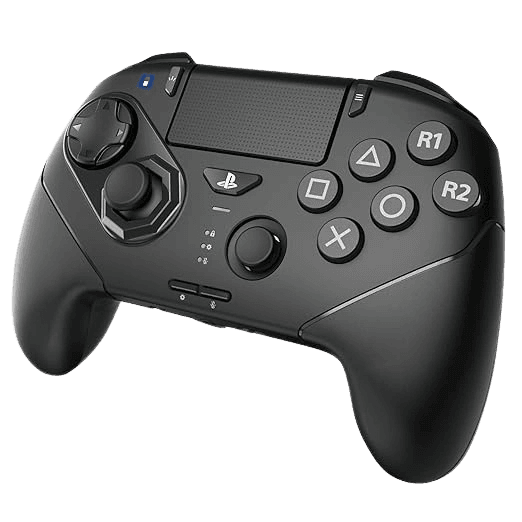
Full Hori Wireless OCTA Pro diagnostic
The Controller Benchmark runs every relevant subsystem on your Wireless OCTA Pro — the analog stick with octagonal gate constraint, deadzone, microswitch face buttons, shoulder buttons, two programmable rear buttons, analog slider pad, touchpad, latency over the 2.4GHz dongle, and battery health — then produces a composite Controller Health Score. Like the wired OCTA, the Pro has no rumble motors by design (fight-pad convention), so the vibration test will correctly report no input.
Hori Wireless Fighting Commander OCTA Pro hardware specifications
| Specification | Hori Wireless Fighting Commander OCTA Pro |
|---|---|
| Connection | USB-C, 2.4GHz Wireless Dongle |
| Button count | 24 |
| Analog stick type | Potentiometer (susceptible to drift) |
| Gyroscope | No |
| Rumble / haptics | None |
| Impulse triggers | No |
| Adaptive triggers | No |
| Touchpad | Yes |
| Built-in microphone | No |
| Built-in speaker | No |
| Back paddles | Yes |
| Battery life | ~10 hours |
| Weight | 260 g |
| Release year | 2025 |
| MSRP | $99.99 USD |
Recommended tests for Hori Wireless Fighting Commander OCTA Pro
Each test runs in your browser via the Gamepad API — no install, no account, no upload. Run any individually, or use the full benchmark above.
Stick Drift Test
Detect unwanted analog input at rest
Deadzone Test
Measure your stick’s deadzone radius
Circularity Test
Visualize stick travel as a circle
Button Test
Check every button responds instantly
Polling Rate
Measure inputs reported per second
Latency Test
Measure input lag in milliseconds
Touchpad Test
Test DualSense and DualShock touchpads
Connection Stability
Detect dropouts and signal interruptions
Battery Health
Estimate wireless controller battery life
Known Hori Wireless Fighting Commander OCTA Pro issues
Recurring problems users report with this controller, ranked by frequency. Each links to a step-by-step fix guide.
- Common
No rumble motors — vibration won't fire
Like the wired OCTA, the OCTA Pro has no internal rumble motors. This is intentional fight-pad design — rumble causes hand fatigue in long tournament matches and provides no competitive benefit. The vibration test will correctly report no input. If your game shows a rumble prompt, the game will not vibrate the controller. This is not a defect.
View fix guide - Common
PS4 wireless not supported — wired only on PS4
Per Hori's official manual, the OCTA Pro's wireless dongle does NOT work on PS4 — only PS5 and Windows PC support wireless mode. PS4 users must use the controller in wired mode, AND must purchase a USB-C to USB-A cable separately (the included USB-C to USB-C cable doesn't fit PS4's USB-A ports). Hori SPF-015U is the recommended cable.
View fix guide - Common
Firmware update required before first use
Hori's product page explicitly states 'please download and install the latest firmware before using the HORI Wireless Fighting Commander OCTA Pro.' Units shipped before mid-2025 may have outdated firmware that causes pairing issues. Download HORI Device Manager from horiusa.com, connect the OCTA Pro via wired USB-C, and update firmware before pairing the wireless dongle.
View fix guide - Occasional
Wireless dongle is single-controller — no multi-pairing
The included USB-C wireless dongle is pre-paired to one OCTA Pro controller from the factory. You cannot pair multiple OCTA Pros to one dongle for local multiplayer — each controller needs its own dongle. This is by design for tournament reliability (no signal contention), but worth knowing if you're buying two for couch co-op.
View fix guide - Common
Octagonal gate limits stick to 8 directions
Like the wired OCTA, the Pro variant's left analog stick has a physical 8-gate octagonal ring that constrains motion to 8 discrete directions. Excellent for fighting game inputs (quarter-circle motions snap cleanly into cardinal/diagonal positions), limiting for non-fighting games requiring fluid 360° motion. The circularity test will visualize the octagonal constraint clearly.
View fix guide
How to set up the Hori Wireless Fighting Commander OCTA Pro
Get your controller connected before running diagnostics — wired or wireless, mobile or desktop.
Update firmware via HORI Device Manager first
Before first use, plug the OCTA Pro into a Windows PC via USB-C and run HORI Device Manager (download from horiusa.com). Apply the latest firmware. This step prevents the most common 'controller not detected' issue on first PS5 use.
Set the platform mode toggle on the back
The OCTA Pro has a mode toggle on the back labeled PS5 / PS4 / PC. Set it to your intended host platform. For PS4 use, you must use wired mode — PS4 wireless is not supported. PS5 and Windows PC both support wireless via the USB-C dongle.
Insert the USB-C wireless dongle into your host
Plug the included USB-C dongle into a USB-C port on your PS5 (front or rear port works) or Windows PC. If your host only has USB-A ports, you'll need a USB-A to USB-C adapter. The dongle is pre-paired with the OCTA Pro from the factory — no manual sync needed.
Press the PS button to power on the controller
Press the central PS button on the OCTA Pro to power on. The LED ring illuminates. The controller connects to the dongle within 2 seconds. If pairing fails, check that the mode toggle matches your host (PS5 mode for PS5 console).
Press any button to expose to the browser
Browsers gate gamepad access behind a user gesture. With the OCTA Pro connected to your PC via the dongle, press any button to expose it to the Gamepad API. The controller reports with PlayStation-style face button labels (X, Circle, Square, Triangle) for the four base buttons, plus the additional two of the 6-button layout mapped to R1 and R2.
Hori Wireless Fighting Commander OCTA Pro vs the competition
Head-to-head reviews against the other controllers most buyers cross-shop.
- vs
Hori Fighting Commander OCTA (wired)
Wired OCTA at $59 is the foundational tournament fight pad. OCTA Pro at $99 adds wireless via USB-C dongle, two programmable rear buttons, three swappable D-pads, and 10h battery — worth the $40 premium for couch play or if you want extra customization.
- vs
PS5 DualSense Edge
DualSense Edge at $200 has full haptics, adaptive triggers, replaceable sticks, and a standard 4-button face. OCTA Pro at $99 is half the price, has the 6-button fight-pad layout, but no rumble or haptics. Buy DualSense Edge for general gaming with PS5 features; OCTA Pro for fighting games specifically.
- vs
Victrix Pro KO Leverless
Victrix Pro KO is a Hitbox-style leverless all-button arcade controller at $180. OCTA Pro is a traditional pad-style controller with a 6-button face at $99. Buy Pro KO if you want a leverless competitive setup; OCTA Pro if you prefer pad-style with analog stick.
Hori Wireless Fighting Commander OCTA Pro definitions
Plain-language definitions for the terms used on this page. Each links to the full glossary entry with thresholds, mechanism, and FAQs.
Hori Wireless Fighting Commander OCTA Pro questions
Yes. Like the wired OCTA before it, the OCTA Pro is officially licensed for PlayStation 5 and works on PS5-exclusive native games including Street Fighter 6, Tekken 8, Mortal Kombat 1, and Granblue Fantasy Versus Rising. The Sony licensing is what differentiates the OCTA line from PS4-era third-party controllers (like the Astro C40 TR) that Sony's PS5 restrictions block from native titles.
Four main differences worth the $40 price gap. First, wireless connectivity via included USB-C dongle (10m range, no Bluetooth). Second, two programmable rear buttons (the wired OCTA has none). Third, three swappable D-pad modules with different feel options. Fourth, 10-hour rechargeable battery via USB-C. The 6-button microswitch face layout, octagonal-gate analog stick, and tournament lock are identical.
By design. The OCTA Pro's wireless dongle is licensed for PS5 and Windows PC only — Sony's PS4 platform restrictions don't permit wireless third-party fight pads. On PS4, you must use the OCTA Pro in wired mode AND you need a USB-C to USB-A cable (the included USB-C to USB-C cable doesn't fit PS4's USB-A ports). Hori sells the SPF-015U cable separately for PS4 wired use.
Same reason as the wired OCTA: fight pads intentionally omit rumble motors. Vibration causes hand fatigue in long tournament matches and provides no competitive benefit. Hori's spec sheets explicitly list 'Rumble Vibration: false' for both OCTA variants. If you want rumble in a PS5 fight pad, no current officially-licensed option provides it — the entire FGC pad category is rumble-free by convention.
Hori rates the OCTA Pro at approximately 10 hours per charge. Real-world usage varies from 8-12 hours depending on how aggressively you press buttons (microswitches consume more power than membrane buttons) and whether the controller's LED ring is active. Charge time from empty is approximately 3 hours via USB-C with a standard 5V/2A charger.
Yes, but you need two separate dongles. The wireless dongle is pre-paired to one controller from the factory — you can't pair multiple controllers to one dongle. Each OCTA Pro needs its own USB-C dongle plugged into the console. The PS5 has multiple USB-C ports specifically for this kind of multi-controller setup. The wired OCTA Pro can also coexist with one wireless OCTA Pro on the same console.
Three different physical D-pad modules ship in the box: a standard cross D-pad (similar to DualSense), a domed/concave D-pad optimized for rolling thumb motions (for charge-character inputs in fighting games), and a tactile clicky D-pad for precise individual direction presses (for SNK-style fighters). They swap magnetically — no tools needed. The sensitivity of each is adjustable in HORI Device Manager.
Yes — the LOCK function on the back disables non-essential buttons (Share, mute, function, PS button) to prevent disqualifying accidental presses during tournament matches. This is identical to the wired OCTA's tournament lock. Engage it before competitive play; disengage for casual use when you want full button access.
Get a full health report for your Hori Wireless Fighting Commander OCTA Pro
Run the Controller Benchmark to score every subsystem and generate a shareable Controller Health Score graded S through F.
Run the Benchmark