Machenike G5 Pro Controller Test
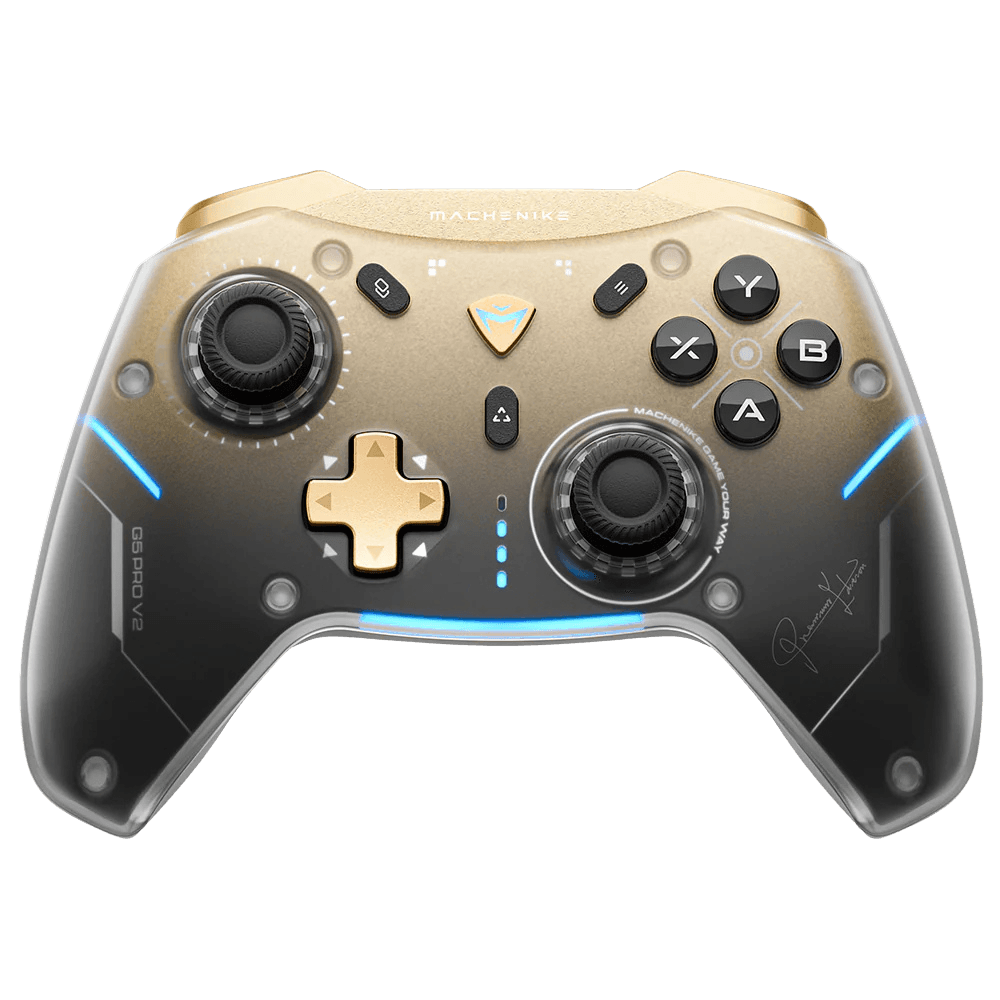
The Machenike G5 Pro controller test runs a full diagnostic on this budget full-Hall controller in your browser — verifying the Hall-effect sticks and triggers, Kailh mechanical-switch D-pad, two programmable back buttons, and gyro. Connect over the 2.4G dongle, Bluetooth, or USB-C, press any button, and get a Controller Health Score graded S through F.
Full Machenike G5 Pro diagnostic
The Controller Benchmark runs every subsystem on your G5 Pro — Hall sticks, deadzone, button response, Kailh D-pad, Hall trigger range, back buttons, rumble, gyro, latency, and connection stability — then produces a composite Controller Health Score. The full-Hall sticks and triggers should test very clean for drift; if they don't, recalibrate via the Machenike software.
Machenike G5 Pro hardware specifications
| Specification | Machenike G5 Pro |
|---|---|
| Connection | 2.4GHz Wireless Dongle, Bluetooth, USB-C |
| Button count | 17 |
| Analog stick type | Hall-effect (drift-resistant) |
| Gyroscope | Yes |
| Rumble / haptics | ERM motors (standard rumble) |
| Impulse triggers | No |
| Adaptive triggers | No |
| Touchpad | No |
| Built-in microphone | No |
| Built-in speaker | No |
| Back paddles | Yes |
| Battery life | ~12 hours |
| Weight | 240 g |
| Release year | 2023 |
| MSRP | $39.99 USD |
Recommended tests for Machenike G5 Pro
Each test runs in your browser via the Gamepad API — no install, no account, no upload. Run any individually, or use the full benchmark above.
Stick Drift Test
Detect unwanted analog input at rest
Deadzone Test
Measure your stick’s deadzone radius
Hall Effect Checker
Identify Hall Effect vs potentiometer sticks
Trigger Pressure
Verify full analog range on triggers
Button Test
Check every button responds instantly
Vibration Test
Test both rumble motors independently
Gyro Test
Test 6-axis motion sensors
Polling Rate
Measure inputs reported per second
Known Machenike G5 Pro issues
Recurring problems users report with this controller, ranked by frequency. Each links to a step-by-step fix guide.
- Common
Does not work on Xbox or PlayStation consoles
The G5 Pro supports PC, Switch, Android, iOS, and Android TV over Bluetooth, 2.4G, or wired — but it is not licensed for Xbox or PlayStation consoles and won't be recognized by either.
View fix guide - Occasional
G5 Pro V2 has optical triggers, not Hall
The original G5 Pro has full Hall-effect triggers; the later G5 Pro V2 switched to optical linear triggers and optical face buttons (and added hot-swappable sticks). If your triggers behave differently from a guide, confirm whether you have the original or the V2.
View fix guide - Occasional
Back-button macros require Machenike software
The two back buttons are programmed through Machenike's proprietary software. If a back button isn't doing what you expect, open the app to check or reassign its mapping, then run the button test to confirm it registers.
View fix guide
How to pair the Machenike G5 Pro
Get your controller connected before running diagnostics — wired or wireless, mobile or desktop.
2.4G dongle for lowest latency
Plug the included full-size 2.4G USB-A dongle into a port; it has a pair/reset button and status LED. The G5 Pro connects automatically — best for PC gaming.
Bluetooth for mobile and Switch
Hold the pairing combo until the indicator flashes, then select the Machenike G5 Pro in your device's Bluetooth menu.
Wired USB-C
Connect a USB-C cable for a wired connection and charging; full charge takes around three hours.
Press any button to confirm in the browser
Browsers gate gamepad access behind a user gesture. Press any button on the G5 Pro to expose it to the Gamepad API, then run the benchmark or any individual test.
Machenike G5 Pro vs the competition
Head-to-head reviews against the other controllers most buyers cross-shop.
- vs
EasySMX X10
Both are sub-$45 full-Hall controllers with mechanical elements; the X10 has full-mechanical face buttons and swappable faceplates, while the G5 Pro pairs Hall with a Kailh mechanical D-pad.
- vs
GameSir Nova 2 Lite
Close budget rivals: the Nova 2 Lite adds trigger stops and a tuned circular D-pad, while the G5 Pro brings a gyro and a Kailh mechanical D-pad at a similar price.
- vs
8BitDo Ultimate 2C
The Ultimate 2C leans on 8BitDo's software and build polish; the G5 Pro counters with full Hall triggers (on the original) plus a gyro at a comparable budget price.
Machenike G5 Pro definitions
Plain-language definitions for the terms used on this page. Each links to the full glossary entry with thresholds, mechanism, and FAQs.
Machenike G5 Pro questions
The original G5 Pro does — Hall-effect sensors on both the thumbsticks and the triggers, which resist the drift and wear that affect potentiometer parts. Note the later G5 Pro V2 uses optical linear triggers instead of Hall.
The original G5 Pro is full Hall (sticks and triggers). The V2 switched to hot-swappable Hall sticks but optical linear triggers and optical face buttons, and added a charging dock. They share a name but differ in trigger tech.
No. The G5 Pro works on PC, Switch, Android, iOS, and Android TV, but it is not licensed for Xbox or PlayStation consoles.
The G5 Pro's D-pad uses Kailh mechanical switches rated for fast actuation and a long lifespan, giving a clicky, tactile feel that's more durable and responsive than a membrane D-pad — useful for fighters and platformers.
Yes, a 6-axis motion sensor for gyro aiming, useful in Switch titles and PC games that support motion controls through Steam Input or native motion.
Three: a 2.4G wireless dongle (lowest latency, with its own pair/reset button), Bluetooth (best for mobile), and wired USB-C. It moves across PC, Switch, and mobile easily.
Yes. Frequently discounted to around $25-30, the original G5 Pro offers full Hall sticks and triggers, a mechanical D-pad, gyro, and back buttons — an unusually complete spec sheet for the price.
Get a full health report for your Machenike G5 Pro
Run the Controller Benchmark to score every subsystem and generate a shareable Controller Health Score graded S through F.
Run the Benchmark