Mobapad M6 HD Controller Test
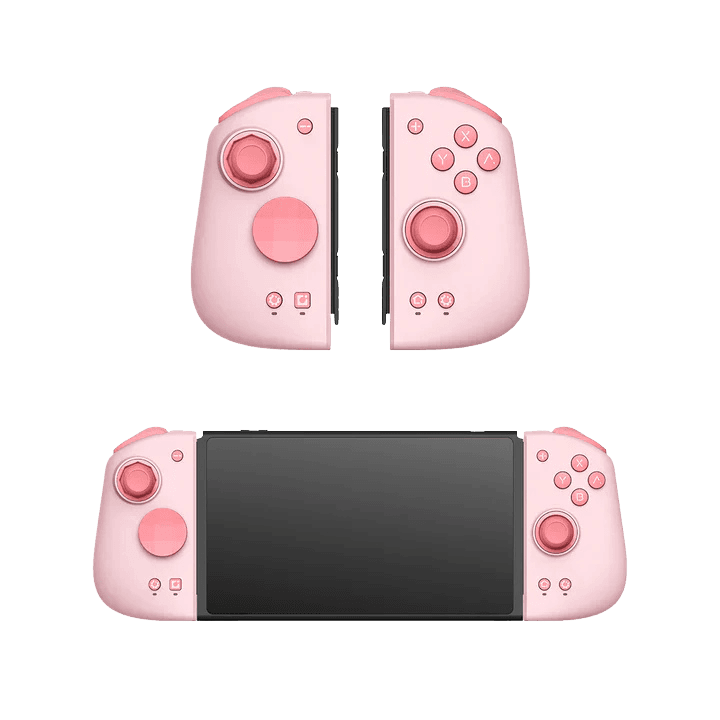
The Mobapad M6 HD controller test runs a full diagnostic on this premium Joy-Con replacement set in your browser — verifying the drift-free Hall-effect sticks, Hall-linear triggers, Omron mechanical buttons, gyro, and HD rumble. Slide the halves onto your Switch or connect to PC, press any button, and get a Controller Health Score graded S through F.
Full Mobapad M6 HD diagnostic
The Controller Benchmark runs every subsystem on your M6 HD — Hall sticks, deadzone, circularity, Omron button response, Hall trigger range, HD rumble, gyro, latency, and connection stability — then produces a composite Controller Health Score. The metal-ring Hall sticks are praised as some of the smoothest available, so circularity and deadzone should score very clean.
Mobapad M6 HD hardware specifications
| Specification | Mobapad M6 HD |
|---|---|
| Connection | Bluetooth, USB-C |
| Button count | 18 |
| Analog stick type | Hall-effect (drift-resistant) |
| Gyroscope | Yes |
| Rumble / haptics | Haptic (voice-coil / LRA) |
| Impulse triggers | No |
| Adaptive triggers | No |
| Touchpad | No |
| Built-in microphone | No |
| Built-in speaker | No |
| Back paddles | No |
| Battery life | ~15 hours |
| Weight | 200 g |
| Release year | 2024 |
| MSRP | $59.99 USD |
Recommended tests for Mobapad M6 HD
Each test runs in your browser via the Gamepad API — no install, no account, no upload. Run any individually, or use the full benchmark above.
Stick Drift Test
Detect unwanted analog input at rest
Deadzone Test
Measure your stick’s deadzone radius
Hall Effect Checker
Identify Hall Effect vs potentiometer sticks
Circularity Test
Visualize stick travel as a circle
Trigger Pressure
Verify full analog range on triggers
Button Test
Check every button responds instantly
Vibration Test
Test both rumble motors independently
Gyro Test
Test 6-axis motion sensors
Known Mobapad M6 HD issues
Recurring problems users report with this controller, ranked by frequency. Each links to a step-by-step fix guide.
- Common
Joy-Con replacement form factor, primarily Switch
The M6 HD is a pair of Joy-Con replacements, not a standalone gamepad. It works on Switch 1 (handheld and wireless), Switch 2 (wireless), and PC/Steam, but it is not licensed for Xbox or PlayStation. On PC it presents as a Switch-style controller.
View fix guide - Occasional
Stiff to slide onto the console at first
Reviewers note the halves are slightly stiff to slide onto the Switch rails initially. This is the snug fit by design — once seated they're very secure. Don't force at an angle; slide straight down the rail.
View fix guide - Rare
If a stick reads off-center, recalibrate in system settings
The Hall sticks are drift-immune, but if a reading looks off-center, recalibrate through Switch System Settings > Controllers and Sensors > Calibrate Control Sticks. Genuine Hall drift is extremely unlikely; a bad calibration is the usual cause.
View fix guide
How to connect the Mobapad M6 HD
Get your controller connected before running diagnostics — wired or wireless, mobile or desktop.
Attach to the Switch (handheld mode)
Slide each half straight down the Switch's side rails until it clicks. Seated, the M6 HD acts like a built-in controller and charges from the console.
Wireless / detached use
For tabletop or Switch 2 use, detach the halves and pair them via Change Grip/Order, holding the SYNC button. One-touch wake-up brings the console up.
PC connection
On PC/Steam the M6 HD connects over Bluetooth or USB-C and presents as a Switch-style controller. Enable Switch controller support in Steam if it isn't detected.
Press any button to confirm in the browser
Browsers gate gamepad access behind a user gesture. Press any button on the M6 HD to expose it to the Gamepad API, then run the benchmark or any individual test.
Mobapad M6 HD vs the competition
Head-to-head reviews against the other controllers most buyers cross-shop.
- vs
Nintendo Joy-Con
The M6 HD fixes the Joy-Con's biggest flaw — drift-prone potentiometer sticks — with Hall-effect sticks, while adding Omron buttons, macros, and a far more comfortable grip at the same price as a Joy-Con pair.
- vs
Mobapad M6s
The cheaper M6s keeps the Hall sticks and comfort but uses standard switches instead of Omron and drops HD rumble and macro support — a good pick on a tighter budget.
- vs
GameSir G8 Plus
Both are premium handheld grips; the G8+ is a mobile/phone-oriented clamp, while the M6 HD is a dedicated Switch Joy-Con replacement with HD rumble and amiibo NFC.
Mobapad M6 HD definitions
Plain-language definitions for the terms used on this page. Each links to the full glossary entry with thresholds, mechanism, and FAQs.
Mobapad M6 HD questions
Yes — genuine Hall-effect sticks, confirmed by Mobapad's manual and multiple hands-on reviews. The metal-ring stick design is praised as some of the smoothest available, and the contact-free sensors are immune to drift.
No — it's a pair of Joy-Con replacements that slide onto the sides of a Switch. It works in handheld and wireless modes on Switch 1, wireless on Switch 2, and on PC/Steam, but it isn't licensed for Xbox or PlayStation.
Omron mechanical microswitches rated to around 10 million clicks, giving a clicky, responsive feel well above the squishy membrane buttons on stock Joy-Cons. The cheaper M6s uses standard microswitches.
Yes to both. The M6 HD includes NFC for amiibo scanning and HD Rumble that closely matches the nuanced feedback of official Joy-Cons — features most third-party controllers skip.
The M6 HD adds Omron switches, HD rumble, and macro support; the M6s uses standard switches and drops HD rumble and macros at a lower price. Both keep the Hall sticks and comfortable grip.
Very unlikely. The Hall-effect sensors have no physical contact to wear out. If a stick ever reads off-center, recalibrate in Switch System Settings — a bad calibration, not drift, is almost always the cause.
Yes, in wireless mode with one-touch wake-up. For handheld attachment the M6 HD is designed around the original Switch rails, but it pairs wirelessly with Switch 2.
Get a full health report for your Mobapad M6 HD
Run the Controller Benchmark to score every subsystem and generate a shareable Controller Health Score graded S through F.
Run the Benchmark