PB Tails Crush Defender Controller Test
The PB Tails Crush Defender controller test runs a full diagnostic on the world's first pre-built TMR controller in your browser — verifying its K-Silver TMR sticks, Hall-effect triggers, 6-axis gyro, and polling rate. Connect over the 2.4G dongle, Bluetooth, or USB-C, press any button, and get a Controller Health Score graded S through F.
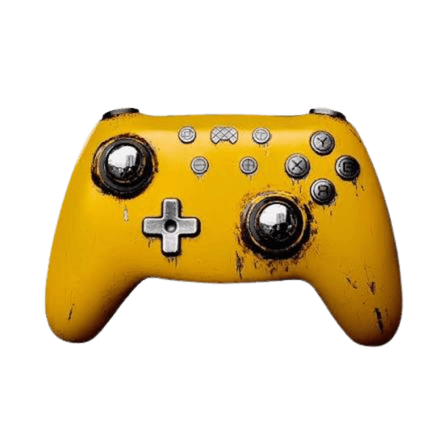
Full PB Tails Crush Defender diagnostic
The Controller Benchmark runs every subsystem on your Crush Defender — TMR sticks, deadzone, circularity, button response, Hall trigger range, rumble, gyro, latency, and connection stability — then produces a composite Controller Health Score. The TMR sticks resolve roughly ten times the positions of a Hall stick, so circularity and deadzone should score exceptionally clean.
PB Tails Crush Defender hardware specifications
| Specification | PB Tails Crush Defender |
|---|---|
| Connection | 2.4GHz Wireless Dongle, Bluetooth, USB-C |
| Button count | 16 |
| Analog stick type | TMR (drift-resistant, low-power) |
| Gyroscope | Yes |
| Rumble / haptics | ERM motors (standard rumble) |
| Impulse triggers | No |
| Adaptive triggers | No |
| Touchpad | No |
| Built-in microphone | No |
| Built-in speaker | No |
| Back paddles | Yes |
| Battery life | ~25 hours |
| Weight | 346 g |
| Release year | 2024 |
| MSRP | $109.99 USD |
Recommended tests for PB Tails Crush Defender
Each test runs in your browser via the Gamepad API — no install, no account, no upload. Run any individually, or use the full benchmark above.
Stick Drift Test
Detect unwanted analog input at rest
Deadzone Test
Measure your stick’s deadzone radius
Circularity Test
Visualize stick travel as a circle
Trigger Pressure
Verify full analog range on triggers
Button Test
Check every button responds instantly
Vibration Test
Test both rumble motors independently
Gyro Test
Test 6-axis motion sensors
Polling Rate
Measure inputs reported per second
Known PB Tails Crush Defender issues
Recurring problems users report with this controller, ranked by frequency. Each links to a step-by-step fix guide.
- Common
1000Hz polling requires X-mode
The Crush Defender only hits 1000Hz when in X-mode (wired or 2.4G) and recognized as an Xbox controller. If your system sees it as a Pro Controller or generic gamepad, it's running at 125Hz — hold + and - for 3 seconds in 2.4G mode to switch modes.
View fix guide - Common
Not natively licensed for Xbox or PlayStation consoles
The Crush Defender works on PC, Steam, Switch, iOS, and Android. Windows detects it as an Xbox pad, but it is not licensed for Xbox or PlayStation consoles. Use the X-S toggle to pick an Xbox-style or Switch-style layout.
View fix guide - Occasional
Heavy and limited customization for the price
The metal Defender edition is heavy (~346g) and pricey at $109, and reviewers note the feature set is lighter than rivals at that cost. The plastic TMR Crush offers the same sticks for much less if weight or budget matter.
View fix guide
How to pair the PB Tails Crush Defender
Get your controller connected before running diagnostics — wired or wireless, mobile or desktop.
Pick a mode
The Crush Defender connects wired over USB-C, via Bluetooth, or through the 2.4G dongle. For full 1000Hz polling, use X-mode wired or 2.4G.
Set the X-S layout toggle
Use the X-S mode switch to choose an Xbox-style or Switch-style button layout before you start, so the on-screen mapping matches your expectation.
Switch modes if polling reads low
In 2.4G mode, press and hold the + and - buttons together for three seconds to toggle modes. When the system recognizes it as an Xbox controller, you're at 1000Hz.
Press any button to confirm in the browser
Browsers gate gamepad access behind a user gesture. Press any button on the Crush Defender to expose it to the Gamepad API, then run the benchmark or any individual test.
PB Tails Crush Defender vs the competition
Head-to-head reviews against the other controllers most buyers cross-shop.
- vs
PB Tails Crush
The Crush Defender upgrades the original Crush's Hall sticks to TMR (higher resolution, lower power) and adds the limited metal chassis; the original Crush keeps Hall sticks at a lower price.
- vs
GameSir Tarantula Pro
Both run TMR sticks; the Tarantula Pro is cheaper with a swappable DualShock-style layout, while the Crush Defender adds 2.4G dongle 1000Hz and a premium metal build at a higher price.
- vs
GameSir Cyclone 2
The Cyclone 2 delivers TMR sticks at a much lower price; the Crush Defender's draw is its metal limited-edition design and 2.4G dongle support, not a core performance lead.
PB Tails Crush Defender definitions
Plain-language definitions for the terms used on this page. Each links to the full glossary entry with thresholds, mechanism, and FAQs.
PB Tails Crush Defender questions
TMR sticks — it was the world's first pre-built controller to ship with TMR joysticks. The triggers are Hall-effect. This is the key upgrade over the original Crush, which uses Hall sticks.
Both are contact-free and drift-immune. TMR resolves roughly ten times more positions per axis than Hall, draws far less power, and produces a cleaner signal — which is why competitive players favor it.
Not natively. It works on PC, Steam, Switch, iOS, and Android — Windows sees it as an Xbox pad — but it isn't licensed for Xbox or PlayStation consoles.
Use X-mode (wired or 2.4G) so the system recognizes it as an Xbox controller — that's 1000Hz. If it's seen as a Pro Controller or generic gamepad, it's running at 125Hz; hold + and - for three seconds in 2.4G mode to switch.
Yes. The metal Defender is a limited edition (~$109), but PB Tails also sells a plastic Crush with the same TMR sticks for around $49 if you don't need the metal chassis.
Yes — the magnetic MagCase swaps in seconds with no tools, the joystick caps are interchangeable, and the RGB lighting is adjustable on the controller without an app.
Long. TMR sticks use roughly 98% less power than Hall sticks, so the 860mAh battery lasts well — reviewers went through a two-week test period without recharging.
Get a full health report for your PB Tails Crush Defender
Run the Controller Benchmark to score every subsystem and generate a shareable Controller Health Score graded S through F.
Run the Benchmark