Astro C40 TR Controller Test
The Astro C40 TR controller test runs a full diagnostic on Astro Gaming's PS4-era flagship — verifying the modular analog sticks (swappable in offset or parallel configuration), two rear paddles, two-stage trigger stops, and 2.4GHz wireless connection with 5ms claimed latency. Important: the C40 TR only works on PS4 backward-compatible titles when used on PS5, not native PS5 games.
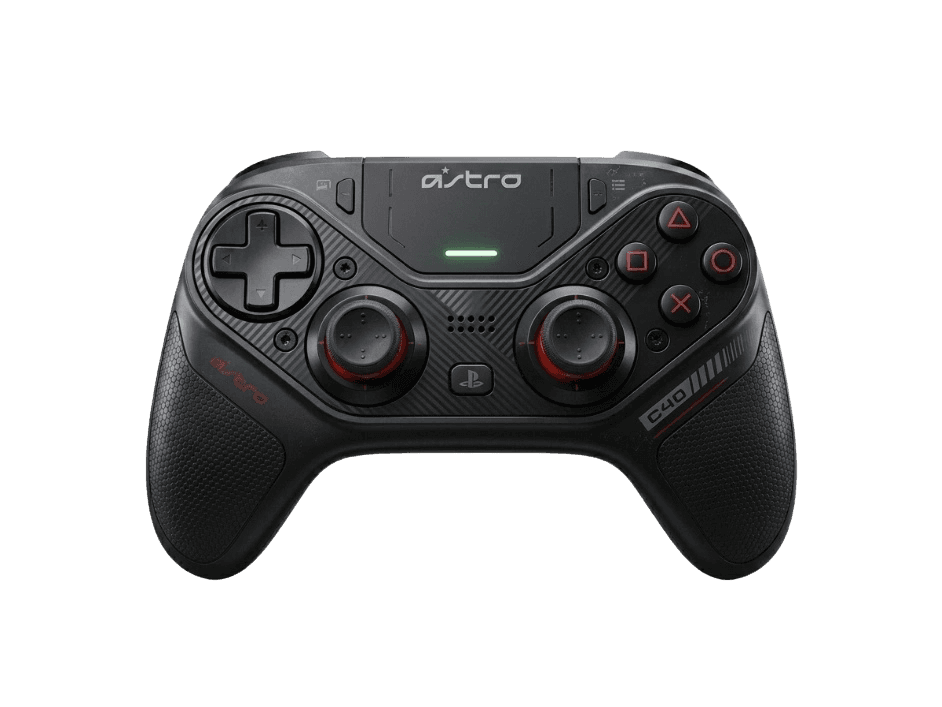
Full Astro C40 TR diagnostic
The Controller Benchmark runs every relevant subsystem on your C40 TR — analog sticks (potentiometer-based, so worth running the drift test regularly), deadzone, button response, trigger range in both standard and hair-trigger modes, the two rear paddles, rumble, latency, and 2.4GHz connection stability — then produces a composite Controller Health Score. If sticks show drift, the modular design means you can swap in fresh stick modules without buying a new controller.
Astro C40 TR hardware specifications
| Specification | Astro C40 TR |
|---|---|
| Connection | USB-C, 2.4GHz Wireless Dongle |
| Button count | 22 |
| Analog stick type | Potentiometer (susceptible to drift) |
| Gyroscope | No |
| Rumble / haptics | ERM motors (standard rumble) |
| Impulse triggers | No |
| Adaptive triggers | No |
| Touchpad | Yes |
| Built-in microphone | No |
| Built-in speaker | No |
| Back paddles | Yes |
| Battery life | ~12 hours |
| Weight | 310 g |
| Release year | 2019 |
| MSRP | $199.99 USD |
Recommended tests for Astro C40 TR
Each test runs in your browser via the Gamepad API — no install, no account, no upload. Run any individually, or use the full benchmark above.
Stick Drift Test
Detect unwanted analog input at rest
Deadzone Test
Measure your stick’s deadzone radius
Circularity Test
Visualize stick travel as a circle
Trigger Pressure
Verify full analog range on triggers
Button Test
Check every button responds instantly
Polling Rate
Measure inputs reported per second
Latency Test
Measure input lag in milliseconds
Vibration Test
Test both rumble motors independently
Touchpad Test
Test DualSense and DualShock touchpads
Connection Stability
Detect dropouts and signal interruptions
Known Astro C40 TR issues
Recurring problems users report with this controller, ranked by frequency. Each links to a step-by-step fix guide.
- Common
Does not work on native PS5 games
Sony restricts third-party controllers on PS5 — the C40 TR works only with PS4 backward-compatible games when connected to a PS5. Native PS5 titles (Returnal, Demon's Souls, Spider-Man 2, etc.) require a DualSense. This is a platform-level restriction, not a C40 firmware issue, and cannot be worked around. The C40 TR still works fully on PC.
View fix guide - Common
Stick drift after extended use
The C40 TR uses potentiometer-based analog sticks rather than Hall-effect sensors. Pots wear over time and develop drift, typically after 400–600 hours of active use. The modular design helps: Astro sells replacement stick modules separately, so you can swap drifted sticks without buying a new controller. Run the drift test monthly to monitor.
View fix guide - Occasional
Battery cannot be checked from PS4 system menu
Because the C40 TR uses its 2.4GHz dongle rather than Bluetooth, it bypasses the PS4's controller battery display in System Settings. The C40 TR has its own LED indicator on the front of the controller: solid green when charged, yellow when medium, red when low. There's no way to see exact percentage.
View fix guide - Rare
Wireless mode reduces audio quality vs wired
The 3.5mm headphone jack passthrough works in both wired and wireless modes, but Astro's wireless audio uses compression that subtly reduces fidelity compared to wired mode. Most users won't notice, but if you're using high-impedance headphones for competitive audio, wired mode is the better choice.
View fix guide - Common
No haptics, adaptive triggers, or gyro
The C40 TR predates the DualSense feature set by two years. It has standard dual-motor ERM rumble, no haptic feedback, no adaptive triggers, and no gyro motion controls. Games designed around DualSense haptics (Astro's Playroom, Returnal) feel significantly less immersive on the C40 — though those games are PS5-only and the C40 won't run them anyway.
View fix guide
How to pair the Astro C40 TR
Get your controller connected before running diagnostics — wired or wireless, mobile or desktop.
Set the connection mode toggle to Wireless or Wired
On the back of the C40 TR there's a small toggle switch labeled W/U (Wireless/USB). Set it to W for 2.4GHz wireless or U for USB-wired. The mode is detected at power-on, so switching mid-session requires powering off and on.
Plug the 2.4GHz dongle into your PS4 or PC
Insert the included USB-A 2.4GHz dongle into a USB port on your PS4, PS5 (for PS4 games only), or Windows PC. The dongle is pre-paired with the controller from the factory and does not require system setup.
Press the central PS button to power on
Press the PS button at the center of the controller. The LED ring around the PS button lights up — solid white when paired, flashing while pairing. The controller takes over input within 2 seconds on PS4 or PC.
Use Astro Command Center on PC to customize
Download Astro Command Center from Astro's support site (Windows only). Connect the C40 TR via the included USB-A cable, then create profiles for button remapping, paddle assignments, stick sensitivity curves, and trigger stop thresholds. Profiles save to onboard memory and work on PS4.
Press any button to expose the controller to the browser
Browsers gate gamepad access behind a user gesture. Press any button to expose the C40 TR to the Gamepad API. The controller reports a PlayStation-style HID descriptor with X (cross), Circle, Square, Triangle face button labels.
Astro C40 TR vs the competition
Head-to-head reviews against the other controllers most buyers cross-shop.
- vs
PS4 DualShock 4
DualShock 4 is the $60 standard PS4 controller. C40 TR adds modular sticks, two rear paddles, trigger stops, and 2.4GHz wireless audio at $199 — but doesn't support native PS5 games.
- vs
PS5 DualSense Edge
DualSense Edge is the modern $200 PS5 pro controller with haptics, adaptive triggers, and replaceable sticks. C40 TR is the previous-generation alternative — modular but no haptics, no PS5 native game support.
- vs
Razer Wolverine V2 Pro
Wolverine V2 Pro is the $249 PS5-era third-party with HyperSpeed Wireless and mecha-tactile buttons. C40 TR is the older $199 PS4-era option with modular sticks but no PS5 native compatibility.
Astro C40 TR definitions
Plain-language definitions for the terms used on this page. Each links to the full glossary entry with thresholds, mechanism, and FAQs.
Astro C40 TR questions
Only for PS4 backward-compatible games. Sony restricts third-party controllers from running native PS5 titles — Returnal, Demon's Souls, Spider-Man 2, and other PS5-exclusive games require a DualSense. The C40 TR works fully for PS4 games played on a PS5, and works without restriction on Windows PC. If you primarily play PS5 native games, the DualSense Edge is the correct pro controller.
No. The C40 TR uses potentiometer-based analog sticks, like most pre-2022 pro controllers. The sticks ARE modular — you can swap them in offset or parallel configurations and replace worn modules without buying a new controller — but the sensor technology is still potentiometer. Expect 400–600 hours before drift may develop, after which a stick module swap restores it.
The C40 TR ships with a modular faceplate that lets you arrange the two sticks in either Xbox-style (offset — left stick higher than D-pad) or PlayStation-style (parallel — both sticks at the bottom, symmetrical). Use Astro's included tool to remove the faceplate and swap the stick modules between the two positions. This is a physical hardware change, not a software toggle.
Because the C40 TR connects via its proprietary 2.4GHz dongle rather than Bluetooth, it bypasses Sony's official controller stack and doesn't appear in the PS4's battery indicator. The controller has its own LED on the front: solid green is full, yellow is medium, red is low. There's no percentage display.
Logitech rates the C40 TR at 12+ hours per charge. Real-world reviews consistently confirm 10–14 hours depending on rumble usage and wireless audio. Charge time from empty is approximately 3 hours via the included USB-A to micro-USB cable (note: the C40 TR uses micro-USB, not USB-C — a sign of its 2019 vintage).
No to all three. The C40 TR predates the PS5 generation and uses standard dual-motor rumble only. It has no haptic feedback, no adaptive trigger resistance, and no gyro motion controls. If those features matter to you, the DualSense Edge is the modern PlayStation pro controller that has them — at the same $199.99 price.
The C40 TR's 3.5mm headphone jack works in both wired and wireless modes — audio passes from the PS4/PC through the 2.4GHz dongle to the controller and out to your headset. Astro's implementation uses some audio compression in wireless mode, which is fine for most gaming headsets but audibly different from wired on high-fidelity audio gear. For competitive audio cues, wired mode is recommended.
Yes, but availability is limited as of 2026. Astro/Logitech officially sells C40 TR replacement stick and D-pad modules, but stock has been intermittent since the C40 TR is now an older product. Third-party replacement modules of varying quality are available on Amazon and eBay. The modular design was forward-thinking, but the supply chain hasn't aged as gracefully as the controller itself.
Get a full health report for your Astro C40 TR
Run the Controller Benchmark to score every subsystem and generate a shareable Controller Health Score graded S through F.
Run the Benchmark