Brook Wingman FGC2 Adapter Test
The Brook Wingman FGC2 test verifies that your controller adapter is correctly translating inputs from your source controller (Xbox, Switch Pro, PS4 DualShock, or wired arcade stick) to the PS5 or PC. The FGC2 is an EVO Best Product Award-winning converter that supports 135+ wired controllers and lets you play all PS5 native games — including Street Fighter 6 and Tekken 8 — with your preferred controller from any platform.
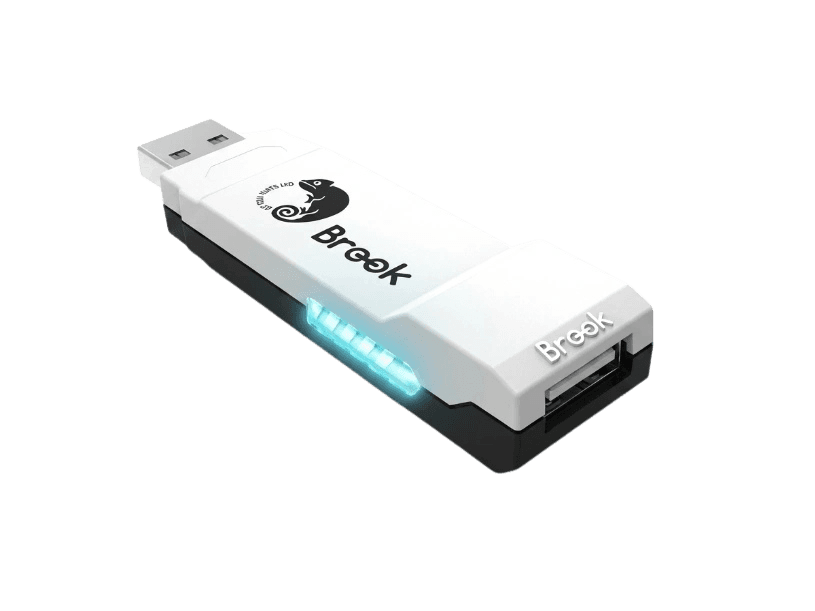
Verify your controller-to-FGC2-to-PS5 pipeline
The Button Test is the most useful diagnostic for the Wingman FGC2 because it verifies your source controller is translating correctly through the adapter. Plug your controller into the FGC2, plug the FGC2 into your PC, then press each button — the test highlights which PlayStation input fires (X, Circle, Square, Triangle, L1/R1, L2/R2, etc.). If a button on your source controller doesn't highlight anything on the PS5 layout, the controller may not be in Brook's supported list — check the official compatibility PDF before assuming hardware failure.
Brook Wingman FGC2 hardware specifications
| Specification | Brook Wingman FGC2 |
|---|---|
| Connection | USB-C |
| Button count | 0 |
| Analog stick type | Hall-effect (drift-resistant) |
| Gyroscope | Yes |
| Rumble / haptics | None |
| Impulse triggers | No |
| Adaptive triggers | No |
| Touchpad | Yes |
| Built-in microphone | No |
| Built-in speaker | No |
| Back paddles | No |
| Battery life | ~0 hours |
| Weight | 35 g |
| Release year | 2024 |
| MSRP | $54.99 USD |
Recommended tests for Brook Wingman FGC2
Each test runs in your browser via the Gamepad API — no install, no account, no upload. Run any individually, or use the full benchmark above.
Button Test
Check every button responds instantly
Stick Drift Test
Detect unwanted analog input at rest
Deadzone Test
Measure your stick’s deadzone radius
Trigger Pressure
Verify full analog range on triggers
Polling Rate
Measure inputs reported per second
Latency Test
Measure input lag in milliseconds
Vibration Test
Test both rumble motors independently
Gyro Test
Test 6-axis motion sensors
Touchpad Test
Test DualSense and DualShock touchpads
Connection Stability
Detect dropouts and signal interruptions
Known Brook Wingman FGC2 issues
Recurring problems users report with this controller, ranked by frequency. Each links to a step-by-step fix guide.
- Common
DualSense haptics and adaptive triggers cannot be replicated
No adapter on the market can replicate DualSense's voice-coil haptics or adaptive trigger resistance — these features require Sony's proprietary hardware. The Wingman FGC2 passes through standard rumble from your source controller but cannot generate the DualSense's nuanced haptic feedback. Games designed around DualSense haptics (Astro's Playroom, Returnal) will work via FGC2 but feel less immersive than with a DualSense.
View fix guide - Common
Some PS5 games actively block non-DualSense controllers
While Brook advertises 'all PS5 games' support, a small number of PS5 games (Returnal, the new God of War titles, some VR titles) actively detect non-DualSense controllers via the haptic handshake and refuse to launch — or limit gameplay to PS4 backward-compatibility mode. This is a Sony-side restriction, not a Brook firmware issue. Check Brook's official compatibility list before assuming your target game will work.
View fix guide - Common
Firmware update required on first use
FGC2 units ship with older firmware. On first use, plug the FGC2 into a Windows PC via USB-C and run Brook Converter Center to update firmware before connecting to PS5. Many buyers report 'controller not detected' errors that resolve immediately after firmware update. The update process takes under 5 minutes.
View fix guide - Common
Wired controllers only — no Bluetooth source devices
The Wingman FGC2 accepts only wired source controllers — no Bluetooth pairing supported. For wireless source controllers like DualSense Edge, Xbox Wireless Controller, or 8BitDo Ultimate, connect them via USB-C cable to the FGC2 (most wireless controllers work in wired mode when cabled). The Brook Wingman P5 or XE2 are the alternatives if you need wireless source controllers.
View fix guide - Occasional
Source controller not in compatibility list
The FGC2 supports 135+ controllers but not every model on the market. If your source controller isn't detected, check Brook's official PDF compatibility list at brookaccessory.com. Firmware updates expand the list irregularly; if your controller isn't yet supported, future updates may add it. The Wingman P5 has broader support if your target controller is missing from the FGC2 list.
View fix guide
How to set up the Brook Wingman FGC2
Get your controller connected before running diagnostics — wired or wireless, mobile or desktop.
Update FGC2 firmware on a Windows PC first
Before first use on PS5, plug the FGC2 into a Windows PC via USB-C, download Brook Converter Center from brookaccessory.com, and run a firmware update. This step prevents the most common 'controller not detected' issue on first PS5 use.
Plug your source controller into the FGC2
Connect your wired source controller (Xbox Series X|S, Xbox Elite, Switch Pro, PS4 DualShock, fight stick, etc.) into the FGC2's USB-A port on the back. The FGC2 hot-swap capability means you can switch controllers without unplugging the FGC2 from the console.
Plug the FGC2 into your PS5 or PC
Connect the FGC2 to your PS5 via the included USB-C cable. Either the front or rear USB ports on the PS5 work. On PC, any USB 2.0+ port works — the FGC2 reports as an Xbox 360 controller (X-Input) by default.
Configure profiles via Brook Converter Center if needed
For custom button mapping, turbo settings, macros, or stick sensitivity adjustments, run Brook Converter Center on your Windows PC with the FGC2 connected. Profiles save to the FGC2 itself, so they work on PS5 without the PC connected. Tournament Mode disables Turbo and Macros for esports compliance.
Press any button to expose to the browser
Browsers gate gamepad access behind a user gesture. With your source controller plugged into the FGC2 and the FGC2 plugged into your PC, press any button on your source controller to expose the FGC2 to the Gamepad API. The browser sees the FGC2 as a PlayStation-style HID device with X/Circle/Square/Triangle face buttons.
Brook Wingman FGC2 vs the competition
Head-to-head reviews against the other controllers most buyers cross-shop.
- vs
Brook Wingman FGC (original)
Original FGC supports ~60 controllers, fighting games only on PS5. FGC2 expands to 135+ controllers and ALL PS5 games (not just fighting genre). FGC2 at $54 is the better choice for 99% of buyers; the original FGC remains if you're a tournament FGC purist on a strict budget.
- vs
Brook Wingman XE2
XE2 accepts both wired AND wireless source controllers but is a Xbox/PS adapter (not designed for native PS5 game licensing). FGC2 is wired-only but provides native PS5 game compatibility. Buy XE2 if you need wireless source controllers; FGC2 for PS5 native games.
- vs
CronusZen / Cronus MAX
CronusZen supports broader controller compatibility plus scripts and modding, but is banned from most esports tournaments. FGC2 is EVO-approved and tournament-legal. Buy CronusZen for casual cross-platform play; FGC2 for tournament play.
Brook Wingman FGC2 definitions
Plain-language definitions for the terms used on this page. Each links to the full glossary entry with thresholds, mechanism, and FAQs.
Brook Wingman FGC2 questions
The FGC2 is a hardware converter that lets you plug a wired controller from one platform (Xbox, Switch, PS4, or arcade stick) into a PS5 or PC and have it work as if it were a native PlayStation 5 controller. The adapter handles the protocol translation, button mapping, and authentication handshake that Sony's PS5 normally requires. It supports 135+ specific controllers from Brook's tested compatibility list.
Mostly yes, but with caveats. Brook markets 'all PS5 games' support, and the vast majority of native PS5 titles work fine — Street Fighter 6, Tekken 8, Spider-Man 2, etc. However, a handful of games (Returnal, some VR titles, specific games that lean heavily on DualSense haptics) detect non-DualSense controllers and either refuse to launch or limit gameplay. This is a Sony platform restriction, not a Brook firmware issue.
No. DualSense haptic feedback (voice-coil actuators) and adaptive triggers (variable resistance) require Sony's proprietary hardware that no third-party controller or adapter can replicate. The FGC2 passes through standard rumble from your source controller and supports gyro motion if your source controller has it, but games designed around DualSense's signature features will feel less immersive through any adapter.
Yes. The FGC2 won the EVO Best Product Award and complies with strict esports tournament standards. Use Tournament Mode (default firmware setting) to disable Turbo and Macro functions for compliance with EVO, Combo Breaker, CEO, and most major fighting game tournament rules. Non-Tournament Mode adds Turbo and Macro for casual play.
Three common causes. First, your controller may not be in Brook's compatibility list — check the official PDF at brookaccessory.com. Second, FGC2 may need a firmware update — plug it into a Windows PC and run Brook Converter Center. Third, the controller may need to be in wired mode — wireless controllers like the Xbox Wireless Controller or 8BitDo Ultimate must be connected to the FGC2 via USB-C cable, not paired wirelessly.
Yes — per SpecialEffect's GameAccess accessibility review, the Xbox Adaptive Controller works with the FGC2 to provide accessibility hardware compatibility on PS5 native games. This is a meaningful use case: users with accessibility setups built around the XAC and external switches can use those same setups on PS5 via the FGC2. Plug the XAC into the FGC2, FGC2 into the PS5, and the XAC's mapped inputs translate through to PS5.
Brook claims 'ultra-low latency' but doesn't publish a specific millisecond figure. Independent testing typically measures 2-4ms of additional latency for the protocol translation — generally imperceptible in normal gameplay and well below the threshold where competitive players notice. The latency is consistent and predictable, unlike Bluetooth which can have variable latency spikes.
FGC2 is the established mid-2024 PS5-and-PC adapter, EVO-certified, ~$54, wired source controllers only, broadest tournament-legal coverage. Wingman P5 is the newer 2025 release with broader source controller compatibility including some wireless options and native PS4+PS5 support but less mature tournament certification. Choose FGC2 for FGC tournament play and proven stability; consider P5 for wireless source controllers or the latest controller models.
Get a full health report for your Brook Wingman FGC2
Run the Controller Benchmark to score every subsystem and generate a shareable Controller Health Score graded S through F.
Run the Benchmark