GameSir G7 HE Controller Test
The GameSir G7 HE is a $49.99 wired Xbox-licensed controller with Hall-effect thumbsticks, Hall-effect analog triggers, microswitch face buttons rated for 3 million clicks, and 1000Hz polling. It's the microswitch-upgraded tier sibling of the $39.99 GameSir G7 SE — the face buttons replace membrane domes with microswitches and the back grips add silicone for tactile improvement. Everything else (Hall sticks, Hall triggers, 4 rumble motors, 2 back buttons, swappable faceplate) is identical to the G7 SE. Compatible with Xbox Series X|S, Xbox One, and Windows PC.
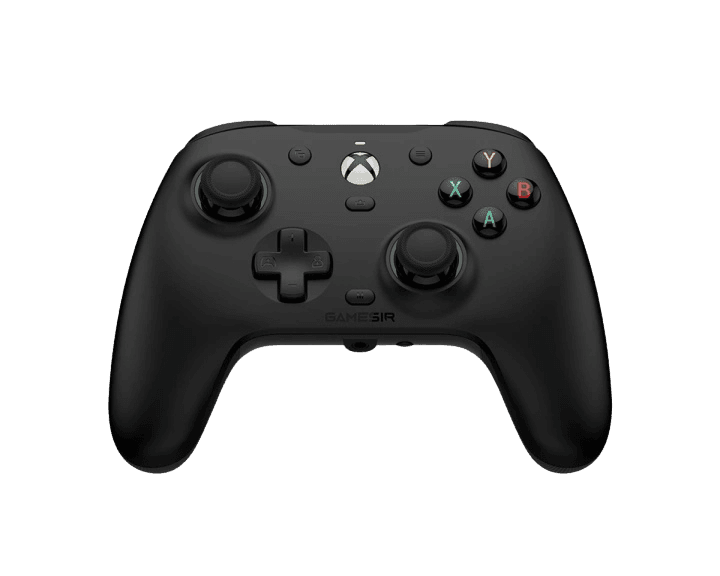
Full GameSir G7 HE diagnostic
The Controller Benchmark runs every relevant subsystem on your G7 HE — Hall-effect sticks, deadzone, microswitch button response, Hall-effect analog trigger range with hair-trigger toggle, 4 rumble motors across grips and triggers, polling rate, and connection stability — then produces a composite Controller Health Score. The G7 HE's microswitch buttons should show consistent registration; if any button is unresponsive, the 3M-click rating means the issue is likely software (Nexus profile) rather than hardware wear.
GameSir G7 HE hardware specifications
| Specification | GameSir G7 HE |
|---|---|
| Connection | USB-C |
| Button count | 20 |
| Analog stick type | Hall-effect (drift-resistant) |
| Gyroscope | No |
| Rumble / haptics | ERM motors (standard rumble) |
| Impulse triggers | Yes |
| Adaptive triggers | No |
| Touchpad | No |
| Built-in microphone | No |
| Built-in speaker | No |
| Back paddles | Yes |
| Battery life | Wired (no internal battery) |
| Weight | 227 g |
| Release year | 2024 |
| MSRP | $49.99 USD |
Recommended tests for GameSir G7 HE
Each test runs in your browser via the Gamepad API — no install, no account, no upload. Run any individually, or use the full benchmark above.
Stick Drift Test
Detect unwanted analog input at rest
Deadzone Test
Measure your stick’s deadzone radius
Hall Effect Checker
Identify Hall Effect vs potentiometer sticks
Trigger Pressure
Verify full analog range on triggers
Button Test
Check every button responds instantly
Circularity Test
Visualize stick travel as a circle
Vibration Test
Test both rumble motors independently
Polling Rate
Measure inputs reported per second
Connection Stability
Detect dropouts and signal interruptions
Known GameSir G7 HE issues
Recurring problems users report with this controller, ranked by frequency. Each links to a step-by-step fix guide.
- Common
Wired-only — major limitation for couch gamers
The G7 HE is wired-only with a 3m detachable USB-C cable — no Bluetooth, no 2.4GHz dongle, no wireless option. For desk PC use this is fine; for living-room console play, the cable can be limiting. Windows Central's review explicitly cited this as the controller's main weakness, noting that most Xbox gamers prefer wireless for couch play. If wireless is a hard requirement, the 8BitDo Ultimate for Xbox or PowerA Fusion Pro 3 are the closest Hall-effect alternatives (both have wireless variants).
View fix guide - Occasional
USB-C port is deeper than standard cables can reach
Per Amazon's official product Q&A and multiple reviewer reports, the G7 HE's USB-C port is recessed deeper into the controller chassis than standard. Third-party USB-C cables with thicker housings may not fully insert, causing intermittent connection issues. The included 3m USB-C cable has the correct profile; if substituting your own cable, look for one with a slim connector housing (under 8mm wide at the cable strain-relief).
View fix guide - Occasional
GameSir Nexus may not recognize G7 HE on first install
Per GameSir's official Amazon support note, GameSir Nexus software occasionally fails to recognize the G7 HE on first install. The documented fix is to uninstall Nexus completely, reboot the PC, then reinstall Nexus from gamesir.com. Most users only need this once during initial setup; the G7 HE works out-of-box for Xbox without Nexus, but the back-button remapping and trigger hair-toggle modes require Nexus on PC.
View fix guide - Occasional
Microswitch upgrade may not justify $10 premium for G7 SE owners
Windows Central's February 2025 review scored the G7 HE 4/5 versus the G7 SE's earlier 4.5/5, explicitly noting that $50 for a wired controller feels less reasonable in 2025 than $40 felt in 2023. The microswitch upgrade is real (3M-click durability vs membrane domes) and the silicone grips add comfort, but if you already own the G7 SE and its membrane buttons feel fine, the upgrade may not be compelling. For new buyers, the $10 difference is small enough that the G7 HE is the cleaner pick.
View fix guide - Rare
Xbox console restart bug can prevent recognition
Per GameSir's Amazon support documentation, the Xbox console occasionally fails to recognize the G7 HE after disconnect/reconnect cycles. The fix is a 'cold restart' — hold the Xbox power button for 10 seconds to fully power off, then power back on. This is a known Xbox firmware quirk affecting some licensed third-party controllers, not specifically a G7 HE defect.
View fix guide
How to pair the GameSir G7 HE
Get your controller connected before running diagnostics — wired or wireless, mobile or desktop.
Connect the USB-C cable to the controller
The G7 HE uses a 3m detachable USB-C cable that ships in the box. Connect the USB-C end firmly into the controller's port — the port is recessed deeper than standard, so push until you hear a solid click. The cable's controller end is straight (not angled).
Plug the USB-A end into Xbox or PC
Connect the USB-A end to an Xbox Series X|S front USB port, Xbox One USB port, or any USB-A port on a Windows 10/11 PC. The G7 HE is plug-and-play — no drivers needed on Xbox; Windows recognizes it as an XInput device automatically. The Xbox button on the controller lights up white when the device is detected.
(PC only) Install GameSir Nexus for customization
Download GameSir Nexus from gamesir.com (Windows only — there is no macOS or Linux version). Nexus exposes back-button remapping, trigger curve adjustment, hair-trigger mode toggle (also available via M + LT/RT hotkey), stick deadzone configuration, vibration intensity, and up to 4 onboard profiles. The G7 HE works without Nexus on Xbox, but most back-button remapping requires Nexus on PC.
Enable hair-trigger mode (optional, for FPS)
Hold the M (mode) button + LT for 2 seconds to toggle the left trigger between full analog mode (racing) and hair-trigger mode (FPS one-tap). Repeat with M + RT for the right trigger. Each trigger can be set independently. The hair-trigger toggle is preserved across power cycles via onboard memory — no need to reconfigure each session.
Press any button to confirm in the browser
Browsers gate gamepad access behind a user gesture. Press any button on the G7 HE to expose it to the Gamepad API. The G7 HE advertises as an Xbox-licensed XInput device, so the standard Xbox button layout applies (A/B/X/Y face buttons, LB/RB/LT/RT shoulder/trigger). All 4 rumble motors should respond to the vibration test.
GameSir G7 HE vs the competition
Head-to-head reviews against the other controllers most buyers cross-shop.
- vs
GameSir G7 SE
G7 SE ($39.99) has membrane face buttons; G7 HE ($49.99) upgrades them to microswitch (3M-click rated) and adds silicone non-slip grips. Both share identical Hall-effect sticks, Hall-effect analog triggers, 4 rumble motors, 2 back buttons, swappable faceplate, and 3m wired connection. For new buyers, G7 HE is the cleaner pick; existing G7 SE owners may not find the $10 upgrade compelling.
- vs
8BitDo Ultimate for Xbox
Both Hall-effect Xbox-licensed at similar prices. G7 HE ($49.99) is wired-only with microswitch face buttons. 8BitDo Ultimate for Xbox ($59.99) adds wireless (Xbox-licensed 2.4GHz dongle), but reverts to standard face buttons. Pick G7 HE for the microswitch precision and lower price; pick Ultimate for wireless freedom.
- vs
Xbox Wireless Controller
Standard Xbox Wireless Controller ($64.99) is Microsoft's first-party reference design — potentiometer sticks, no Hall-effect, no microswitches, no back buttons. G7 HE ($49.99) costs $15 less and adds Hall-effect sticks/triggers, microswitch buttons, and 2 remappable back buttons. The first-party trade-off is wireless connectivity (rechargeable AA support) which the wired G7 HE doesn't offer.
GameSir G7 HE definitions
Plain-language definitions for the terms used on this page. Each links to the full glossary entry with thresholds, mechanism, and FAQs.
GameSir G7 HE questions
Three concrete differences. (1) Face buttons: G7 HE uses microswitches rated for 3 million clicks; G7 SE uses membrane domes. (2) Back grips: G7 HE adds silicone non-slip wrap; G7 SE has bare plastic handles. (3) Polling rate: G7 HE explicitly advertises 1000Hz; G7 SE doesn't publish a polling figure. Everything else is identical — both have Hall-effect sticks, Hall-effect analog triggers, 4 rumble motors, 2 remappable back buttons, magnetic swappable faceplate, GameSir Nexus software, and 3m wired USB-C. Price difference is $10 ($39.99 vs $49.99).
Yes. The G7 HE carries the 'Designed for Xbox' official licensing badge, which means it has been certified by Microsoft, supports Xbox Series X|S and Xbox One natively without third-party warnings, and receives standard Xbox firmware compatibility updates. Officially licensed status also means the controller is allowed on Xbox by the platform's controller authentication system — non-licensed controllers can be rejected by Xbox.
Yes — both the thumbsticks AND the analog triggers use Hall-effect magnetic sensing. This is meaningful because most 'Hall-effect controllers' only have Hall-effect sticks; their triggers remain potentiometer-based and can develop the same drift/wear issues as traditional sticks. The G7 HE applying Hall-effect to triggers means the entire analog input path is drift-resistant by design.
Hair-trigger mode reduces the trigger's travel distance from full analog range to a near-instant click (similar to a mouse button). Toggle each trigger independently by holding M + LT (left trigger) or M + RT (right trigger) for 2 seconds. The hair-trigger setting is saved in onboard memory, so it persists across power cycles. Useful for FPS games where instant trigger response matters more than analog throttle control. Hold the same hotkeys again to return to full analog mode for racing.
GameSir Nexus is the Windows-only customization application for the G7 HE (and other GameSir controllers). It enables back-button remapping beyond defaults, trigger response curve adjustment, stick deadzone configuration, vibration intensity tuning, and onboard profile management. You do NOT need Nexus for basic Xbox or PC gameplay — the G7 HE works out-of-box. Nexus is required only if you want to customize the controller beyond its factory defaults. macOS and Linux are not supported by Nexus.
No. The G7 HE is officially licensed for Xbox Series X|S, Xbox One, and Windows 10/11 only. It does not work on PlayStation 5, PlayStation 4, Nintendo Switch, macOS, iOS, or Android. PlayStation and Switch both enforce platform-level controller authentication that rejects non-licensed third-party devices. If you need a multi-platform Hall-effect controller, the 8BitDo Ultimate or GuliKit KK3 series support PC + Switch + mobile (but not Xbox).
GameSir's positioning for the G7 HE is competitive Xbox/PC gaming at a sub-$50 price point. Removing wireless (no Bluetooth, no 2.4GHz dongle, no rechargeable battery) keeps the price competitive while eliminating wireless latency entirely — the wired connection delivers consistent 1000Hz polling without any wireless-protocol overhead. For wireless Hall-effect Xbox alternatives, the 8BitDo Ultimate for Xbox ($59.99) is the closest match.
The included USB-C cable is 3 meters (approximately 10 feet) — long enough for typical living-room couch-to-TV-console setups, though a 10-foot extension is sometimes needed for larger rooms. The cable is detachable, so you can substitute a longer cable if needed. Important: the G7 HE's USB-C port is recessed deeper than standard, so third-party cables with thick connector housings may not fully insert. Look for cables with slim connector ends if substituting.
Get a full health report for your GameSir G7 HE
Run the Controller Benchmark to score every subsystem and generate a shareable Controller Health Score graded S through F.
Run the Benchmark