SCUF Omega Controller Test
The SCUF Omega controller test runs a full diagnostic on SCUF's $219.99 officially licensed PS5/PS5 Pro flagship in your browser — verifying Endurance TMR thumbsticks, Omron mechanical Instant Triggers and Action Buttons, 4 rear paddles, 2 side action buttons, and 5 G-Keys (11 customizable inputs total). Launched May 12, 2026, the Omega replaces the entire Reflex lineup and is SCUF's first officially licensed PS5 controller — but deliberately omits rumble, haptic feedback, and adaptive triggers for competitive weight reduction.
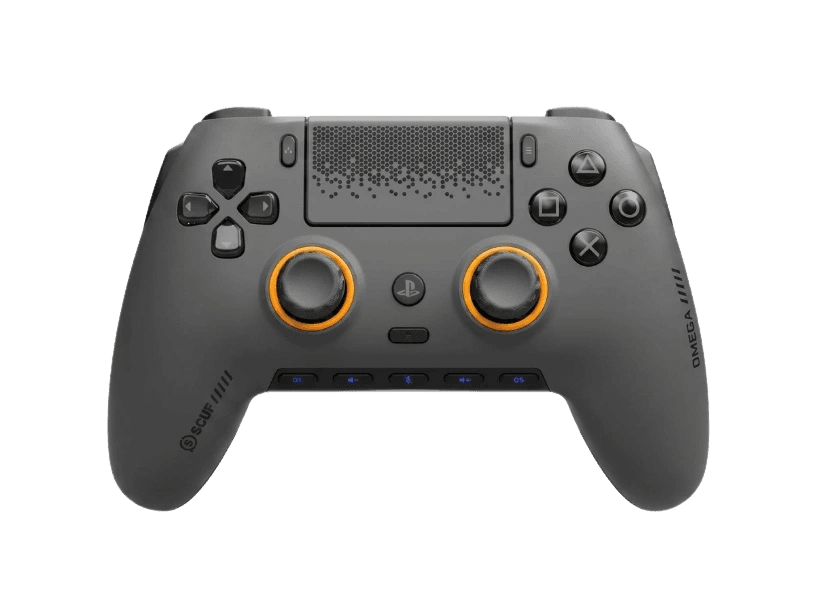
Full SCUF Omega diagnostic
The Controller Benchmark runs every relevant subsystem on your Omega — TMR sticks, deadzone, Omron mechanical button response, 11 customizable inputs (4 rear paddles + 2 side buttons + 5 G-Keys), Instant Trigger click-mode/analog-mode toggle, latency, and connection stability — then produces a composite Controller Health Score. The Omega has no rumble or adaptive triggers by design, so those subsystems are correctly skipped.
SCUF Omega hardware specifications
| Specification | SCUF Omega |
|---|---|
| Connection | USB-C, Bluetooth |
| Button count | 28 |
| Analog stick type | TMR (drift-resistant, low-power) |
| Gyroscope | Yes |
| Rumble / haptics | None |
| Impulse triggers | No |
| Adaptive triggers | No |
| Touchpad | Yes |
| Built-in microphone | No |
| Built-in speaker | No |
| Back paddles | Yes |
| Battery life | ~17 hours |
| Weight | — |
| Release year | 2026 |
| MSRP | $219.99 USD |
Recommended tests for SCUF Omega
Each test runs in your browser via the Gamepad API — no install, no account, no upload. Run any individually, or use the full benchmark above.
Stick Drift Test
Detect unwanted analog input at rest
Deadzone Test
Measure your stick’s deadzone radius
Trigger Pressure
Verify full analog range on triggers
Button Test
Check every button responds instantly
Circularity Test
Visualize stick travel as a circle
Polling Rate
Measure inputs reported per second
Gyro Test
Test 6-axis motion sensors
Touchpad Test
Test DualSense and DualShock touchpads
Connection Stability
Detect dropouts and signal interruptions
Known SCUF Omega issues
Recurring problems users report with this controller, ranked by frequency. Each links to a step-by-step fix guide.
- Common
No rumble, haptic feedback, or adaptive triggers — by design
SCUF deliberately removed all vibration modules from the Omega to reduce weight and eliminate aim-disrupting feedback during competitive play. This is the same approach as the Razer Wolverine V3 Pro and the retired Reflex FPS line. If immersive single-player haptics matter to you (Astro Bot, Returnal, Spider-Man trigger resistance), the stock DualSense or DualSense Edge are the only PS5 controllers that retain these features. The Omega is purpose-built for competitive shooters where haptics get disabled anyway.
View fix guide - Common
Three of five G-Keys permanently pre-assigned in PS5 mode
Per Basic Tutorials' review, when the Omega is connected to a PS5, three of the five G-Keys are locked to system functions and cannot be remapped through the SCUF Mobile App. Only two G-Keys are user-customizable on PS5. PC mode unlocks all five. SCUF has not announced whether this PS5 restriction will be loosened in a future firmware update — it appears to be a Sony licensing constraint rather than a SCUF software limitation.
View fix guide - Occasional
SCUF Mobile App is iOS and Android only — no PC desktop app
Unlike the Razer Synapse 4 or 8BitDo Ultimate V2 desktop apps, SCUF requires a smartphone for all Omega configuration. Trigger curves, stick deadzones, button remapping, and profile management all happen in the mobile app. If you don't own an iOS or Android device, you cannot configure the Omega beyond its default profile. The app pairs with the controller via Bluetooth.
View fix guide - Occasional
1000Hz polling claim applies to PC only
The advertised 1000Hz wired-and-wireless polling rate applies only when the Omega is connected to a Windows or Mac PC. On PS5, the controller polls at the standard Sony-imposed rate (~250Hz) regardless of connection method. The polling rate test will confirm this difference — competitive PS5 players don't see the 1000Hz benefit unless playing on PC.
View fix guide - Rare
RGB lighting customization is PC-only
The Omega's RGB lighting strip can be customized (color, brightness, pattern) only when connected to a PC via the SCUF Mobile App proxied through Bluetooth. On PS5, the RGB defaults to a standard preset and cannot be changed. This matches the standard DualSense limitation — Sony's PS5 SDK does not expose RGB controller customization to third-party controllers.
View fix guide
How to pair the SCUF Omega
Get your controller connected before running diagnostics — wired or wireless, mobile or desktop.
PS5 / PS5 Pro pairing (wired first-pair)
Connect the included USB-C to USB-A braided cable from the Omega to the PS5's front USB port. Press the PS button — the controller will be recognized automatically and assigned to a player slot. The Omega is officially licensed, so no third-party warning appears (unlike the previous Reflex lineup). After first pairing, the Omega can be used wirelessly via Bluetooth.
PS5 wireless pairing (after initial wired setup)
After the first wired connection establishes the device, unplug the USB-C cable. The Omega switches to Bluetooth automatically. Press the PS button to wake the controller and connect. If pairing fails, hold the small Reset button on the back of the controller for 3 seconds, then re-pair via USB-C.
Windows / Mac PC pairing (Bluetooth)
Power on the Omega by holding the PS button for 3 seconds (LED pulses to indicate pairing mode). On the PC, open Bluetooth settings and select 'SCUF Omega Wireless Controller'. For 1000Hz polling on PC, connect via USB-C wired instead — Bluetooth on Windows caps at lower polling rates regardless of controller capability.
Install the SCUF Mobile App for full customization
Download the SCUF Mobile App from the iOS App Store or Google Play Store. Pair the Omega to your phone via Bluetooth (separate pairing from your PS5/PC). The app exposes trigger response curves, stick deadzones, button remapping for all 11 customizable inputs, and RGB controls. The app communicates with the controller in real time and writes changes to onboard profiles.
Press any button to confirm in the browser
Browsers gate gamepad access behind a user gesture. Press any button on the Omega to expose it to the Gamepad API. The Omega advertises as a PS5-licensed controller, so the standard DualSense button layout applies (Cross, Circle, Square, Triangle). All 11 customizable inputs report as standard gamepad buttons.
SCUF Omega vs the competition
Head-to-head reviews against the other controllers most buyers cross-shop.
- vs
PS5 DualSense Edge
DualSense Edge ($199.99) retains haptics + adaptive triggers but has only 2 back paddles. Omega ($219.99) removes haptics for competitive aim stability and adds 11 customizable inputs (4 paddles + 2 side buttons + 5 G-Keys), Omron mechanical switches, and TMR sticks. Edge for immersion; Omega for competition.
- vs
Razer Wolverine V3 Pro
Both compete in the $200+ competitive-PS5 tier with TMR sticks and removed haptics. Wolverine V3 Pro ($249.99) has 8000Hz polling on PC vs Omega's 1000Hz. Omega adds 5 G-Keys (Wolverine has 6 remappable buttons total but no G-Keys), officially licensed status, and PS5 Pro certification.
- vs
PS5 DualSense (standard)
Standard DualSense ($74.99) keeps every feature Sony designed including HD haptics, adaptive triggers, gyro, and touchpad. Omega ($219.99) is 3x the price but trades haptics for 11 customizable inputs, TMR sticks (vs DualSense's potentiometer), Omron mechanical switches, and pro-tier ergonomics. Standard for casual; Omega for competitive.
SCUF Omega definitions
Plain-language definitions for the terms used on this page. Each links to the full glossary entry with thresholds, mechanism, and FAQs.
SCUF Omega questions
The SCUF Omega is SCUF Gaming's officially licensed PS5/PS5 Pro flagship controller, launched May 12, 2026 at $219.99. It replaces the entire Reflex lineup (Reflex, Reflex Pro, Reflex FPS) which is being retired. Key upgrades over the Reflex Pro: Endurance TMR thumbsticks (vs Reflex Pro's potentiometers or optional Hall-effect), Omron mechanical switches across triggers/D-pad/action buttons, 11 customizable inputs vs Reflex Pro's 4 paddles, 1000Hz PC polling, and official PS5 licensing for the first time in SCUF's history.
SCUF deliberately removed all vibration modules to reduce controller weight and eliminate aim-disrupting feedback during competitive play — a design choice shared with the Razer Wolverine V3 Pro and the previous Reflex FPS variant. Most competitive shooter players disable rumble in their game settings anyway. If immersive single-player haptics matter to you, the stock DualSense or DualSense Edge are the right choices. The Omega is purpose-built for FPS, fighting games, and competitive multiplayer.
Yes — the SCUF Omega is the first officially licensed PlayStation controller in SCUF Gaming's history. Previous SCUF PS5 controllers (Reflex, Reflex Pro, Reflex FPS) were unlicensed third-party products. Official licensing means the Omega is recognized natively by the PS5 system without third-party-controller warnings, supports PS5 Pro features, and receives official SCUF and Sony co-developed firmware updates.
The SCUF Omega has 28 total inputs, 11 of which are user-customizable through the SCUF Mobile App: 4 rear paddles (behind the grips), 2 side action buttons (on the inner grip edges), and 5 G-Keys (positioned above the D-pad and action buttons). In PS5 mode, 3 of the 5 G-Keys are permanently pre-assigned to system functions and cannot be remapped — only 2 G-Keys are user-customizable on PS5. PC mode unlocks all 5 G-Keys for remapping.
TMR (Tunnel Magnetoresistance) is a non-contact magnetic sensing technology that replaces traditional potentiometer sticks. Because there are no carbon wipers physically touching the sensor, TMR sticks don't suffer from wear-induced drift — the primary cause of failure in DualSense, Joy-Con, and Xbox controller sticks. TMR offers similar drift resistance to Hall-effect sticks with lower power consumption and better temperature stability.
No. The Omega is officially licensed for PlayStation 5 and PlayStation 5 Pro only. It also works on PC (Windows and Mac), iOS, and Android, but does not work on Xbox Series X/S or Xbox One. Xbox enforces controller authentication at the system level and rejects non-Xbox-licensed controllers.
The Omega's built-in rechargeable battery delivers up to 17 hours per Basic Tutorials' independent review. This is a significant improvement over the predecessor Reflex Pro (which averaged 8-9 hours) — partly because the Omega removed the vibration modules that drained the Reflex's battery. Fast charging is supported via the included USB-C cable; SCUF has not published a specific charge time but reviews indicate approximately 2 hours for full charge.
Yes. SCUF launched a new SCUF Mobile App for iOS and Android with the Omega; there is no PC or Mac desktop application. All trigger curves, stick deadzones, button remapping, and RGB lighting controls require the smartphone app, which pairs with the controller via Bluetooth. If you don't own an iOS or Android device, you can use the Omega with its default factory profile, but you cannot customize any of the 11 customizable inputs.
Get a full health report for your SCUF Omega
Run the Controller Benchmark to score every subsystem and generate a shareable Controller Health Score graded S through F.
Run the Benchmark