8BitDo SN30 Pro Controller Test
The 8BitDo SN30 Pro controller test runs a full diagnostic on 8BitDo's SNES-styled compact controller — verifying the analog sticks (Hall-effect on current shipping units), motion sensor, rumble, classic D-pad, and digital shoulder buttons. Connect via Bluetooth or USB-C to Switch, Switch 2, PC, Mac, Android, iOS, Steam Deck, or Raspberry Pi, then press any button to get a Controller Health Score graded S through F.
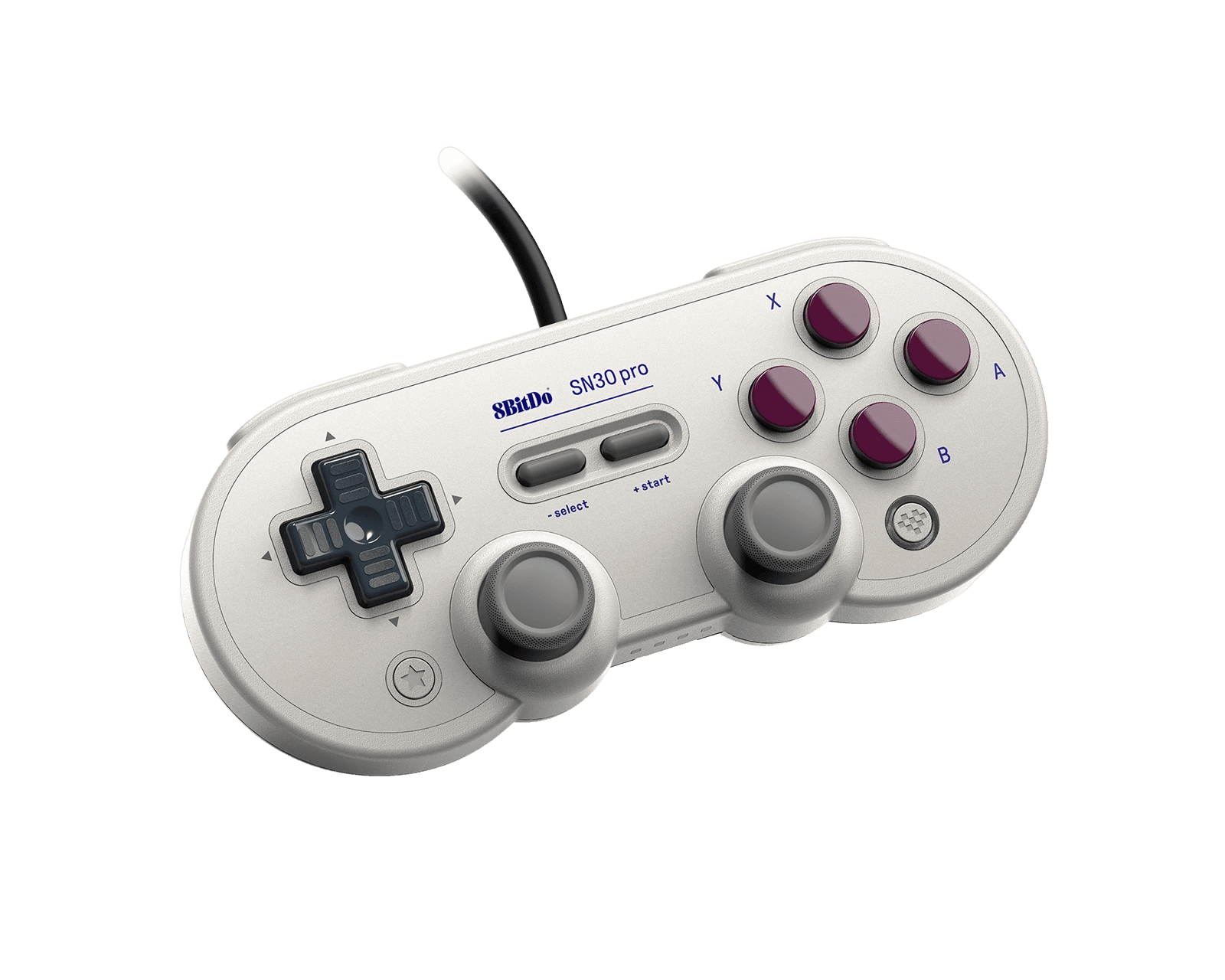
Full 8BitDo SN30 Pro diagnostic
The Controller Benchmark runs every relevant subsystem on your SN30 Pro — analog sticks (Hall-effect on current units, potentiometer on older stock), deadzone, the classic SNES-style D-pad, digital shoulder buttons, rumble, motion sensor, latency, and Bluetooth connection stability — then produces a composite Controller Health Score. Note: the trigger pressure test will report binary input rather than analog range because the SN30 Pro uses digital L2/R2 buttons in classic SNES style.
8BitDo SN30 Pro hardware specifications
| Specification | 8BitDo SN30 Pro |
|---|---|
| Connection | USB-C, Bluetooth |
| Button count | 19 |
| Analog stick type | Hall-effect (drift-resistant) |
| Gyroscope | Yes |
| Rumble / haptics | ERM motors (standard rumble) |
| Impulse triggers | No |
| Adaptive triggers | No |
| Touchpad | No |
| Built-in microphone | No |
| Built-in speaker | No |
| Back paddles | No |
| Battery life | ~18 hours |
| Weight | 145 g |
| Release year | 2017 |
| MSRP | $44.99 USD |
Recommended tests for 8BitDo SN30 Pro
Each test runs in your browser via the Gamepad API — no install, no account, no upload. Run any individually, or use the full benchmark above.
Stick Drift Test
Detect unwanted analog input at rest
Deadzone Test
Measure your stick’s deadzone radius
Hall Effect Checker
Identify Hall Effect vs potentiometer sticks
Button Test
Check every button responds instantly
Circularity Test
Visualize stick travel as a circle
Snapback Test
Measure how fast sticks return to center
Polling Rate
Measure inputs reported per second
Latency Test
Measure input lag in milliseconds
Gyro Test
Test 6-axis motion sensors
Vibration Test
Test both rumble motors independently
Connection Stability
Detect dropouts and signal interruptions
Known 8BitDo SN30 Pro issues
Recurring problems users report with this controller, ranked by frequency. Each links to a step-by-step fix guide.
- Common
Older units (pre-2024) have potentiometer sticks
The SN30 Pro is a long-running product line dating to 2017, and 8BitDo only updated the sticks to Hall-effect around 2024. Units bought before that update have traditional potentiometer sticks and may develop drift after 400-600 hours of use. Look for 'Hall Effect Joystick Update' on the box or Amazon listing to confirm you have the new version. The Hall-effect checker test will identify the sensor type definitively.
View fix guide - Common
Triggers are digital, not analog
The SN30 Pro uses classic SNES-style digital L1/R1/L2/R2 button switches — they register full press or no press, with no analog range in between. This is intentional design, not a defect. Games that require analog triggers (racing sims, FPS games with variable trigger pull) will work but with binary trigger input. For analog triggers, the SN30 Pro+ or Pro 2 are the 8BitDo alternatives.
View fix guide - Occasional
Switch won't pair after too many controllers connected
Per 8BitDo's official FAQ, Nintendo Switch caps controller pairings at 10. If you've connected and disconnected many controllers, the Switch may refuse to pair the SN30 Pro until you clear old pairings. Go to System Settings → Controllers and Sensors → Disconnect Controllers, then re-pair the SN30 Pro fresh.
View fix guide - Occasional
Bluetooth 4.0 is older than competitors
The SN30 Pro uses Bluetooth 4.0, an older spec than the Bluetooth 5.x used by the 8BitDo Ultimate 2 and Pro 2. In practice this means slightly higher latency and slightly more susceptibility to interference from 2.4GHz Wi-Fi networks. For competitive gaming, the wired USB-C connection is recommended over Bluetooth.
View fix guide - Rare
No grips — comfort suffers in long sessions
The SN30 Pro's small SNES-form-factor body has no rear grips. Reviewers and users consistently report it's fine for 1-2 hour sessions but uncomfortable for 4+ hour sessions. If you need a similar 8BitDo controller with grips, the SN30 Pro+ adds handles or the 8BitDo Pro 2 adds full ergonomic grips.
View fix guide
How to pair the 8BitDo SN30 Pro
Get your controller connected before running diagnostics — wired or wireless, mobile or desktop.
Press a platform-specific combo to power on
The SN30 Pro powers on with a platform-specific combo: Y+Start for Switch, B+Start for Android, X+Start for Windows, A+Start for macOS. The LEDs flash to confirm the controller is on. This is the same multi-mode convention 8BitDo uses across its retro line.
Hold the Pair button on the back
On the top edge of the controller near the USB-C port, there's a small Pair button. Hold it for 3 seconds. The four LEDs begin rotating left-to-right, indicating pairing mode is active.
Connect from your device's Bluetooth menu
Open Bluetooth settings on your host device. The SN30 Pro appears as "8BitDo SN30 Pro" (Switch shows it as a Pro Controller). Tap to connect. The LEDs become solid when paired — typically the first LED indicates player 1.
Or use USB-C for wired connection
Plug a USB-C cable from the controller to your host device. The SN30 Pro works wired on Switch, Switch 2, Windows, macOS, Android, Raspberry Pi, and Steam Deck. Wired connection bypasses Bluetooth latency and is recommended for competitive play.
Press any button to expose to the browser
Browsers gate gamepad access behind a user gesture. Press any button to expose the SN30 Pro to the Gamepad API. The controller reports with Nintendo-style face button labels (B A Y X as printed on hardware) when in Switch mode, or X-input/Xbox-style labels in Windows mode.
8BitDo SN30 Pro vs the competition
Head-to-head reviews against the other controllers most buyers cross-shop.
- vs
8BitDo Pro 2
Pro 2 is the larger ergonomic upgrade with proper grips, back paddles, and analog triggers at ~$50. SN30 Pro is the smaller pure-SNES form factor at ~$45 — better for portability and FGC players who prefer compact controllers.
- vs
8BitDo SN30 Pro+ (larger sibling)
Pro+ adds handles, 1000mAh battery (or AA option), analog triggers, and hair-trigger settings. SN30 Pro is the smaller, lighter, cheaper compact version — chosen for portability or for fans of the original SNES form factor.
- vs
Switch Pro Controller
Switch Pro is the first-party benchmark with HD Rumble. SN30 Pro is the smaller, cheaper alternative with similar Switch functionality plus broader cross-platform support (PC, Mac, Android, iOS, Pi, Steam Deck).
8BitDo SN30 Pro definitions
Plain-language definitions for the terms used on this page. Each links to the full glossary entry with thresholds, mechanism, and FAQs.
8BitDo SN30 Pro questions
Current shipping units (since approximately 2024) have Hall-effect sticks, marketed under the 'Hall Effect Joystick Update' label on Amazon and 8BitDo's official store. Older units bought before the update have traditional potentiometer sticks. Check the product listing or box for 'Hall Effect Joystick Update' language to confirm. The Hall-effect checker test on this site will definitively identify which sensor type your unit has.
Three different products. The SN30 Pro Bluetooth (this page) is the small SNES-style wireless controller at $44.99 with Hall sticks on current units. The SN30 Pro USB is a 2021 wired-only variant at $24-29 — confirmed by 8BitDo to NOT have the Hall-effect update. The SN30 Pro+ is a larger 2019 variant with handles, analog triggers, and a 1000mAh battery (or AA option) at ~$50. They are not interchangeable — check carefully before buying.
Digital — the SN30 Pro uses classic SNES-style L1/R1/L2/R2 button switches that register binary press/no-press, not variable analog pressure. Games requiring analog triggers (racing sims, FPS games with variable trigger pull) will still work but trigger inputs will register as full pulls. If you need analog triggers in this 8BitDo style, the SN30 Pro+ or Pro 2 are the alternatives.
It depends on the fighter type. For 2D fighters (Street Fighter, Guilty Gear, KOF) the SN30 Pro's excellent D-pad and small form factor make it competitive — many FGC players prefer it over modern fightpads. For 3D fighters requiring analog stick precision (Tekken 8 movement, VF6), the digital triggers and smaller sticks are limiting. It is not a fightstick replacement; arcade stick players should still use fightsticks.
Yes, after firmware update. The SN30 Pro Bluetooth supports Switch 2 (system software 20.1.1 and above per 8BitDo). Connect the controller to a PC via USB-C and run 8BitDo Ultimate Software V2 to update firmware before pairing with Switch 2. Out-of-box units from before mid-2025 may need this update.
Per 8BitDo's official FAQ, Switch caps controller pairings at 10. If you've connected and disconnected many controllers over time, the Switch may refuse new pairings. Go to System Settings → Controllers and Sensors → Disconnect Controllers (or the equivalent on Switch 2), clear old pairings, then re-pair the SN30 Pro fresh.
8BitDo officially rates the 480mAh battery at up to 18 hours of play. Some retailer listings cite 16 hours under heavier use (rumble enabled, regular motion sensor activity). Charge time from empty is 1-2 hours via the USB-C cable. The controller charges while in use over USB-C, so you can play through a low battery indefinitely.
Yes — the SN30 Pro is one of the most popular controllers for Raspberry Pi gaming setups. RetroPie, EmulationStation, and Recalbox all detect the SN30 Pro natively over Bluetooth. The small form factor and SNES-style layout make it ideal for SNES, NES, Genesis, and arcade emulation. Connect via USB-C for the most reliable setup, or via Bluetooth after initial pairing.
Get a full health report for your 8BitDo SN30 Pro
Run the Controller Benchmark to score every subsystem and generate a shareable Controller Health Score graded S through F.
Run the Benchmark