Razer Wolverine V2 Pro Controller Test
The Razer Wolverine V2 Pro controller test runs a full diagnostic on Razer's first PS5-licensed pro controller — verifying mecha-tactile face buttons, 8-way microswitch D-pad, HyperTriggers with two-stage stops, six remappable buttons including back paddles, and HyperSpeed Wireless connectivity. Connect over the 2.4GHz dongle or wired USB-C, press any button, and get a Controller Health Score graded S through F.
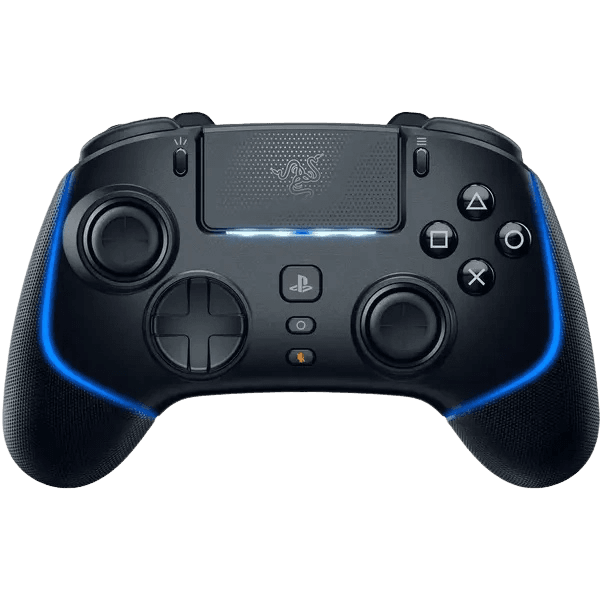
Full Razer Wolverine V2 Pro diagnostic
The Controller Benchmark runs every relevant subsystem on your Wolverine V2 Pro — analog sticks (potentiometer-based, so worth running the drift test regularly), deadzone, mecha-tactile buttons, microswitch D-pad, HyperTrigger range with two-stage stops, the six remappable buttons, latency, and HyperSpeed Wireless stability — then produces a composite Controller Health Score. If sticks show drift above the 0.05 threshold, the potentiometer sensors have likely begun to wear.
Razer Wolverine V2 Pro hardware specifications
| Specification | Razer Wolverine V2 Pro |
|---|---|
| Connection | USB-C, 2.4GHz Wireless Dongle |
| Button count | 22 |
| Analog stick type | Potentiometer (susceptible to drift) |
| Gyroscope | Yes |
| Rumble / haptics | ERM motors (standard rumble) |
| Impulse triggers | No |
| Adaptive triggers | No |
| Touchpad | Yes |
| Built-in microphone | No |
| Built-in speaker | No |
| Back paddles | Yes |
| Battery life | ~28 hours |
| Weight | 279 g |
| Release year | 2023 |
| MSRP | $249.99 USD |
Recommended tests for Razer Wolverine V2 Pro
Each test runs in your browser via the Gamepad API — no install, no account, no upload. Run any individually, or use the full benchmark above.
Stick Drift Test
Detect unwanted analog input at rest
Deadzone Test
Measure your stick’s deadzone radius
Circularity Test
Visualize stick travel as a circle
Trigger Pressure
Verify full analog range on triggers
Button Test
Check every button responds instantly
Polling Rate
Measure inputs reported per second
Latency Test
Measure input lag in milliseconds
Vibration Test
Test both rumble motors independently
Gyro Test
Test 6-axis motion sensors
Touchpad Test
Test DualSense and DualShock touchpads
Connection Stability
Detect dropouts and signal interruptions
Known Razer Wolverine V2 Pro issues
Recurring problems users report with this controller, ranked by frequency. Each links to a step-by-step fix guide.
- Common
Stick drift after extended use
The Wolverine V2 Pro uses potentiometer sticks rather than Hall-effect or TMR sensors. iFixit estimates around 417 hours of active use before potentiometer carbon contacts begin to degrade and produce drift. Unlike the DualSense Edge or Victrix Pro BFG, the sticks are not replaceable modules. Run the stick drift test monthly to monitor.
View fix guide - Common
Controller won't power on PS5 console
The Wolverine V2 Pro cannot power on the PS5 from sleep — only the DualSense can do that. To use the Wolverine, first wake the PS5 with a DualSense or the console power button, then long-press the PS button on the Wolverine to connect.
View fix guide - Common
Back paddle placement causes accidental presses
Multiple reviewers (GamesRadar, Tom's Guide) flag the back paddle position as too close to the grips, causing accidental presses during normal play. If you experience phantom inputs, run the button test to identify which paddle is triggering, then unbind it in Razer Controller app.
View fix guide - Occasional
Chroma lighting reduces battery life by 60%
The RGB Chroma ring drops battery life from 28 hours to approximately 10 hours. Disable Chroma in the Razer Controller app if battery life is a priority. The Chroma on the V2 Pro also does not sync with other Razer Chroma peripherals on PC.
View fix guide - Common
No haptic feedback or adaptive triggers
Despite PlayStation licensing, the V2 Pro uses standard ERM rumble motors with no haptic feedback and no adaptive trigger resistance. This is by design, not a defect — games designed around DualSense haptics (Astro's Playroom, Returnal) will feel less immersive on the Wolverine. The vibration test will confirm standard dual-motor rumble is working.
View fix guide
How to pair the Razer Wolverine V2 Pro
Get your controller connected before running diagnostics — wired or wireless, mobile or desktop.
Set the mode toggle to PS5 or PC
On the back of the controller, between the back paddles, there's a small mode toggle switch. Set it to PS5 or PC depending on your host. The wrong mode will prevent connection at the kernel level.
Plug in the HyperSpeed Wireless dongle
Insert the included USB-C HyperSpeed Wireless dongle into a USB-A port on your PS5 or PC. The PS5 has USB-A ports on the front and back; either works. The dongle is pre-paired with the controller from the factory.
Long-press the PS button to power on
Set the wireless/wired toggle to wireless. Then long-press the PS button on the controller for about 2 seconds. The controller does not auto-power-on when the toggle is flipped — this is a common point of confusion. The Chroma ring lights up when the controller is on.
Wake the PS5 first if connecting to console
The Wolverine V2 Pro cannot wake the PS5 from sleep. Use a DualSense or the console power button first, then connect the Wolverine. Once the PS5 is on, the Wolverine takes over input within a few seconds.
Press any button to expose the controller to the browser
Browsers gate gamepad access behind a user gesture. Press any button to expose the Wolverine V2 Pro to the Gamepad API. The controller reports a PlayStation-style HID descriptor with X (cross), Circle, Square, Triangle face button labels.
Razer Wolverine V2 Pro vs the competition
Head-to-head reviews against the other controllers most buyers cross-shop.
- vs
Razer Wolverine V3 Pro
V3 Pro is the 2024 successor with Hall-effect sticks (no drift), 8000Hz polling, and mechanical micro-switches — but reverts to Xbox/PC only. V2 Pro is the PS5 generation with potentiometer sticks.
- vs
PS5 DualSense Edge
DualSense Edge has haptics, adaptive triggers, and replaceable stick modules at $200. V2 Pro adds HyperSpeed Wireless and Razer mecha-tactile buttons at $250 but ditches haptics and adaptive triggers.
- vs
PS5 DualSense (standard)
DualSense is the $70 baseline with the full PS5 feature set (haptics, adaptive triggers). V2 Pro is $250 and trades those features for HyperSpeed Wireless, back paddles, and mecha-tactile buttons.
Razer Wolverine V2 Pro definitions
Plain-language definitions for the terms used on this page. Each links to the full glossary entry with thresholds, mechanism, and FAQs.
Razer Wolverine V2 Pro questions
No. The Wolverine V2 Pro uses potentiometer-based analog sticks, despite its premium $249.99 price tag. iFixit estimates approximately 417 hours of active use before stick drift may begin to develop. Razer's later Wolverine V3 Pro (2024) was the first in the Wolverine line to use Hall-effect sticks. Some marketing pages incorrectly list the V2 Pro as Hall-effect, but hands-on reviews and teardowns confirm potentiometers.
No to both. Despite being officially licensed by PlayStation for the PS5, the Wolverine V2 Pro uses standard ERM dual-motor rumble (not the DualSense's voice-coil haptics) and standard analog triggers with no adaptive resistance. Two-stage HyperTriggers let you switch between full analog and shorter digital travel, but they don't provide dynamic resistance during gameplay.
Only the DualSense can wake the PS5 from sleep — this is a Sony platform restriction, not a Wolverine defect. Wake the PS5 first using a DualSense or the console's power button, then long-press the PS button on the Wolverine V2 Pro to take over as the active controller. The Wolverine will also not enter rest mode automatically.
The wireless/wired toggle on the back does not power the controller on or off — it only selects the connection mode. After flipping to wireless, you still need to long-press the PS button to turn the controller on. This is a documented design choice and a common source of unboxing confusion.
HyperSpeed Wireless is Razer's proprietary 2.4GHz protocol, transmitted via the included USB-C dongle. It provides lower latency than Bluetooth (Razer claims sub-2ms versus Bluetooth's 8–16ms typical) but requires the dongle to be plugged into the host device. The Wolverine V2 Pro does not support Bluetooth — only HyperSpeed Wireless or USB-C wired.
Battery life depends heavily on the Chroma RGB ring. With Chroma fully off, Razer rates the V2 Pro at approximately 28 hours per charge — competitive with the best controllers on the market. With Chroma at full brightness, battery life drops to approximately 10 hours. The Razer Controller app lets you dim Chroma or disable it entirely.
Install the Razer Controller app on PC (Windows) or mobile. Connect the controller via USB-C, navigate to the Mapping tab, and assign any controller input to the four back paddles (M1–M4) and two trigger-side extras. Profiles save to the controller's onboard memory and persist across hosts, so you don't need the app installed on the PS5.
No. The Razer Controller customization app is PC and mobile only. To configure the V2 Pro for PS5 use, set up your profiles on PC or mobile first — they'll save to the controller's onboard memory — then connect to the PS5 to use them. Switching profiles on PS5 is done via the controller's onboard profile button, not through PS5 settings.
Get a full health report for your Razer Wolverine V2 Pro
Run the Controller Benchmark to score every subsystem and generate a shareable Controller Health Score graded S through F.
Run the Benchmark