Turtle Beach Stealth Ultra Controller Test
The Turtle Beach Stealth Ultra controller test runs a full diagnostic on Turtle Beach's premium Xbox-licensed controller — verifying Hall-effect analog sticks, four remappable back paddles, two-stage hair-trigger locks, microswitch face buttons and D-pad, and the 1.4-inch Command Display. Connect over the 2.4GHz dongle or wired USB-C, press any button, and get a Controller Health Score graded S through F.
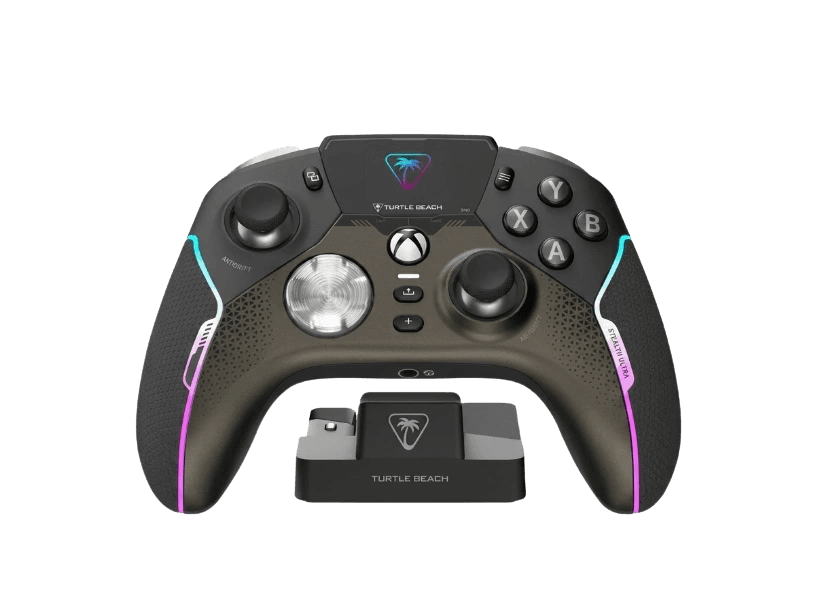
Full Turtle Beach Stealth Ultra diagnostic
The Controller Benchmark runs every relevant subsystem on your Stealth Ultra — Hall-effect sticks, deadzone, the microswitch face buttons and D-pad, trigger range in both standard and hair-trigger modes, the four back paddles, rumble, latency, and connection stability — then produces a composite Controller Health Score. If sticks show drift, run the calibration in the Command Display first; the Hall sensors shouldn't degrade, but the firmware deadzone may need a reset.
Turtle Beach Stealth Ultra hardware specifications
| Specification | Turtle Beach Stealth Ultra |
|---|---|
| Connection | USB-C, Bluetooth, 2.4GHz Wireless Dongle |
| Button count | 23 |
| Analog stick type | Hall-effect (drift-resistant) |
| Gyroscope | No |
| Rumble / haptics | ERM motors (standard rumble) |
| Impulse triggers | No |
| Adaptive triggers | No |
| Touchpad | No |
| Built-in microphone | No |
| Built-in speaker | No |
| Back paddles | Yes |
| Battery life | ~30 hours |
| Weight | 246 g |
| Release year | 2023 |
| MSRP | $199.99 USD |
Recommended tests for Turtle Beach Stealth Ultra
Each test runs in your browser via the Gamepad API — no install, no account, no upload. Run any individually, or use the full benchmark above.
Stick Drift Test
Detect unwanted analog input at rest
Deadzone Test
Measure your stick’s deadzone radius
Hall Effect Checker
Identify Hall Effect vs potentiometer sticks
Trigger Pressure
Verify full analog range on triggers
Button Test
Check every button responds instantly
Circularity Test
Visualize stick travel as a circle
Snapback Test
Measure how fast sticks return to center
Polling Rate
Measure inputs reported per second
Latency Test
Measure input lag in milliseconds
Vibration Test
Test both rumble motors independently
Connection Stability
Detect dropouts and signal interruptions
Known Turtle Beach Stealth Ultra issues
Recurring problems users report with this controller, ranked by frequency. Each links to a step-by-step fix guide.
- Common
Bluetooth works only on Android, not Xbox or PC
Despite advertising Bluetooth, the Stealth Ultra's Bluetooth radio is limited to Android phones and tablets. On Xbox Series X|S, Xbox One, and Windows PC, you must use either the included 2.4GHz USB dongle or the wired USB-C cable. Trying to pair via Windows Bluetooth Settings will not work. This is a firmware-level licensing constraint tied to Xbox Wireless protocol.
View fix guide - Common
Default battery life much shorter than advertised
Out of the box, the Stealth Ultra runs about 8–10 hours per charge. The advertised 30-hour figure requires enabling Eco Mode in the Command Display, which dims the LCD, disables phone notifications, and reduces RGB lighting. Many buyers expect 30 hours by default and feel misled. Eco Mode is in Settings → Power on the controller's LCD.
View fix guide - Common
View and Menu buttons offset by the display
The Command Display occupies the center-top of the controller face, pushing the View and Menu buttons asymmetrically off to either side. Reviewers consistently report mis-pressing the Share button or display-toggle button when reaching for View/Menu. Run the button test to confirm what's actually firing if you suspect phantom inputs.
View fix guide - Occasional
Command Display can fail or crack
Multiple reviewers (XboxEra, several Reddit reports) have documented LCD failures on first-batch units — display going black, refusing to wake, or visibly cracking. Turtle Beach has been quick to replace affected units under warranty. If your display fails, the controller's core inputs still work, but customization becomes app-only.
View fix guide - Rare
Sticks feel notably lighter than Elite Series 2
At 246g, the Stealth Ultra is dramatically lighter than the Elite Series 2 (345g) and DualSense Edge (325g). Some users adapting from heavier pro controllers report it feeling cheap initially or sticks feeling looser, even though Hall sensors are reading correctly. Run the stick drift test and circularity test before assuming hardware fault — the Hall sensors typically test clean.
View fix guide
How to pair the Turtle Beach Stealth Ultra
Get your controller connected before running diagnostics — wired or wireless, mobile or desktop.
Insert the 2.4GHz USB dongle into your Xbox or PC
Plug the included USB-A 2.4GHz transmitter into a USB port on your Xbox Series X|S, Xbox One, or Windows PC. The dongle is also storable in the charging dock if you keep the controller docked when not in use.
Power on the controller via the Xbox button
Press the central Xbox button on the Stealth Ultra. The Command Display lights up and shows the boot logo, then the home screen. The controller defaults to 2.4GHz mode when first powered on with the dongle present.
Pair by holding the small Sync button
If the controller doesn't connect automatically, hold the small Sync button on the back of the controller (near the USB-C port) for 3 seconds. The LED ring flashes. The dongle and controller auto-pair within seconds.
For Android: switch to Bluetooth mode in the Command Display
Navigate the Command Display to Settings → Connectivity → Bluetooth. The controller enters Bluetooth pairing mode. Open Bluetooth settings on your Android device and select 'Turtle Beach Stealth Ultra'. Bluetooth pairing does not work on Xbox or PC.
Press any button to expose the controller to the browser
Browsers gate gamepad access behind a user gesture. Press any button to expose the Stealth Ultra to the Gamepad API. The controller reports as an Xbox Wireless Controller with standard ABXY face button labels.
Turtle Beach Stealth Ultra vs the competition
Head-to-head reviews against the other controllers most buyers cross-shop.
- vs
Xbox Elite Series 2
Elite Series 2 is Microsoft's first-party premium at $179 — modular sticks but potentiometer-based with known drift issues. Stealth Ultra adds Hall-effect sticks (no drift), a Command Display, and four back paddles at $199.
- vs
Xbox Elite Series 2 Core
Elite Core is the $129 stripped-down Elite — no paddles or accessories in-box. Stealth Ultra at $199 adds Hall sticks, four paddles, charging dock, and the Command Display.
- vs
Scuf Instinct Pro
Instinct Pro is the customization-heavy Xbox third-party at $230+ — interchangeable faceplates and per-finger paddles. Stealth Ultra trades customization breadth for Hall-effect sticks and the Command Display at $199.
Turtle Beach Stealth Ultra definitions
Plain-language definitions for the terms used on this page. Each links to the full glossary entry with thresholds, mechanism, and FAQs.
Turtle Beach Stealth Ultra questions
Yes, via the included 2.4GHz USB dongle. The Stealth Ultra is one of very few third-party controllers officially licensed to operate wirelessly on Xbox Series X|S — most Xbox third-party controllers are wired-only or 2.4G-only. Bluetooth on this controller is limited to Android devices and does not work with Xbox or PC.
The Stealth Ultra's Bluetooth radio is firmware-restricted to Android only. On PC and Xbox, you must use the included 2.4GHz USB dongle or a wired USB-C connection. This is a documented limitation tied to Xbox Wireless protocol licensing — third-party controllers cannot freely implement Bluetooth on Xbox-licensed hardware.
Only in Eco Mode. Out of the box, the Stealth Ultra runs 8–10 hours per charge. Reaching 30 hours requires enabling Eco Mode through the Command Display, which dims the LCD, turns off phone notifications, and reduces RGB lighting. Tom's Guide testing confirmed 30 hours is achievable but uses a stripped-down feature set. Plan for ~10 hours if you want the full Command Display experience.
Four main things. First, it shows controller settings (button mapping, RGB, stick sensitivity, hair-trigger toggles) so you can adjust them without an app. Second, it mirrors phone notifications when paired with the Turtle Beach Control Center app on iOS or Android. Third, it shows current profile, battery level, and audio EQ. Fourth, it can display a custom image. It's not a game display — Xbox games render on your TV, not the controller.
Yes. Hall effect uses contactless magnetic sensors instead of physical potentiometer contacts, eliminating the wear mechanism that causes drift on the Elite Series 2 and standard Xbox controllers. PC Gamer, Tom's Guide, and Gaming Nexus all confirmed zero drift after months of testing. If sticks ever do show drift on the test, recalibrate via the Command Display before assuming hardware failure.
Each trigger has a physical lock toggle on the back of the controller with two positions: full analog travel (default, for racing and slow-press games) and short hair-trigger travel (digital, for FPS where you want maximum trigger speed). The locks are mechanical sliders, not software — they physically limit how far the trigger can be pulled before bottoming out.
Yes. If the display fails, breaks, or just isn't useful to you, the controller's core inputs continue working — sticks, buttons, paddles, triggers, rumble, and 2.4G wireless. You lose the ability to change settings without the Turtle Beach Control Center app on PC or mobile. Settings already saved to the controller persist if the display fails.
No to both. The Stealth Ultra uses standard dual-motor ERM rumble, and reviewers describe it as more subdued than DualSense or DualSense Edge. There are no adaptive triggers — the hair-trigger locks are mechanical static settings, not dynamic resistance. If haptics matter to you, the DualSense Edge is the controller that has them; if you're on Xbox, no controller offers haptics because Xbox games don't support haptic APIs.
Get a full health report for your Turtle Beach Stealth Ultra
Run the Controller Benchmark to score every subsystem and generate a shareable Controller Health Score graded S through F.
Run the Benchmark