8BitDo Pro 3 Controller Test
The 8BitDo Pro 3 controller test runs a full diagnostic on 8BitDo's August 2025 flagship — verifying the TMR analog sticks with 12-bit ADC sampling (highest precision in 8BitDo's lineup), switchable Hall-effect or tactile triggers, two back buttons, R4 and L4 extra bumpers, 6-axis motion sensor, and rumble. Connect via Bluetooth, the 2.4GHz dongle, or USB-C, press any button, and get a Controller Health Score graded S through F. Unique feature: face buttons swap magnetically between Xbox (ABXY) and Switch (BAYX) layouts.
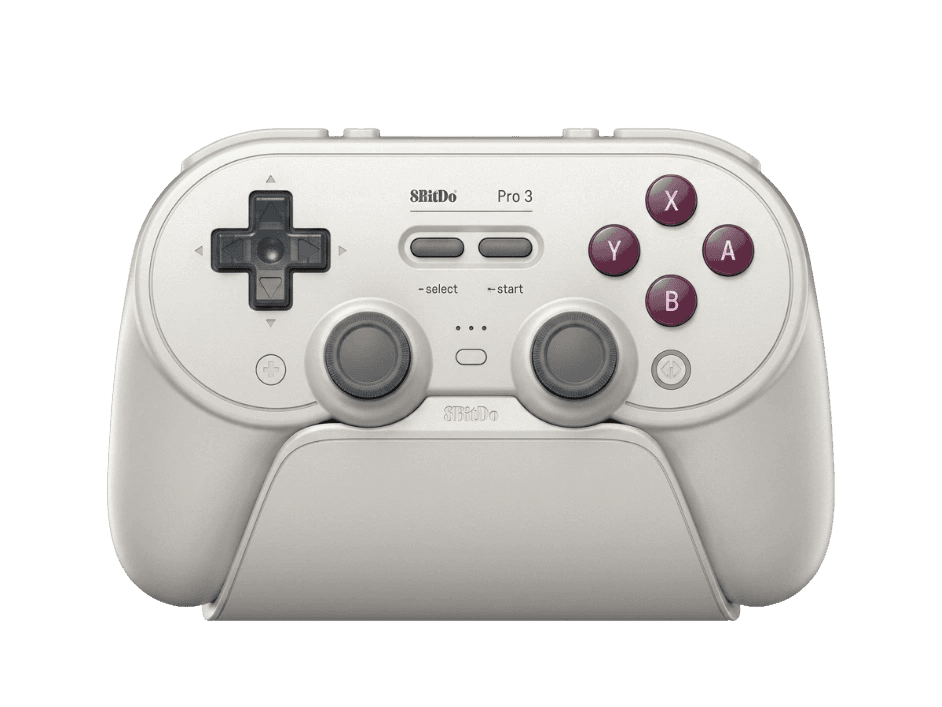
Full 8BitDo Pro 3 diagnostic
The Controller Benchmark runs every relevant subsystem on your Pro 3 — TMR sticks with 12-bit ADC precision, deadzone, swappable face buttons (Xbox or Switch layout), tactile D-pad, triggers in both Hall analog and tactile modes, two back buttons, R4 and L4 bumpers, rumble, gyro, latency, and connection stability — then produces a composite Controller Health Score. The 12-bit ADC delivers 4096 positions per stick axis (vs 256 on 8-bit controllers), so the deadzone and circularity tests should show exceptionally smooth, jitter-free input.
8BitDo Pro 3 hardware specifications
| Specification | 8BitDo Pro 3 |
|---|---|
| Connection | USB-C, Bluetooth, 2.4GHz Wireless Dongle |
| Button count | 22 |
| Analog stick type | TMR (drift-resistant, low-power) |
| Gyroscope | Yes |
| Rumble / haptics | ERM motors (standard rumble) |
| Impulse triggers | No |
| Adaptive triggers | No |
| Touchpad | No |
| Built-in microphone | No |
| Built-in speaker | No |
| Back paddles | Yes |
| Battery life | ~25 hours |
| Weight | 242 g |
| Release year | 2025 |
| MSRP | $69.99 USD |
Recommended tests for 8BitDo Pro 3
Each test runs in your browser via the Gamepad API — no install, no account, no upload. Run any individually, or use the full benchmark above.
Stick Drift Test
Detect unwanted analog input at rest
Deadzone Test
Measure your stick’s deadzone radius
Hall Effect Checker
Identify Hall Effect vs potentiometer sticks
Trigger Pressure
Verify full analog range on triggers
Button Test
Check every button responds instantly
Circularity Test
Visualize stick travel as a circle
Snapback Test
Measure how fast sticks return to center
Polling Rate
Measure inputs reported per second
Latency Test
Measure input lag in milliseconds
Gyro Test
Test 6-axis motion sensors
Vibration Test
Test both rumble motors independently
Connection Stability
Detect dropouts and signal interruptions
Known 8BitDo Pro 3 issues
Recurring problems users report with this controller, ranked by frequency. Each links to a step-by-step fix guide.
- Common
Vibration and motion control only work on Switch and SteamOS
Critical limitation: per 8BitDo's product listing, vibration and motion control on the Pro 3 work ONLY on Switch and SteamOS — NOT on Windows PC, macOS, or Android, regardless of connection method (Bluetooth, 2.4G dongle, or wired). This is more restrictive than the 8BitDo Ultimate 2 Bluetooth, which provides full rumble on Switch over Bluetooth AND on PC over 2.4G/wired. If you primarily play on Windows PC, the Ultimate 2 is the better choice for rumble feedback.
View fix guide - Common
250Hz polling rate vs Ultimate 2's 1000Hz
The Pro 3 uses a 250Hz polling rate — adequate for most gaming but notably lower than the 8BitDo Ultimate 2 Bluetooth (1000Hz). For competitive PC games where input-to-display latency matters, the Ultimate 2 has a measurable advantage. The Pro 3's marketing emphasizes the 12-bit ADC stick precision over polling rate; both are real technical advantages but they target different use cases.
View fix guide - Common
Cannot wake Switch 2 from sleep
Per Gizmodo's hands-on review, the Pro 3 cannot wake the Switch 2 from sleep — only the official Nintendo controllers can do this. To use the Pro 3 on Switch 2, first wake the console with a Joy-Con or Switch 2 Pro Controller, then take over with the Pro 3. This is a Nintendo platform restriction, not a Pro 3 defect.
View fix guide - Occasional
Switch 2 firmware update may be required
Pro 3 units shipped between August 2025 and early 2026 may need a firmware update before reliable Switch 2 pairing. Connect to a Windows PC via USB-C and run 8BitDo Ultimate Software V2 to apply the latest firmware. Once updated, Switch 2 pairing works through the standard System Settings → Controllers and Sensors flow.
View fix guide - Rare
Magnetic face buttons can detach during cleaning
The magnetically swappable ABXY face buttons make layout swaps easy but can also come loose during aggressive cleaning. The buttons snap back in place easily — orientation matters (the included button puller tool helps reinstallation). If a button feels loose or registers inconsistently, remove and reseat it cleanly. Don't try to glue it; the magnetic attachment is designed to be removable.
View fix guide
How to pair the 8BitDo Pro 3
Get your controller connected before running diagnostics — wired or wireless, mobile or desktop.
Choose connection mode via back switch
The Pro 3 has a three-position mode toggle on the back: Bluetooth (B icon), 2.4G (G icon), and Wired/USB. Set it to your intended mode before powering on. For Switch and Switch 2, both Bluetooth and 2.4G work fully; on PC, all three modes work but vibration/motion are limited regardless.
Power on by pressing the central 8BitDo button
Press the central 8BitDo logo button. The status LED illuminates. The Pro 3 will reconnect to the last-paired host automatically; if no host is found, enter pairing mode in the next step.
Hold Pair button on the back to enter pairing mode
On the top edge of the controller, there's a small Pair button near the USB-C port. Hold it for 3 seconds. The LEDs flash rapidly. The Pro 3 is now discoverable.
Connect to your host or use 2.4G dongle
For Bluetooth: open your device's Bluetooth settings and select "8BitDo Pro 3" (Switch shows it as a Pro Controller). For 2.4G: plug the USB-C dongle into your host (PS5 has USB-C; PC may need a USB-A adapter). The integrated charging dock includes a slot to store the dongle when docked.
Press any button to expose to the browser
Browsers gate gamepad access behind a user gesture. Press any button to expose the Pro 3 to the Gamepad API. The controller reports with face button labels matching the currently installed button set — Xbox-style (A/B/X/Y) by default, or Switch-style (B/A/Y/X) if you've swapped the magnetic buttons.
8BitDo Pro 3 vs the competition
Head-to-head reviews against the other controllers most buyers cross-shop.
- vs
8BitDo Ultimate 2 Bluetooth
Both $69.99 with TMR sticks and switchable Hall/tactile triggers. Ultimate 2 has 1000Hz polling and rumble on PC over 2.4G/wired. Pro 3 has 12-bit ADC stick precision, magnetically swappable face buttons (Xbox/Switch), and a more refined ergonomic design — but only 250Hz polling and Switch/SteamOS rumble. Pro 3 for casual cross-platform; Ultimate 2 for PC competitive.
- vs
8BitDo Pro 2 (predecessor)
Pro 2 at $49.99 has Hall-effect sticks and the same SNES-style face button layout. Pro 3 at $69.99 upgrades to TMR sticks with 12-bit ADC, adds magnetically swappable Xbox/Switch buttons, and includes R4/L4 extra bumpers — a clear $20 upgrade for users wanting modern stick tech.
- vs
Switch Pro Controller (Switch 2)
Switch 2 Pro Controller is the $90 first-party benchmark with HD Rumble and Nintendo button layout. Pro 3 at $69.99 is the cheaper third-party with TMR sticks, swappable face button layouts, and back paddles — but cannot wake Switch 2 from sleep and has more restricted rumble.
8BitDo Pro 3 definitions
Plain-language definitions for the terms used on this page. Each links to the full glossary entry with thresholds, mechanism, and FAQs.
8BitDo Pro 3 questions
Yes, measurably. The Pro 3's TMR sticks use a 12-bit Analog-to-Digital Converter (ADC) sampling chip, which means each stick axis reports one of 4096 possible positions (0-4095). Most controllers use 8-bit ADCs (256 positions) or 10-bit (1024 positions). For most gaming this difference is imperceptible, but for precision-sensitive applications (flight sims, slow camera pans, fine aim adjustments), the higher resolution genuinely reduces step-quantization artifacts. The deadzone and circularity tests on this site will show exceptionally smooth input.
By design. The Pro 3 limits vibration and motion control to Switch and SteamOS only — this includes Windows PC over any connection method (Bluetooth, 2.4G dongle, or wired). This is more restrictive than the 8BitDo Ultimate 2 Bluetooth, which provides rumble on PC over 2.4G and wired. If PC rumble matters, the Ultimate 2 is the better choice in 8BitDo's lineup. The Pro 3 prioritizes precision (12-bit ADC) over PC feedback features.
Yes — uniquely. The Pro 3's ABXY face buttons are magnetically attached and can be physically swapped using the included button puller tool. Xbox layout has A at the bottom, B on the right, X on the left, Y at the top. Switch layout (which prints as B/A/Y/X) inverts horizontally. Swapping the buttons lets you match the printed label on the controller to the layout used by your current game. The internal HID descriptor adjusts automatically based on which mode the controller boots into.
Yes, both Switch 1 and Switch 2 are supported via Bluetooth or the 2.4G dongle. Out-of-box units may need a firmware update — connect to a PC via USB-C and run 8BitDo Ultimate Software V2 before pairing with Switch 2. One caveat: the Pro 3 cannot wake the Switch 2 from sleep mode (Nintendo's restriction for non-first-party controllers); use a Joy-Con or Switch 2 Pro Controller to wake the console first.
Both $69.99 with TMR sticks. The Ultimate 2 has 1000Hz polling, rumble on PC via 2.4G/wired, and a slightly different button layout (Xbox-style asymmetric vs Pro 3's symmetric). The Pro 3 has 12-bit ADC stick precision (4x the resolution), magnetically swappable Xbox/Switch face buttons, and a more retro-inspired form factor — but only 250Hz polling and no PC rumble. Choose Ultimate 2 for competitive PC gaming with rumble; Pro 3 for cross-platform precision and customization.
The Pro 3 includes the controller, the integrated charging dock, a USB-C cable, a 2.4G USB-C dongle, two ball-top joystick caps (for arcade-stick feel — swappable with the default concave caps), the magnetic button puller tool, and basic documentation. The G Classic and purple color variants ship with matching dock and accessories. Some retailers bundle additional thumbstick toppers.
The 1000mAh battery typically delivers 20-30 hours per charge depending on usage intensity. Gizmodo's review noted 'a few hours less than my Switch 2 Pro Controller' — Nintendo's first-party Pro Controller is rated 40 hours. Charge time on the integrated dock is approximately 3 hours from empty. The controller charges while in use over USB-C, so you can play through a low battery indefinitely.
If your Pro 2 still works and you don't need TMR sticks, no — the Pro 2 at $49.99 is still a strong controller for $20 less. The upgrade case for Pro 3 is: you want drift-resistant TMR sticks (vs Pro 2's Hall-effect), you want the magnetic Xbox/Switch face button swap, you want R4/L4 bumpers, or your Pro 2 has developed stick drift. The Pro 3 is the clear technical upgrade but the Pro 2 remains a strong value at the lower price.
Get a full health report for your 8BitDo Pro 3
Run the Controller Benchmark to score every subsystem and generate a shareable Controller Health Score graded S through F.
Run the Benchmark