8BitDo SN30 Pro+ Controller Test
The 8BitDo SN30 Pro+ controller test runs a full diagnostic on 8BitDo's larger SNES-styled controller with proper handles — verifying the analog hair triggers (adjustable via Ultimate Software), 1000mAh rechargeable battery or AA alternative, 6-axis motion sensor, rumble, and the symmetrical analog sticks. Connect via Bluetooth or USB-C to Switch, Switch 2, PC, Mac, Android, Steam Deck, or Raspberry Pi, then press any button for a Controller Health Score graded S through F.
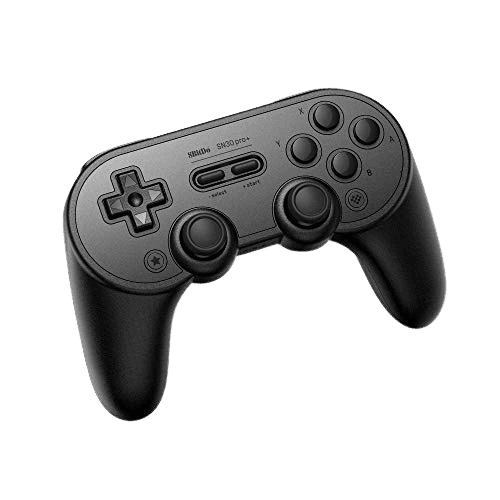
Full 8BitDo SN30 Pro+ diagnostic
The Controller Benchmark runs every relevant subsystem on your SN30 Pro+ — analog sticks (potentiometer-based, so worth running the drift test regularly), deadzone, classic SNES-style D-pad, analog hair triggers in both standard and shortened pull modes, rumble, motion sensor, latency, and connection stability — then produces a composite Controller Health Score. Unlike the base SN30 Pro, the Pro+ has analog triggers so the trigger pressure test reports a full 0-255 range instead of binary press.
8BitDo SN30 Pro+ hardware specifications
| Specification | 8BitDo SN30 Pro+ |
|---|---|
| Connection | USB-C, Bluetooth |
| Button count | 19 |
| Analog stick type | Potentiometer (susceptible to drift) |
| Gyroscope | Yes |
| Rumble / haptics | ERM motors (standard rumble) |
| Impulse triggers | No |
| Adaptive triggers | No |
| Touchpad | No |
| Built-in microphone | No |
| Built-in speaker | No |
| Back paddles | No |
| Battery life | ~20 hours |
| Weight | 228 g |
| Release year | 2019 |
| MSRP | $49.99 USD |
Recommended tests for 8BitDo SN30 Pro+
Each test runs in your browser via the Gamepad API — no install, no account, no upload. Run any individually, or use the full benchmark above.
Stick Drift Test
Detect unwanted analog input at rest
Deadzone Test
Measure your stick’s deadzone radius
Hall Effect Checker
Identify Hall Effect vs potentiometer sticks
Trigger Pressure
Verify full analog range on triggers
Button Test
Check every button responds instantly
Circularity Test
Visualize stick travel as a circle
Snapback Test
Measure how fast sticks return to center
Polling Rate
Measure inputs reported per second
Latency Test
Measure input lag in milliseconds
Gyro Test
Test 6-axis motion sensors
Vibration Test
Test both rumble motors independently
Connection Stability
Detect dropouts and signal interruptions
Known 8BitDo SN30 Pro+ issues
Recurring problems users report with this controller, ranked by frequency. Each links to a step-by-step fix guide.
- Common
Sticks are potentiometer — NOT updated to Hall like base SN30 Pro
Counterintuitive but verified: the smaller base SN30 Pro Bluetooth received a Hall-effect joystick update around 2024, but the larger Pro+ did NOT. The Pro+ ships with traditional potentiometer sticks and may develop drift after 400–600 hours of use. iFixit's official replacement guide confirms the sticks are soldered analog modules, not Hall sensor boards. If drift resistance is a priority, the base SN30 Pro (Hall update) or 8BitDo Pro 2 are better choices.
View fix guide - Occasional
4-hour charge time is unusually slow
The Pro+'s 1000mAh battery takes approximately 4 hours to fully charge from empty — significantly longer than the base SN30 Pro (1-2 hours for its smaller 480mAh battery). This is by design, not a defect. If charge time matters, you can swap to 2x AA batteries for instant 'recharge' by battery replacement, or buy a second 1000mAh battery pack as a swap.
View fix guide - Occasional
Hair trigger setting only affects PC and X-input modes
The hair-trigger feature is configured via 8BitDo Ultimate Software (Windows only) and saved to the controller. It works in X-input mode and PC D-input mode, but on Switch and macOS modes the triggers behave as full analog. This isn't a defect — it's a firmware limitation tied to which controller HID descriptor is in use.
View fix guide - Occasional
Bluetooth 4.0 is older than competitors
The Pro+ uses Bluetooth 4.0, an older spec than the Bluetooth 5.x used by the 8BitDo Ultimate 2, Pro 3, and Pro 2. In practice this means slightly higher latency and more susceptibility to interference from 2.4GHz Wi-Fi. For competitive gaming, the wired USB-C connection is recommended over Bluetooth.
View fix guide - Occasional
Switch won't pair after too many controllers connected
Per 8BitDo's official FAQ, Nintendo Switch caps controller pairings at 10. If you've connected and disconnected many controllers, the Switch may refuse to pair the Pro+ until you clear old pairings. Go to System Settings → Controllers and Sensors → Disconnect Controllers, then re-pair the Pro+ fresh.
View fix guide
How to pair the 8BitDo SN30 Pro+
Get your controller connected before running diagnostics — wired or wireless, mobile or desktop.
Press a platform-specific combo to power on
The Pro+ powers on with a platform-specific combo: Y+Start for Switch, B+Start for Android, X+Start for Windows, A+Start for macOS. The four LEDs flash to confirm the controller is on. This is the same multi-mode convention 8BitDo uses across its retro line.
Hold the Pair button to enter pairing mode
On the top edge of the controller near the USB-C port, there's a small Pair button. Hold it for 3 seconds. The LEDs begin rotating left-to-right, indicating pairing mode is active and the controller is discoverable.
Connect from your device's Bluetooth menu
Open Bluetooth settings on your host device. The Pro+ appears as "8BitDo SN30 Pro+". Tap to connect. The LEDs become solid when paired. Switch displays it as a Pro Controller; PC sees it as either Xbox 360-style (X-input mode) or generic gamepad (D-input mode) depending on which mode you booted into.
Or use USB-C for wired connection
Plug a USB-C cable from the controller to your host. Wired mode bypasses Bluetooth latency. Important: use the included USB-C cable for charging — 8BitDo notes that some third-party cables don't deliver enough current for full charging.
Install 8BitDo Ultimate Software for customization
On Windows or macOS, download 8BitDo Ultimate Software from support.8bitdo.com. The software unlocks button mapping, stick sensitivity curves, vibration intensity, the hair-trigger setting, and macro creation. Profiles save to onboard memory and persist across hosts. Mac mode does not support Ultimate Software customization (Windows only).
8BitDo SN30 Pro+ vs the competition
Head-to-head reviews against the other controllers most buyers cross-shop.
- vs
8BitDo SN30 Pro (smaller sibling)
Base SN30 Pro is the smaller SNES-form-factor at ~$45 with Hall-effect sticks (post-2024 update) and digital triggers. Pro+ is the larger handled version at $49 with analog hair triggers, full Ultimate Software customization, and a 1000mAh battery — but potentiometer sticks.
- vs
8BitDo Pro 2
Pro 2 is the modern ergonomic upgrade with Hall-effect sticks, back paddles, and DualShock-style face button arrangement at ~$50. Pro+ retains the SNES-style face button layout and has potentiometer sticks. Buy Pro 2 for drift resistance; Pro+ for the classic SNES button arrangement and AA battery option.
- vs
Switch Pro Controller
Switch Pro is the first-party benchmark with HD Rumble and Nintendo button layout. Pro+ is the cheaper third-party alternative with similar Switch functionality plus broader cross-platform support (PC, Mac, Android, Steam Deck, Raspberry Pi).
8BitDo SN30 Pro+ definitions
Plain-language definitions for the terms used on this page. Each links to the full glossary entry with thresholds, mechanism, and FAQs.
8BitDo SN30 Pro+ questions
No. Despite the base SN30 Pro receiving a Hall-effect joystick update around 2024, the Pro+ has NOT received this update. iFixit's teardown guide confirms the Pro+ ships with traditional soldered potentiometer sticks. This is counterintuitive — buyers often assume the larger 'plus' version has newer technology than the budget sibling — but the Pro+ is older hardware and 8BitDo prioritized the more popular base SN30 Pro for the Hall update.
Three main differences. First, size and ergonomics — Pro+ has proper handles versus the Pro's compact SNES form factor. Second, triggers — Pro+ has analog triggers with adjustable hair-trigger settings, while the Pro has digital L2/R2 buttons. Third, battery — Pro+ has a removable 1000mAh pack or AA option; Pro has a built-in 480mAh battery. Pro is $44.99, Pro+ is $49.99.
Yes. The Pro+ ships with a removable 1000mAh Li-Polymer pack, but the same battery compartment accepts two standard AA batteries. This is unique among modern controllers and is genuinely useful: if your battery dies during a long session, swap in fresh AAs and keep playing. Many users keep a charged 1000mAh pack and a set of AAs as backup.
Approximately 20 hours per full charge on the included 1000mAh pack. With AA batteries, life depends on AA quality — premium alkaline AAs last 25-30 hours, NiMH rechargeables 15-20 hours, basic AAs 10-15 hours. Charge time on the included pack is approximately 4 hours via USB-C — significantly longer than the base SN30 Pro's 1-2 hour charge.
Hair trigger reduces the analog trigger's activation point — instead of pulling the trigger 100% to register a full press, you can configure it to register full press at, say, 50% or 30% pull. Useful for FPS games where faster trigger response matters. Configure via 8BitDo Ultimate Software on Windows; the setting saves to controller memory and persists on PC and X-input modes (not Switch/Mac modes).
Yes, with firmware update. Connect the Pro+ to a Windows PC via USB-C and run 8BitDo Ultimate Software V2 (or the legacy 8BitDo firmware updater) to update before pairing with Switch 2. Out-of-box units from before mid-2025 may need this update. Once updated, pair via Switch 2's System Settings → Controllers and Sensors menu.
8BitDo's Ultimate Software runs on Windows only — there's no official macOS, Linux, or mobile version of the customization tool. macOS users can still use the controller with default settings but cannot adjust hair-trigger thresholds, stick curves, or button mapping. This is a software ecosystem limitation, not a hardware constraint.
No — the Pro+ has no back paddles. If you need back paddles in an 8BitDo controller, the Pro 2 (smaller, retro layout) or Ultimate 2 (modern Xbox layout) are the options that include them. The Pro+ focuses on hair-trigger customization and battery flexibility rather than rear buttons.
Get a full health report for your 8BitDo SN30 Pro+
Run the Controller Benchmark to score every subsystem and generate a shareable Controller Health Score graded S through F.
Run the Benchmark