8BitDo Ultimate 2 Controller Test
The 8BitDo Ultimate 2 controller test runs a full diagnostic on 8BitDo's TMR-equipped flagship in the browser — verifying the Tunneling Magnetoresistance analog sticks, switchable Hall/tactile triggers, two back paddles, R4 and L4 fast bumpers, and rumble. Connect over Bluetooth, the 2.4GHz adapter, or USB-C, press any button, and get a Controller Health Score graded S through F.
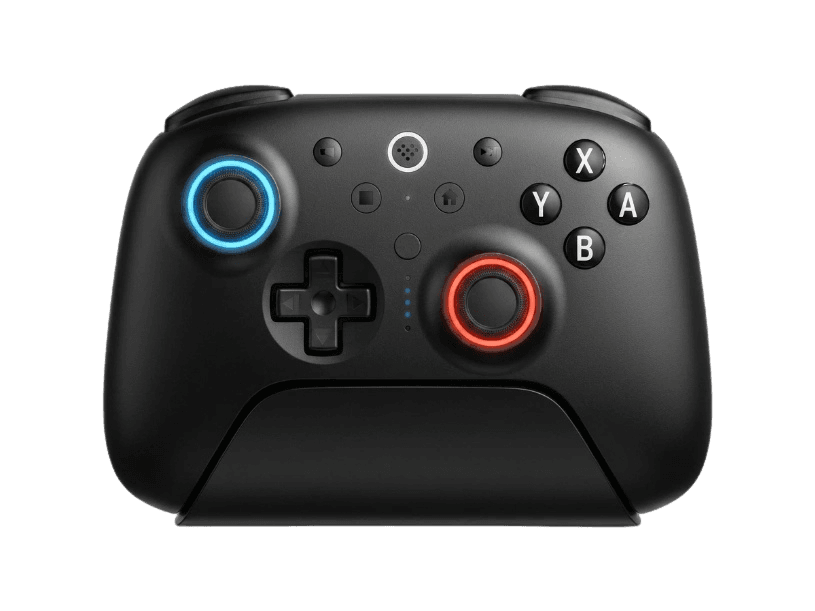
Full 8BitDo Ultimate 2 diagnostic
The Controller Benchmark runs every relevant subsystem on your 8BitDo Ultimate 2 — TMR sticks, deadzone, button response, R4/L4 bumpers, back paddles, trigger range in both Hall and tactile modes, rumble, latency, and connection stability — then produces a composite Controller Health Score. TMR sticks should test exceptionally clean for drift; if they don't, the controller may need a recalibration via the LB + RB + Minus + Plus combo.
8BitDo Ultimate 2 hardware specifications
| Specification | 8BitDo Ultimate 2 |
|---|---|
| Connection | USB-C, Bluetooth, 2.4GHz Wireless Dongle |
| Button count | 22 |
| Analog stick type | TMR (drift-resistant, low-power) |
| Gyroscope | Yes |
| Rumble / haptics | ERM motors (standard rumble) |
| Impulse triggers | No |
| Adaptive triggers | No |
| Touchpad | No |
| Built-in microphone | No |
| Built-in speaker | No |
| Back paddles | Yes |
| Battery life | ~25 hours |
| Weight | 246 g |
| Release year | 2025 |
| MSRP | $69.99 USD |
Recommended tests for 8BitDo Ultimate 2
Each test runs in your browser via the Gamepad API — no install, no account, no upload. Run any individually, or use the full benchmark above.
Stick Drift Test
Detect unwanted analog input at rest
Deadzone Test
Measure your stick’s deadzone radius
Hall Effect Checker
Identify Hall Effect vs potentiometer sticks
Trigger Pressure
Verify full analog range on triggers
Button Test
Check every button responds instantly
Circularity Test
Visualize stick travel as a circle
Snapback Test
Measure how fast sticks return to center
Polling Rate
Measure inputs reported per second
Latency Test
Measure input lag in milliseconds
Gyro Test
Test 6-axis motion sensors
Vibration Test
Test both rumble motors independently
Connection Stability
Detect dropouts and signal interruptions
Known 8BitDo Ultimate 2 issues
Recurring problems users report with this controller, ranked by frequency. Each links to a step-by-step fix guide.
- Common
Vibration and gyro disabled on PC over Bluetooth
On PC, vibration and motion control work only over 2.4G adapter or wired USB-C. Bluetooth strips both due to HID bandwidth limits. This is by design, not a defect — Switch retains both features over its proprietary Bluetooth HID profile. If you need rumble on PC, plug in the included 2.4G adapter.
View fix guide - Occasional
Switch 2 not recognizing the controller
Units shipped before mid-2025 may need a firmware update before Switch 2 detects them. Connect to a PC via USB-C and run 8BitDo Ultimate Software V2 to update — the process takes under five minutes. After updating, repair via Switch System Settings → Controllers and Sensors.
View fix guide - Common
Wrong variant received — Xbox layout instead of Switch
Two SKUs share the Ultimate 2 name: the Bluetooth variant (80ND01/80ND02) with Nintendo button layout and Switch support, and the Wireless variant (81HE-SG) with Xbox layout and no Switch Bluetooth. Buyers regularly receive the wrong one. Check the model number on the back of the box before opening.
View fix guide - Rare
Trigger feels wrong for current game
The Ultimate 2 has a physical trigger mode switch — Hall (linear analog) or tactile (clicky digital). If your trigger inputs feel binary in a racing game, the switch is in tactile mode. Flip it to Hall mode. If they feel mushy in a fighting game, flip it to tactile. The switch is on the back, between the back paddles.
View fix guide - Common
Back paddles not registering any input
Out of the box, the back paddles and R4/L4 fast bumpers are unassigned. Use the on-controller mapping (hold the Star button + the target button, then press the paddle to assign) or install 8BitDo Ultimate Software V2 for per-profile assignments. Profiles persist in the controller's onboard memory.
View fix guide
How to pair the 8BitDo Ultimate 2
Get your controller connected before running diagnostics — wired or wireless, mobile or desktop.
Choose your connection mode
The Ultimate 2 has a three-position mode switch on the back: Bluetooth (B icon), 2.4G (G icon), and Wired/USB. Set the switch to your intended mode before powering on. For Switch and Switch 2 use Bluetooth or 2.4G; for PC any mode works.
Hold the Pair button to enter pairing mode
Between the L2 and R2 triggers on the back of the controller there's a small Pair button. Hold it for about three seconds until the LED ring begins to flash rapidly — pairing mode is active and the controller is discoverable.
Connect to your host device
For Bluetooth: open your device's Bluetooth settings and select "8BitDo Ultimate 2". For 2.4G: plug the included USB-C adapter into your host — pairing is pre-bound and reconnects automatically. For wired: connect the USB-C cable.
Update firmware if connecting to Switch 2
If you bought the controller before mid-2025 and want to use it on Switch 2, connect it to a PC via USB-C first and run 8BitDo Ultimate Software V2 to update the firmware. Older firmware versions are not recognized by Switch 2.
Press any button to expose the controller to the browser
Browsers gate gamepad access behind a user gesture. Press any button to expose the Ultimate 2 to the Gamepad API. The Ultimate 2 Bluetooth variant uses Switch face button labels (B A Y X as printed on hardware).
8BitDo Ultimate 2 vs the competition
Head-to-head reviews against the other controllers most buyers cross-shop.
- vs
8BitDo Ultimate (original)
Original Ultimate uses Hall-effect sticks at 250Hz polling for $49; Ultimate 2 upgrades to TMR sticks at 1000Hz polling with switchable Hall/tactile triggers for $69.
- vs
Switch Pro Controller
Switch Pro is the first-party benchmark with HD Rumble; Ultimate 2 adds TMR drift-resistant sticks, back paddles, 1000Hz polling, and a charging dock at lower MSRP.
- vs
Gulikit KingKong 3 Max
KK3 Max is the Hall-effect benchmark at a similar price point; Ultimate 2 steps up to TMR sticks (newer magnetic sensor generation) and switchable trigger modes.
8BitDo Ultimate 2 definitions
Plain-language definitions for the terms used on this page. Each links to the full glossary entry with thresholds, mechanism, and FAQs.
8BitDo Ultimate 2 questions
TMR (Tunneling Magnetoresistance) joysticks use a thin-film magnetic sensor that detects changes in electron tunneling probability. Like Hall-effect sticks, TMR is contactless — there's no physical wear surface to cause drift. TMR claims higher precision and lower power draw than Hall effect at the cost of more expensive components. The Ultimate 2 is 8BitDo's first controller to use TMR sticks.
Yes. The Ultimate 2 Bluetooth variant (model 80ND01 white or 80ND02 black) officially supports Switch 2 via Bluetooth, 2.4G adapter, and USB-C wired. Out-of-box units shipped before mid-2025 may need a firmware update — connect to a PC running 8BitDo Ultimate Software V2 to update before pairing.
Bluetooth HID bandwidth on PC strips vibration and motion control from the Ultimate 2. Switch to either 2.4G (using the included USB-C adapter) or wired USB-C to restore both features. The full feature set works over Switch's proprietary Bluetooth HID profile, which is why Switch users see no missing features.
It physically switches the triggers between two response curves. In Hall-effect mode the triggers report a full analog range from 0 to 255 — useful for racing and shooter games that benefit from variable pressure. In tactile mode the triggers behave like digital bumpers with a clicky stop near the top, useful for fighting games and platformers where you want a binary press.
The headline upgrades are TMR sticks (versus Hall on the original), 1000Hz polling (versus 250Hz on the original), and the switchable Hall/tactile triggers. If your original Ultimate is still drift-free and you don't need higher polling, the upgrade is incremental. If your original has worn-out sticks or you want competitive-grade polling, the Ultimate 2 is a meaningful step up.
The Bluetooth variant (model 80ND01/80ND02) has Nintendo button layout, supports Switch and Switch 2, and adds Bluetooth alongside 2.4G and wired. The Wireless variant (model 81HE-SG) has Xbox button layout, is PC/Mac/SteamOS/Android only, and has no Switch Bluetooth pairing. Both share the same internal hardware — TMR sticks, switchable triggers, 1000Hz polling.
With the controller powered on, hold the Minus (−) and Plus (+) buttons together for 5 seconds. The controller will toggle zero-deadzone mode. This bypasses the firmware deadzone entirely — useful if you want to read raw stick values on the deadzone test or drift test rather than the filtered output. Toggle again to re-enable the default deadzone.
Power on the controller, then hold LB + RB + Minus + Plus together for 8 seconds. The status LED starts blinking. Push both sticks to the edge and rotate slowly 2 to 3 times, then press both triggers fully 2 to 3 times. Press the same LB + RB + Minus + Plus combo again to save. This is 8BitDo's official recalibration routine.
Get a full health report for your 8BitDo Ultimate 2
Run the Controller Benchmark to score every subsystem and generate a shareable Controller Health Score graded S through F.
Run the Benchmark