Razer Raiju V3 Pro Controller Test
The Razer Raiju V3 Pro controller test runs a full diagnostic on Razer's 2025 PS5-licensed wireless flagship — verifying the TMR (Tunneling Magnetoresistance) thumbsticks, Pro HyperTriggers with customizable actuation, four removable mouse-click back buttons, double-shot PBT face buttons and D-pad, and the 2350mAh battery. Connect over HyperSpeed Wireless via the USB-A dongle or wired USB-C, press any button, and get a Controller Health Score graded S through F.
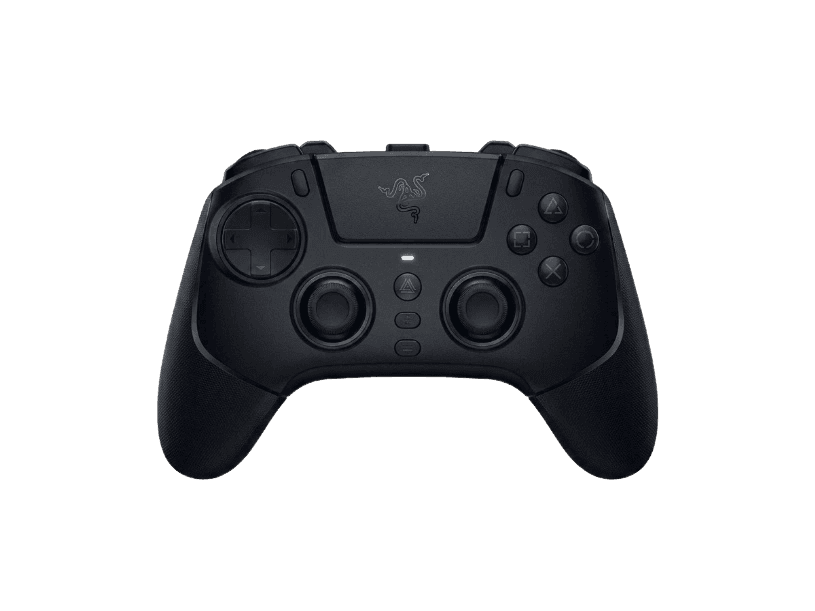
Full Razer Raiju V3 Pro diagnostic
The Controller Benchmark runs every relevant subsystem on your Raiju V3 Pro — TMR sticks (test exceptionally clean for drift), deadzone, double-shot PBT face buttons, Pro HyperTriggers in both standard and hair-trigger modes, the four removable mouse-click back buttons, touchpad, latency, and HyperSpeed Wireless connection stability — then produces a composite Controller Health Score. The TMR sticks represent the newest magnetic sensor generation and should outperform Hall-effect on circularity and snapback tests.
Razer Raiju V3 Pro hardware specifications
| Specification | Razer Raiju V3 Pro |
|---|---|
| Connection | USB-C, 2.4GHz Wireless Dongle |
| Button count | 23 |
| Analog stick type | TMR (drift-resistant, low-power) |
| Gyroscope | No |
| Rumble / haptics | None |
| Impulse triggers | No |
| Adaptive triggers | No |
| Touchpad | Yes |
| Built-in microphone | No |
| Built-in speaker | No |
| Back paddles | Yes |
| Battery life | ~36 hours |
| Weight | 260 g |
| Release year | 2025 |
| MSRP | $219.99 USD |
Recommended tests for Razer Raiju V3 Pro
Each test runs in your browser via the Gamepad API — no install, no account, no upload. Run any individually, or use the full benchmark above.
Stick Drift Test
Detect unwanted analog input at rest
Deadzone Test
Measure your stick’s deadzone radius
Hall Effect Checker
Identify Hall Effect vs potentiometer sticks
Trigger Pressure
Verify full analog range on triggers
Button Test
Check every button responds instantly
Circularity Test
Visualize stick travel as a circle
Snapback Test
Measure how fast sticks return to center
Polling Rate
Measure inputs reported per second
Latency Test
Measure input lag in milliseconds
Touchpad Test
Test DualSense and DualShock touchpads
Connection Stability
Detect dropouts and signal interruptions
Battery Health
Estimate wireless controller battery life
Known Razer Raiju V3 Pro issues
Recurring problems users report with this controller, ranked by frequency. Each links to a step-by-step fix guide.
- Common
No rumble or haptic feedback — by design
Sony restricts PS5 haptic feedback and adaptive trigger licensing to first-party DualSense controllers — no third-party PS5 controller can replicate these features. The Raiju V3 Pro additionally omits standard rumble motors entirely, positioning itself as an esports-only controller. Games designed around DualSense haptics (Astro's Playroom, Returnal) will feel less immersive on the Raiju. If immersive feedback matters, the DualSense Edge is the only PS5 pro controller that has it.
View fix guide - Common
2000Hz polling capped to 250Hz on PS5 console
The Raiju V3 Pro supports 2000Hz polling on PC (a major competitive advantage), but Sony caps all PS5 controllers at 250Hz at the platform level. PS5 users get the same 250Hz polling as a standard DualSense — the higher polling is only useful on PC. If you're buying primarily for PS5 console play, the Raiju's polling advantage is mostly wasted.
View fix guide - Occasional
Symmetrical PS5-style stick layout may feel different from Razer's Xbox controllers
The Raiju V3 Pro uses symmetrical (PS5-style) thumbsticks where both sticks sit at the bottom of the controller, unlike Razer's Wolverine line (Xbox-style asymmetric where left stick is higher). Users coming from the Wolverine V3 Pro report it taking time to adjust. This is not a defect — it's the PS5 convention.
View fix guide - Rare
US launch was delayed by regulatory clearance
Per Razer's October 22, 2025 statement, the Raiju V3 Pro was 'currently unavailable for purchase in the United States as we await regulatory clearance.' US availability appears to have resumed by late 2025 (Walmart, Amazon listings active). If you encounter the controller listed but out of stock in the US, this is the residual cause — Razer should have inventory now.
View fix guide - Occasional
No Bluetooth — wireless only via included dongle
The Raiju V3 Pro uses Razer HyperSpeed Wireless via a USB-A dongle — there is no Bluetooth radio. If the dongle is damaged or lost, the controller can only be used wired via USB-C. This differs from the DualSense Edge, which uses Bluetooth and pairs without a dongle.
View fix guide
How to pair the Razer Raiju V3 Pro
Get your controller connected before running diagnostics — wired or wireless, mobile or desktop.
Set the platform mode toggle on the back
The Raiju V3 Pro has a 3-position mode toggle: PS5, PC, and Wired/USB. Set it to your intended host. PS5 mode is required for PlayStation 5 console use; PC mode unlocks the 2000Hz polling rate option.
Plug the HyperSpeed Wireless dongle into your host
Insert the included USB-A dongle into a USB port on your PS5 or PC. The PS5 has USB-A ports on both front and rear. On PC, any USB 2.0+ port works. The dongle is pre-paired with the controller from the factory.
Press the PS button to power on the controller
Press and hold the central PS button for ~2 seconds. The LED ring around the PS button illuminates. The controller connects to the dongle within 2 seconds. Like the Wolverine V2 Pro, the Raiju V3 Pro cannot wake a PS5 from sleep — use a DualSense for that first, then take over with the Raiju.
Customize via Razer Synapse 4 (PC) or Razer Controller App (mobile)
On PC, install Razer Synapse 4 from razer.com/synapse and connect the Raiju via wired USB-C the first time. On mobile (iOS/Android), install the Razer Controller App. Both let you configure button mapping, stick sensitivity, trigger actuation points, and the four back buttons. Settings save to onboard memory and persist across hosts.
Press any button to expose to the browser
Browsers gate gamepad access behind a user gesture. Press any button to expose the Raiju V3 Pro to the Gamepad API. The controller reports as a PlayStation-style HID device with X, Circle, Square, Triangle face button labels and the standard L1/R1/L2/R2 shoulder/trigger naming.
Razer Raiju V3 Pro vs the competition
Head-to-head reviews against the other controllers most buyers cross-shop.
- vs
PS5 DualSense Edge
DualSense Edge at $200 has full haptic feedback, adaptive triggers, and replaceable stick modules but potentiometer sticks (6-12h battery). Raiju V3 Pro at $219 has TMR sticks (no drift), 36h battery, and four removable back buttons — but no haptics or adaptive triggers. Choose Edge for PS5-feature immersion; Raiju for competitive longevity.
- vs
Razer Wolverine V2 Pro (predecessor)
Wolverine V2 Pro at $249 (2023) was Razer's first PS5 controller — potentiometer sticks, 28h battery without Chroma. Raiju V3 Pro at $219 supersedes it with TMR sticks, 36h battery, four back buttons (vs six on V2 Pro), and double-shot PBT face buttons. The Raiju is the better choice in 2026.
- vs
Scuf Reflex Pro
Scuf Reflex Pro at $230+ uses Hall-effect sticks (recent upgrade) with full DualSense haptics and adaptive triggers. Raiju V3 Pro at $219 uses newer TMR sticks but lacks haptics entirely. Choose Reflex Pro for the full PS5 feature set; Raiju for the longest battery life and newest stick sensor technology.
Razer Raiju V3 Pro definitions
Plain-language definitions for the terms used on this page. Each links to the full glossary entry with thresholds, mechanism, and FAQs.
Razer Raiju V3 Pro questions
Razer's marketing language uses 'Tension Magnetic Resistance' but the underlying technology IS standard TMR (Tunneling Magnetoresistance) — the same magnetic sensor generation 8BitDo, GameSir, and other manufacturers use under the TMR name. Razer's wording is a marketing rebrand, not a different technology. Like other TMR sticks, the Raiju V3 Pro's sensors eliminate drift entirely, draw less power than Hall-effect (contributing to the 36-hour battery), and offer finer precision than Hall.
Two reasons. First, Sony's PS5 platform restricts haptic feedback and adaptive trigger licensing to first-party DualSense controllers — no third-party PS5 controller can implement these features. Second, Razer chose to omit even standard rumble motors entirely, positioning the Raiju as an esports-only competitive controller where vibration causes hand fatigue. If immersive feedback matters, the DualSense Edge is the only PS5 pro option that has it.
No, not really. The Raiju V3 Pro supports up to 2000Hz polling on PC, but Sony's PS5 platform caps all controllers at 250Hz — including the Raiju. On PS5, you get the same polling rate as a standard DualSense. The 2000Hz feature only matters if you're using the controller on PC competitively. For console-only PS5 gamers, the polling spec is a wasted feature.
Razer officially rates the 2350mAh battery at up to 36 hours. Independent reviews (PowerUp, CGMagazine, Pokde) consistently confirm 25-36 hours in real-world play — significantly more than the 6-12 hours of a standard DualSense or DualSense Edge. CGMagazine reported draining the battery only twice in 14 days of 3-hour-per-day gaming. The TMR sticks' lower power draw contributes to the longevity.
Razer's HyperSpeed Wireless protocol via USB-A delivers ~1ms latency, significantly faster than Bluetooth's 8-16ms typical. This is the same wireless tech Razer uses in its premium gaming mice. The tradeoff is needing the dongle plugged in — if the dongle is lost or damaged, the controller falls back to wired USB-C only. There is no Bluetooth fallback.
The four back buttons are mouse-click switches (the same switches Razer uses in their gaming mice) and they're physically removable — pop them out if you don't want them in a particular game. To customize button mapping, install Razer Synapse 4 on PC or the Razer Controller App on mobile. Profiles save to the controller's onboard memory, so PS5 console use respects your PC-configured mappings.
Two sets of swappable thumbsticks: standard concave (similar to DualSense default) and taller dome-shaped (for enhanced precision in shooters). Razer's review materials also reference a 'long, long' thumbstick topper option for extreme precision — this varies by retailer bundle. The thumbstick caps swap by pulling firmly straight up; no tools required.
Different platforms, different layouts. Wolverine V3 Pro is Xbox-licensed with asymmetric (Xbox-style) sticks and works on Xbox + PC. Raiju V3 Pro is PS5-licensed with symmetrical sticks and works on PS5 + PC. Both have TMR sticks and Razer HyperSpeed Wireless, but they're not cross-compatible — you cannot use a Raiju on Xbox or a Wolverine on PS5 (without an adapter like Brook Wingman FGC2).
Get a full health report for your Razer Raiju V3 Pro
Run the Controller Benchmark to score every subsystem and generate a shareable Controller Health Score graded S through F.
Run the Benchmark