GameSir Cyclone 2 Controller Test
The GameSir Cyclone 2 controller test runs a full diagnostic on GameSir's $49.99 budget TMR controller — verifying the Mag-Res TMR analog sticks, switchable Hall-effect or microswitch triggers (2-in-1 design), 5M-click microswitch face buttons, two back buttons, asymmetric rumble in grips, and tri-mode connectivity. The Cyclone 2 is currently the cheapest controller with genuine TMR sticks on the market, undercutting the 8BitDo Ultimate 2 at $69.99 and the Razer Raiju V3 Pro at $219.99.
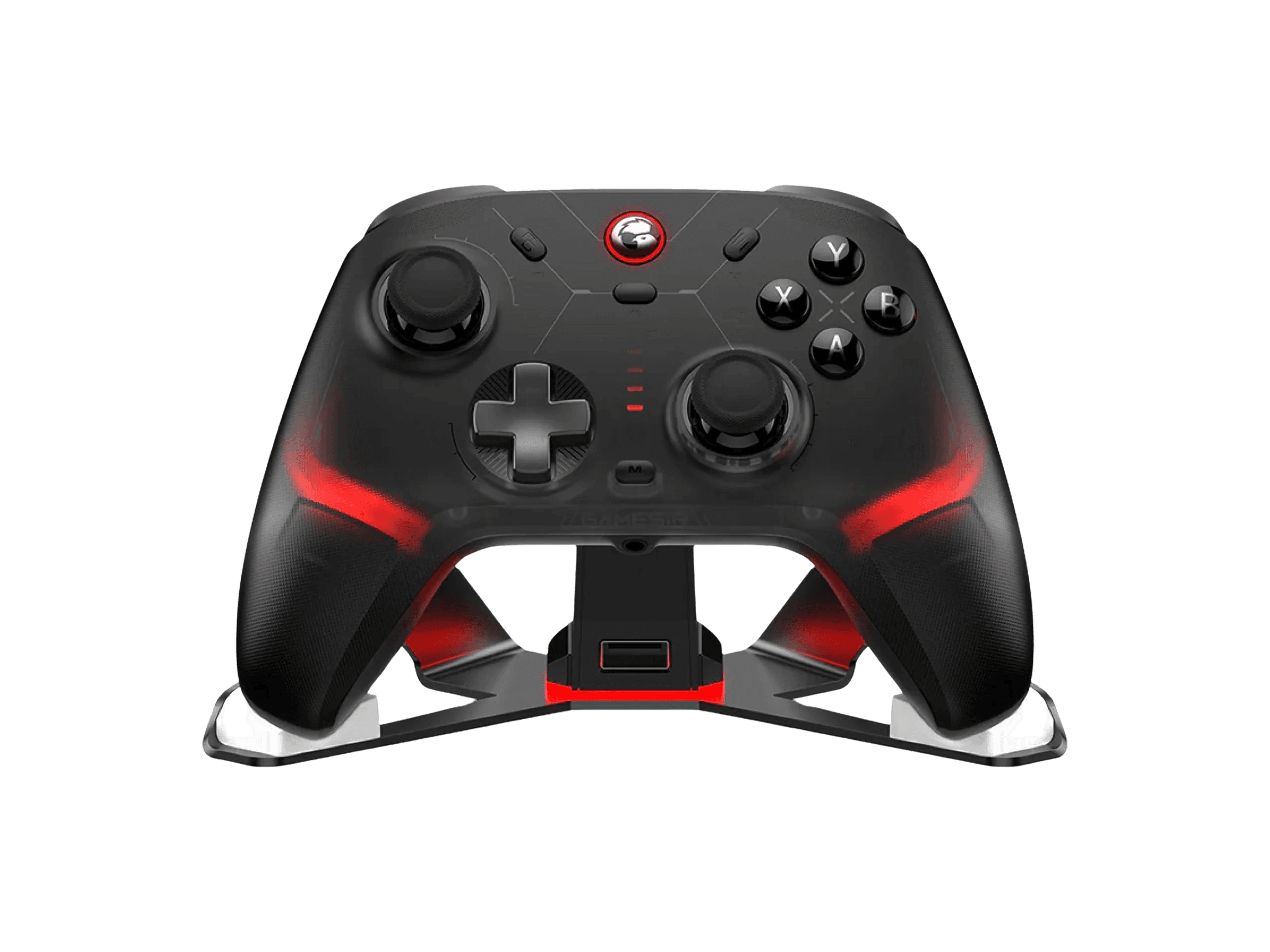
Full GameSir Cyclone 2 diagnostic
The Controller Benchmark runs every relevant subsystem on your Cyclone 2 — Mag-Res TMR sticks (test exceptionally clean for drift), deadzone, microswitch face buttons, triggers in both Hall-effect analog and microswitch modes, two back buttons, asymmetric grip rumble, 6-axis gyro, latency, 1000Hz polling, and connection stability — then produces a composite Controller Health Score. The TMR sticks should test cleanest among GameSir's lineup; if drift appears, recalibrate via GameSir Connect rather than assuming hardware failure.
GameSir Cyclone 2 hardware specifications
| Specification | GameSir Cyclone 2 |
|---|---|
| Connection | USB-C, Bluetooth, 2.4GHz Wireless Dongle |
| Button count | 21 |
| Analog stick type | TMR (drift-resistant, low-power) |
| Gyroscope | Yes |
| Rumble / haptics | ERM motors (standard rumble) |
| Impulse triggers | No |
| Adaptive triggers | No |
| Touchpad | No |
| Built-in microphone | No |
| Built-in speaker | No |
| Back paddles | Yes |
| Battery life | ~25 hours |
| Weight | 235 g |
| Release year | 2024 |
| MSRP | $49.99 USD |
Recommended tests for GameSir Cyclone 2
Each test runs in your browser via the Gamepad API — no install, no account, no upload. Run any individually, or use the full benchmark above.
Stick Drift Test
Detect unwanted analog input at rest
Deadzone Test
Measure your stick’s deadzone radius
Hall Effect Checker
Identify Hall Effect vs potentiometer sticks
Trigger Pressure
Verify full analog range on triggers
Button Test
Check every button responds instantly
Circularity Test
Visualize stick travel as a circle
Snapback Test
Measure how fast sticks return to center
Polling Rate
Measure inputs reported per second
Latency Test
Measure input lag in milliseconds
Gyro Test
Test 6-axis motion sensors
Vibration Test
Test both rumble motors independently
Connection Stability
Detect dropouts and signal interruptions
Battery Health
Estimate wireless controller battery life
Known GameSir Cyclone 2 issues
Recurring problems users report with this controller, ranked by frequency. Each links to a step-by-step fix guide.
- Common
Trigger rumble removed vs T4 Cyclone Pro — only grip motors
Counterintuitive downgrade: the older T4 Cyclone Pro had 4 rumble motors (2 in grips + 2 in triggers). The newer Cyclone 2 has only 2 grip motors — trigger rumble was removed. GameSir's marketing doesn't emphasize this. If trigger vibration feedback was a key reason you wanted the T4 Cyclone Pro, the Cyclone 2 won't deliver it. The grip rumble is asymmetric (different intensity in each grip for directional feedback).
View fix guide - Common
Not compatible with Xbox consoles
Same as the T4 Cyclone Pro — the Cyclone 2 explicitly does not support Xbox One or Xbox Series X|S. This is a Microsoft licensing constraint, not a firmware issue. If you need Xbox support, GameSir's G7 SE or G7 HE (wired Xbox-licensed) are the alternatives. The Cyclone 2 works on PC, Switch, Switch 2, iOS, Android, and Steam.
View fix guide - Common
Wrong customization app — Connect vs Nexus confusion
GameSir publishes two separate customization apps: Connect (for non-Xbox controllers like the Cyclone 2 and T4 Cyclone Pro) and Nexus (for Xbox-licensed controllers like the G7 SE). Users with multiple GameSir controllers often install the wrong one. The Cyclone 2 requires GameSir Connect — download from gamesir.com/pages/gamesir-connect.
View fix guide - Occasional
RGB lighting can behave erratically
CGMagazine's review notes that the RGB lighting strip 'sometimes has a mind of its own' — reverting to default patterns or not responding to app commands. Firmware updates via GameSir Connect have improved this over time but it's not fully resolved. If RGB is purely cosmetic for you, this is a non-issue; if you want precise lighting control, expect some quirks.
View fix guide - Occasional
Two SKU variants — standalone vs bundle with dock
The Cyclone 2 ships in two configurations: standalone at $49.99 and bundle with aluminum charging dock at $55.99. The dock also stores the 2.4G dongle when docked. The $6 premium is genuinely worth it if you'll use it daily — the dock has automatic charging when the controller is placed on top and stores the dongle out of the way. If you bought the standalone version and want the dock later, it's not sold separately by GameSir as of mid-2026.
View fix guide
How to pair the GameSir Cyclone 2
Get your controller connected before running diagnostics — wired or wireless, mobile or desktop.
Choose connection mode via back switch
The Cyclone 2 has a mode toggle on the back with three positions: Bluetooth, 2.4G (dongle), and Wired/USB-C. Set the toggle to your intended mode before powering on.
Power on with platform-specific combo
Hold the GameSir (M) button plus a platform letter: A for Android, B for Switch, X for iOS, Y for Windows. The LED indicator flashes rapidly when pairing mode is active. For 2.4G use Y (Windows) regardless of host since the dongle is pre-paired.
Connect to your host device
For Bluetooth: open your device's Bluetooth settings and select "GameSir-Cyclone2" (Switch sees it as a Pro Controller, Windows sees it as an Xbox 360 controller). For 2.4G: plug the included USB-A dongle into your PC — pairing is automatic. The aluminum charging dock (bundle only) stores the dongle when not in use.
Install GameSir Connect for customization
For button remapping, RGB lighting, trigger mode switching (Hall analog vs microswitch), stick curves, vibration intensity, and firmware updates, install GameSir Connect on PC or mobile. The Cyclone 2 supports 4 onboard profiles that persist across hosts.
Press any button to expose to the browser
Browsers gate gamepad access behind a user gesture. Press any button to expose the Cyclone 2 to the Gamepad API. The controller reports with Xbox-style face button labels (A B X Y) by default, like the T4 Cyclone Pro.
GameSir Cyclone 2 vs the competition
Head-to-head reviews against the other controllers most buyers cross-shop.
- vs
GameSir T4 Cyclone Pro (predecessor)
T4 Cyclone Pro at $49.99 has Hall-effect sticks and quad-motor rumble (including trigger motors). Cyclone 2 at $49.99 upgrades to TMR sticks and switchable Hall/microswitch triggers but removes the trigger rumble motors. Same price; different tradeoffs — TMR longevity vs trigger haptic feedback.
- vs
8BitDo Ultimate 2 Bluetooth
8BitDo Ultimate 2 at $69.99 has TMR sticks, full back paddles + R4/L4 bumpers, and works on Switch over Bluetooth (Cyclone 2 needs 2.4G or wired for Switch). Cyclone 2 at $49.99 is $20 cheaper with similar TMR sticks but simpler back-button layout. Choose Ultimate 2 for Switch + premium features; Cyclone 2 for budget TMR.
- vs
Razer Raiju V3 Pro
Raiju V3 Pro at $219.99 is the premium TMR PS5-licensed competitive controller with 36-hour battery and four removable back buttons. Cyclone 2 at $49.99 is the budget TMR option for PC/Switch (NOT PS5). $170 price gap reflects materials, battery, and PS5 licensing — not the underlying stick technology.
GameSir Cyclone 2 definitions
Plain-language definitions for the terms used on this page. Each links to the full glossary entry with thresholds, mechanism, and FAQs.
GameSir Cyclone 2 questions
Yes. 'Mag-Res' is GameSir's marketing brand for standard TMR (Tunneling Magnetoresistance) sensors. The underlying technology is identical to the TMR used in 8BitDo's Ultimate 2 and Razer's Raiju V3 Pro (which Razer brands as 'Tension Magnetic Resistance'). All three are the same generation of magnetic sensor that improves on Hall-effect by detecting finer movements with lower power draw. GameSir, 8BitDo, and Razer each chose different marketing names for identical physics.
Yes — significantly. As of mid-2026, the Cyclone 2 is the cheapest controller with genuine TMR sticks at $49.99 standalone or $55.99 with charging dock. The 8BitDo Ultimate 2 Bluetooth is $69.99. The Razer Raiju V3 Pro is $219.99. The GameSir G7 Pro (Aimlabs Edition) is $79.99+. The Cyclone 2 delivers the same TMR technology as those premium options but cuts cost by using less premium materials, omitting trigger rumble motors, and skipping platform licensing for Xbox.
The Cyclone 2 has 2 grip rumble motors only; the T4 Cyclone Pro had 4 motors (2 grip + 2 trigger). GameSir didn't publicly explain this change but likely traded the trigger motors for the TMR stick cost increase to maintain the $49.99 price point. The grip rumble is asymmetric (different intensity per side for directional feedback) but doesn't replicate trigger-specific haptic feedback. If trigger rumble was important to you, the T4 Cyclone Pro is the right model.
It changes the trigger response curve via a physical mode toggle. In Hall mode, the triggers report the full 0-255 analog range — useful for racing games and shooters with variable trigger pull. In microswitch mode, the triggers behave like digital bumpers with a clicky stop near the top — useful for fighting games and platformers where you want binary trigger press. This is a clear improvement over the T4 Cyclone Pro's Hall-only triggers.
Yes — both Switch and Switch 2. Connect via Bluetooth (standard pairing), 2.4G dongle, or USB-C wired. Switch sees the Cyclone 2 as a Pro Controller and supports gyro motion, rumble, and standard button input. Like the T4 Cyclone Pro, the Cyclone 2 is NOT compatible with Xbox consoles — that's a Microsoft licensing constraint, not a firmware limitation.
The $6 dock premium is genuinely worth it for daily users. The aluminum dock charges the controller automatically when placed on top and stores the 2.4G dongle in a built-in slot — solving the 'where did I put the dongle' problem. If you'll mostly use Bluetooth and wired connections, the standalone is fine. The dock is NOT sold separately by GameSir, so you can't upgrade later.
Yes. The Cyclone 2 uses microswitch face buttons rated for 5 million clicks — same as the GameSir G7 HE upgrade. The T4 Cyclone Pro had standard tactile buttons. The microswitches feel clickier and more mechanical, with shorter actuation and better tactile feedback. Some users find them too clicky for relaxed casual play; competitive players consistently prefer them.
Yes, especially at full brightness. The 860mAh battery rated for ~25 hours drops to approximately 15-18 hours with RGB at full brightness. GameSir Connect lets you dim or disable the lighting strip to extend battery life. For competitive play where battery longevity matters, disable RGB entirely — it serves no functional purpose during gameplay.
Get a full health report for your GameSir Cyclone 2
Run the Controller Benchmark to score every subsystem and generate a shareable Controller Health Score graded S through F.
Run the Benchmark